Configure SIP trunks and routing
Use this guide to configure inbound SIP trunks, outbound trunks and pools, and base numbers. For an existing call failure, first identify the call leg and responding component with SIP diagnostics.
Separate the configuration questions
| Question | Configuration to inspect |
|---|---|
| Which inbound trunk matches this request? | Enabled trunks, matching order, and identification criteria |
| Is this identified caller authorized? | The selected trunk's authentication and transport policy |
| How is a transfer destination reached? | Target form, effective egress selection, and outbound identity |
| Why is an expected diagnostic header missing? | Termination/header handling, after checking the correct call leg |
A trunk-identification event does not prove authentication succeeded. A successful OPTIONS probe does not prove that an actual call can complete identification, authorization, route lookup, and setup.
Configure an inbound SIP trunk
An inbound trunk tells the edge how to identify incoming SIP traffic and which authentication, transport and media policy to apply. It does not assign a destination number, application, team or server group. Set those up through base numbers and application entry points before testing a call. Agree network, transport, NAT and codec requirements with the peer using SIP signaling and media.
Availability: A Super Admin creates, updates and deletes inbound trunks in Admin settings → SIP Trunks. Platform readers can view the list, where the edit controls are disabled. No feature flag controls this page.
Open Admin settings → SIP Trunks, then follow these steps.
- Record the provider's actual source addresses, From-domain/User-Agent behavior, authentication requirement and transport/media agreement. Have the intended credentials and certificate material available through approved handling.
- Choose Create. Start with a blank form or a Quick Template and review every populated field; templates are presets, not discovery or proof that a carrier's current network matches the stored sample ranges.
- Enter a unique Name and Trunk ID, then configure identification, authentication, TLS and media as described below. Use a specific identification rule before a broad fallback.
- Choose Save, reopen the record and verify it. This persists database configuration; it does not automatically activate the change at the SIP edge.
- Have the responsible administrator perform the platform Sync All to Redis action and verify the effective configuration and any TLS reload. This is a platform-wide operation, described under configuration activation and recovery, not the Teams toolbar's legacy Sync All Apps action.
- Test the intended inbound path in the approved test environment, then verify identification, authentication, destination routing, media and teardown separately. A saved row or SIP OPTIONS result alone does not establish a usable call.
Read trunk operational insights
Availability: from 0.9.19, platform readers can view Active calls and SIP reachability in Admin settings → SIP Trunks. No additional feature flag is required. These are read-only observations; changing maintenance still requires Super Admin.
Active calls counts canonical inbound calls attributed to the trunk, including setup and answered calls. Forked legs of one logical call count once per trunk. This is not an outbound pool count or a count of RTP sessions. The page refreshes every ten seconds while active. It reads a shared Redis summary maintained from call lifecycle changes, rather than fetching every call record. Edge discovery is cached for ten seconds per Web process. Hover a value for its observation time.
Unknown is intentional when records are missing, malformed, truncated or unattributable, edge telemetry is unavailable/stale, or native edge work has no canonical call record. A known zero requires complete, fresh observations. A bounded background repair checks the summary at most once per minute, in batches of 32 dialogs; call changes also update the repair copy until it replaces the previous summary. Counts become unknown if the last successful repair is older than 90 seconds, the index is inconsistent, more than 2,000 dialogs are active, or a source record exceeds the supported size. This summary requires standalone Redis; Redis Cluster needs a separate validated adapter. Counts are observational and do not control call admission or authorize a restart. Do not interpret unknown as drained or safe to restart.
SIP reachability reports the latest edge OPTIONS probe as reachable, unreachable or unknown. A missing, invalid or older-than-60-second probe is unknown. This does not prove successful authentication, call routing or media, and it differs from the separately debounced trunk health alarm.
Maintenance shows configured admission. A pending runtime warning means the shared Redis flag differs from the expected value; an unknown runtime warning means it could not be verified. Even a matching flag is not an acknowledgement from each edge. After a change, verify new-call rejection or acceptance with an isolated test, while checking that existing calls and other trunks continue.
For monitoring event fields, delivery verification and alarm design, use maintenance and scaling monitoring.
List, templates and basic fields
The list shows # (priority), Name, Trunk ID, Active calls, SIP reachability, Identification, Type, Enabled and Maintenance, with search/filtering and row edit/history/delete actions. The Maintenance column shows whether the trunk accepts calls; see trunk maintenance. The API defaults to returning 50 records; filtering the displayed list is not proof that no other record exists. A duplicate name or technical ID is rejected by create/update.
| Control | Range and default | Effect |
|---|---|---|
| Quick Templates | Create-only buttons Twilio, Janus WebRTC and Internal Trunk. | Replace the draft's identity/name, identification, auth method, internal/X-Call-ID and external-ID fields. They do not reset every TLS/media/limit field and do not save. Review retained fields when switching presets. |
| Name | Required; up to 100 characters; HTML tags rejected. | Display name. |
| Trunk ID | Required; up to 64 characters: starts with a lower-case letter, followed by lower-case letters, digits, _ or -. | Technical identifier. It keys runtime trunk configuration and correlation; renaming is not merely cosmetic. |
| Enabled | On or off; new-record default on. | Platform sync includes only enabled trunks in the matching order. Saving off without activation does not immediately remove the previously exported configuration. Use Maintenance mode to reject new calls while keeping the trunk configured. |
| Description | Optional; up to 1000 characters. | Explanatory text. |
| Priority | Integer 0–100; default 50. | Lower priorities are evaluated first, then names in ascending order. The first matching trunk wins. |
Cancel closes the editor without submitting its draft. Save Snapshot appears while editing an existing trunk; treat it as a snapshot of persisted configuration, not Save or live activation. The row history/snapshot recovery workflow is owned by configuration recovery.
Identification: fill every selected condition
In Admin settings → SIP Trunks, open the create or edit dialog for the trunk. When you edit an existing trunk, the Maintenance mode section appears at the top of the dialog, above the fields described here.
Identification Methods (AND logic when multiple selected) offers IP Whitelist, From Domain, and User-Agent. The form keeps at least one selected; new records start with IP Whitelist.
| Conditional field | How to configure it |
|---|---|
| Allowed IPs / CIDRs | Visible with IP Whitelist selected. Enter an IPv4 address or CIDR and choose Add (or Enter); delete a chip to remove it. Multiple populated entries are alternatives within the IP check; runtime tests exact addresses and CIDR membership. The matching loop examines at most 100 entries. The validator checks a textual IPv4/CIDR pattern, not complete network correctness—verify the actual address/prefix. |
| From Domain Pattern (regex) | Visible with From Domain selected. Matches the SIP From-header domain, not automatically the Request-URI or authentication realm. Use an appropriately anchored pattern when an exact domain is intended. |
| User-Agent Pattern (regex) | Visible with User-Agent selected. Matches the received User-Agent value. A recognizable User-Agent alone is not an IP authorization check. |
Important implementation limit: the runtime combines the checks that have usable values. A selected method with an empty list/pattern is skipped rather than forced to fail. An IP-only trunk with no usable IP entry has no participating check and does not match; an empty IP list combined with a populated User-Agent pattern can match that User-Agent alone. The UI's empty-IP hint must not be interpreted as a safe complete rule. Populate every selected condition and verify the resulting matched trunk.
For example, a trunk with a populated IP list and a populated User-Agent pattern matches only when the source is in the list and the User-Agent matches. An unrelated source that presents the same User-Agent must fail that combined rule. Verify both positive and negative cases after activation; JavaScript regex validation in the editor does not prove identical deployed SIP-engine behavior.
Authentication
Authentication is evaluated after identification. The selector defaults to IP Whitelist Only (recommended); that label does not add an IP check if identification uses another method.
| Authentication Method | Runtime consequence |
|---|---|
IP Whitelist Only (ip_only) | Accepts the already identified trunk without a separate digest challenge. Configure populated IP identification if IP authorization is the intended protection. |
SIP Digest Auth (digest) | Requires a configured username and password, challenges/validates the SIP credentials and checks the returned username. Identification must still select a trunk first. |
IP + Digest (both required) (ip_and_digest) | Requires digest plus a separate authorized-source-IP check, even if the selected identification methods do not include IP. Configure the allowed source list as well as credentials. |
Auth Realm, Auth Username, and Auth Password appear for the two digest choices. Blank realm falls back to the SIP From domain. Missing username/password causes an inbound-auth configuration failure instead of a successful challenge flow.
Editing credential limitation: the editor opens Auth Password empty and its helper says to leave it empty to retain the existing password. The update handler instead saves the submitted empty value. When saving a digest trunk, supply the intended password again through the approved secure procedure; do not assume a blank edit preserves it. Changing unrelated fields can otherwise clear the credential before the next sync. The trunk handler stores the password as submitted. Treat the record, exports, snapshots and diagnostic data as sensitive. Do not paste the password into support examples.
TLS and media
TLS controls are rendered independently of the selected authentication method. These settings require the edge's TLS service/certificates to be configured; the switches do not create certificates or enable a missing TLS listener.
| Control | Range and default | Effect |
|---|---|---|
| Require TLS Transport | On or off; default off. | When active at runtime, non-TLS traffic for the identified trunk is rejected. |
| Verify Peer Certificate | On or off; default off. | Requires selected CA material and a peer verified by the TLS layer. A saved UUID is not evidence that the actual CA bytes were loaded. |
| Require Client Certificate (mTLS) | On or off; default off. | Also requires CA material. The global TLS watcher collects CA material while per-trunk SIP checks enforce the requirement; do not assume a wholly isolated trust store per trunk. |
| Peer Name Verification | Disabled or Enabled; default Disabled. | The edge compares the peer certificate common name with TLS Remote Subject Name when Enabled and that name is populated. This is not a general SAN/hostname-validation guarantee. |
| TLS Remote Subject Name | Optional text, up to 255 characters. | Name for the peer-name check. Populate the intended name when enabling peer-name checking; a blank name does not perform the CN comparison in the TLS-enabled route. |
| TLS CA Certificate (Platform Material) | An existing TLS_CA_CERT platform material; the picker loads up to 100. Required by validation when either certificate-verification or client-certificate switch is on, even if a helper only says optional. | CA material for the certificate checks. Arrange the material through platform administration; selecting it does not upload the certificate. Use platform secret controls to create the material record and populate its value. |
| SRTP Mode | Disabled (plain RTP), Prefer (offer SDES, accept plain) or Require (RTP/SAVP only); default Disabled. | Sets the media proxy's SDES flags. For where SRTP ends and which SDP profile results, see SDP and media security. |
| Symmetric RTP | On or off; default off. | Adds the symmetric-media behavior to RTPEngine's offer/answer flags for NAT/media-address handling. Verify actual two-way audio, not only signaling. |
Without TLS support at the edge, enabled certificate or peer-name requirements lead to rejection; saved settings alone cannot supply that support. For listener certificates, renewal and internal service trust, use the operator TLS verification procedure. The TLS watcher normally checks the exported material version every five seconds and attempts tls.reload; failure can leave the previous runtime state. Verify its result rather than promise a fixed activation time or zero downtime.
Routing and technical fields
| Control | Consequence |
|---|---|
| Unique ID Header | Optional header name, up to 64 characters, used to extract an external call identifier for correlation. It does not by itself authorize the caller or route a destination. |
| Internal Trunk | Default off. Changes internal/external routing/media treatment; internal calls can enter special outbound-transfer paths and use different media directions. It also excludes the trunk from the external health-monitor selection. Do not turn it on solely to silence an alarm. |
| Requires X-Call-ID | Default off. Rejects the call unless its X-Call-ID passes the runtime's validation. Used for the gateway/WebRTC call path; a header's mere presence is not sufficient. |
| Max Concurrent Calls | Integer 0–10000, default 0; the form labels 0 unlimited. The value is stored and exported, but the SIP edge does not enforce this inbound-trunk field. Number and server-group limits are separate; do not rely on this field for capacity protection. |
sipByeMaxBytes is an optional maximum BYE size in wire bytes: an integer from 1024 to 65535. Null or absence leaves the maximum unset; zero is invalid. sipByeOverheadBytes is an optional serialization allowance from 256 to 8192 bytes, accounting for fields added when the edge materializes the request (for example, Via). These stored technical fields are separate from optional header-value limits; see SIP termination limits.
codecPreferences is kept in the stored and exported record (new default PCMA, PCMU), but this editor has no codec selector, and the inbound edge route does not apply this list. The codecs actually offered are described in codecs and DTMF.
Save, activate, disable or delete safely
Saving and deleting use database mutations followed by audit logging; the web hooks only refresh query data. They do not automatically run platform Redis sync. If a request fails after a write, reopen the record before repeating it; an error is not a guaranteed rollback of the database change.
The dedicated maintenance action below is an exception: it publishes a per-trunk runtime setting immediately, without a platform-wide sync.
The platform-wide sync clears the managed configuration namespaces and rebuilds them, including inbound trunk order, authentication data and TLS materials. Runtime call/heartbeat keys are outside that targeted delete, but the rebuild is not one atomic transaction: a failure can leave partial configuration. Plan activation with your deployment operator and check its result. Saving a disabled trunk or deleting a record requires this activation step to remove its prior runtime matching configuration.
The delete action confirms the selected record and removes it from the database; it is not soft deletion or a maintenance interval. Keep an approved recovery snapshot/export before destructive changes. Do not assume restore includes usable credentials or that restoring a row activates it; follow configuration recovery.
Reject new calls during trunk maintenance
Availability: from 0.9.18. Maintenance mode applies to enabled inbound SIP trunks. A Super Admin changes it in Admin settings → SIP Trunks; platform readers see the status in the list. There is no feature flag and no restart. The Maintenance mode section appears only when you edit an existing trunk.
Maintenance mode rejects new calls on one trunk while calls that are already established continue. Use it for planned work on a carrier connection without disabling the trunk or running a platform-wide sync.
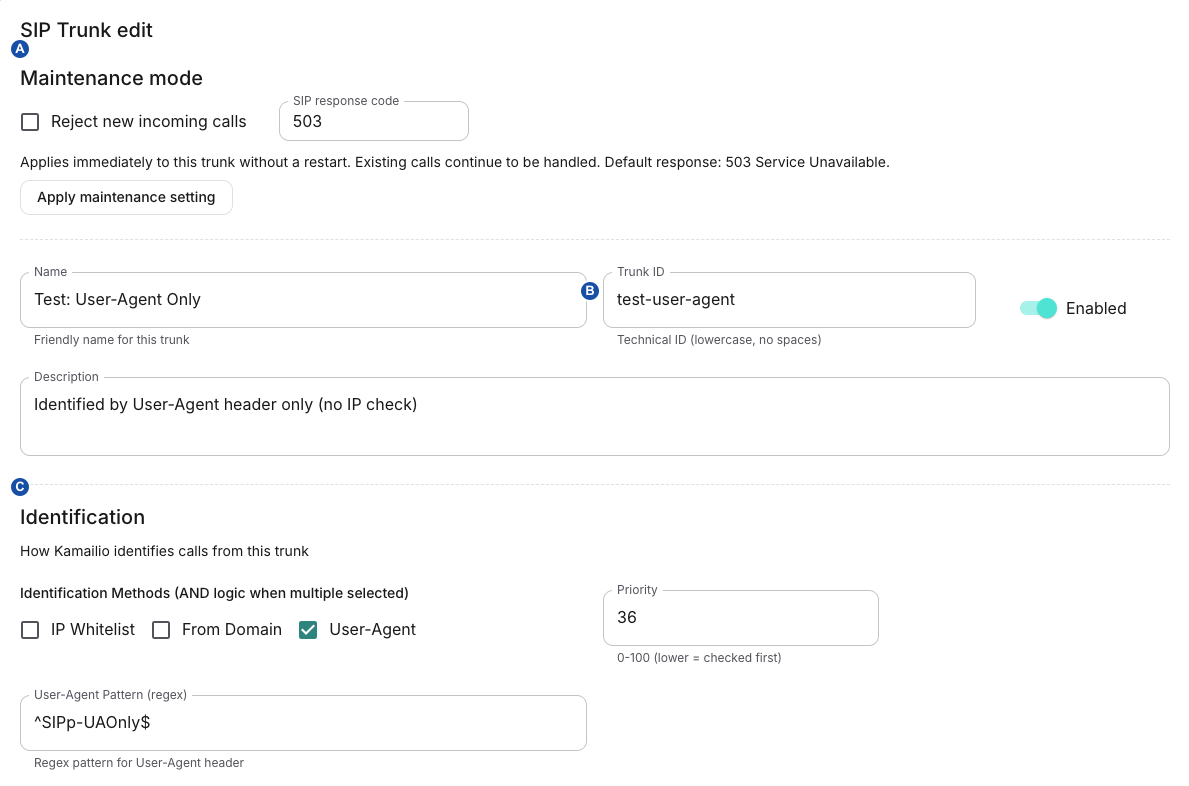
A controls maintenance, B identifies the test trunk, and C defines how incoming calls match it. Review identification separately before applying a maintenance change.
| Setting | Behavior |
|---|---|
| Reject new incoming calls | Off by default. When on, every new INVITE identified as this trunk receives the configured response. Calls on other trunks are not affected. |
| SIP response code | Integer 400–699; default 503. Code 503 is sent as 503 Service Unavailable; any other code is sent with the reason phrase Maintenance. |
| Scope and storage | Per trunk. The setting is stored with the trunk and published to every SIP edge through shared runtime configuration. It takes effect for the next INVITE. |
| Disabled or deleted trunk | Maintenance has no runtime effect while the trunk is disabled. Deleting the trunk removes the setting. A platform-wide sync rebuilds the maintenance state from stored trunks. |
- Open the trunk's edit dialog. In Maintenance mode, select Reject new incoming calls.
- Keep SIP response code at
503, or enter another code from 400 to 699 that your carrier handles as intended. - Choose Apply maintenance setting. This button applies only the maintenance setting; it does not save other edits in the dialog. Use Save for those.
- Check the Maintenance column. It shows
Maintenance · SIP 503(or your code) and Existing calls continue. A trunk that accepts calls shows Accepting calls. - Verify with an approved test call on this trunk: it receives the configured response. A test call on another trunk is still accepted.
- After the work, clear Reject new incoming calls and choose Apply maintenance setting again. Check that the list shows Accepting calls, then verify that a new test call is accepted.
The edge checks maintenance right after it identifies the trunk, before the TLS and authentication checks. Established calls and their in-dialog requests, such as BYE or re-INVITE, are not affected. The list shows the policy, not a live count of active calls.
If applying fails, the dialog shows an error that includes Could not apply SIP trunk maintenance to the SIP edge, and the stored setting returns to its previous value. Reopen the trunk, check the Maintenance column, and retry when the runtime configuration store is reachable.
Each rejection is logged as a warning with the trunk ID, SIP Call-ID and response code, and as the structured trunk_call_rejected event. Find these records with the SIP log reference. If the whole TelPro instance is draining, its drain check runs first and returns 503 Service Unavailable before trunk identification. To tell the two 503 causes apart, use SIP diagnostics.
Understand the health controls actually available
The SIP Trunks list and editor have no per-trunk health switch, probe-target editor or monitor-endpoint field. Enabled controls trunk eligibility, not monitoring. The database holds a monitor endpoint name, but this form and its API do not expose it.
The edge's global HEALTH_PROBE_ENABLED setting controls outgoing OPTIONS probes. The deployment bundle defaults it off, while the image entrypoint fallback is on: the effective deployed value matters. Eligible probes use enabled, external trunks and the first allowed-IP entry. For a CIDR, the probe replaces the last octet with 1; it is not a general subnet-first-host calculation or provider target discovery. Have your deployment operator verify a valid intended target before enabling probes; do not weaken inbound IP identification just to make a probe target convenient.
A final 2xx response is success; a failure can carry status_N (including status_408) or no_reply. These are distinct from the TelPhi monitor's no probe result from edge outcome for missing/invalid/stale data. Health thresholds count monitor evaluations; they are not proof of that many distinct network probes. A trunk may be identified correctly yet fail OPTIONS, or answer OPTIONS while real-call routing/media is broken. To read probe results and trunk health records, use the SIP log reference.
Verify and recover an inbound configuration
| Symptom | First checks |
|---|---|
| Save rejected | Duplicate Name/Trunk ID, required identity fields, IPv4/CIDR syntax, regex syntax, selected CA requirement and numeric bounds. Reopen before retry if the outcome is unclear. |
| Call matches the wrong trunk | Effective sync result, priority order and each populated IP/domain/User-Agent condition; check broad earlier rules and blank selected conditions. |
| Digest fails after an edit | Verify whether the blank Auth Password was saved; restore the intended credential securely, activate and retest. |
| TLS rejected after Save | Actual transport, TLS-enabled deployment, effective CA material/reload result and exact expected CN. |
| Disabled/deleted trunk still matches | Database state and completion of platform-wide activation; this editor does not push automatically. |
| Health unavailable but calls work | Effective global probe setting, first allowed-IP target, result freshness and carrier OPTIONS behavior; do not toggle Internal or weaken identification as a workaround. |
Check outbound selection
Record the original transfer target, effective route selection, and outbound/base-number context. Do not infer the original request solely from the final wire URI: a configured trunk can construct a SIP URI from a number.
| Original target | What to check |
|---|---|
| Number-like destination | Effective route/base identity, selected trunk or pool, and the trunk's routing method |
Literal sip: or sips: destination | URI host, applicable restrictions, actual transport, and reachability; literal URI resolution bypasses number-pool selection |
Bypassing pool selection does not bypass transfer restrictions or establish transport support. Number-handling helpers also do not provide a universal E.164 normalization guarantee. Use the formatting required by the configured route and carrier, and verify the actual outbound request.
Manage outbound trunks and pools
A trunk describes one outbound gateway configuration. A pool (API: egress route) groups one or more trunks and associates an outbound base-number identity. Direct base-number/trunk links also create a legacy pool; they are not the same object as a named route. Neither object allocates a carrier number or publishes an application's phone entry point.
Open Admin Settings → Egress (/admin-settings/egress) for platform management. Trunks and Pools share one manager; older /admin-settings/egress-trunks and /admin-settings/egress-routes links select the corresponding tab. Settings → Team embeds the same manager with the selected team's scope. Its CRUD actions save independently of the surrounding team-settings Save button.
Authority: team-owned trunk/route creation and mutation require Team Admin; global objects require platform SUPERUSER. Changing an object's owner also requires SUPERUSER. Team-list API access requires at least Member and includes available global objects; platform readers can view all teams. A team view disables editing/deleting global rows. Super Viewer cannot perform these protected mutations. An enabled-looking button is not permission: the list UI's read-only flag does not substitute for API guards. See access and teams. These egress handlers do not themselves establish the team's TEL entitlement or carrier availability.
- Identify the intended team/global scope, destination gateway, outbound identity and transfer method. Review outbound selection and team transfer restrictions.
- In Trunks, choose New or edit an existing row. Complete the applicable fields below; a preview only constructs an example URI, not a connectivity test.
- Save, reload and confirm the persisted fields. Check the activation/result boundaries below before interpreting a closed dialog as runtime success.
- If you need an explicit multi-trunk route, create it under Pools after the trunks exist. Otherwise associate the intended base number directly with the trunk.
- Configure the application's entry point and egress base number, then verify a controlled outbound scenario using SIP diagnostics. A route selection or REFER dispatch does not prove the remote peer accepted or completed the transfer.
Trunk fields
| Controls | Values and consequences |
|---|---|
| Name; Trunk ID; Enabled | Name 1–100 characters; technical ID 1–64, starting with a lowercase letter, then lowercase letters/digits/underscore/hyphen. Names and IDs are checked for uniqueness across trunks, not just the team. Enabled defaults on; disabled trunks are omitted from synchronized runtime pools. Changing the ID does not rewrite flow references automatically. |
| SIP URI; Transport | SIP URI is required (up to 256 characters); Transport is UDP/TCP/TLS, default UDP. The legacy Kamailio number-pool path constructs sip:<destination>@<configured value>: use the gateway host/port format expected by that path, not an arbitrary full URI inferred from the field label. URI-building paths have different semantics below. |
| Routing Method | Static URI (use SIP URI as-is), Number @ host (plain SBC), Genesys FQDN (DNS-SRV) or Genesys TGRP (TLS, recommended). Static templates containing {number} use destination substitution; static values without that placeholder remain on the legacy pool path in TelPhi. |
| Proxy hosts (round-robin); Proxy Port | Shown for Number @ host and TGRP. Hosts split on newlines/commas, trim and drop empty entries; maximum 16. Optional port must be 1–65535. Placeholders are not saved defaults. Proxy selection in TelPhi uses a process-local counter, not active health probes. |
| Customer Prefix; Region; BYOC Domain; Trunk Context (override) | Prefix and region are required for the two Genesys modes; TGRP additionally requires at least one proxy host and exposes trunk-context override. Domain/context are optional form fields. These source templates have deployment-specific assumptions: have the operator verify the constructed URI against the actual carrier contract rather than assuming the named mode supports every installation. |
| Authentication Method | IP Only (no auth), SIP Digest, Registration, IP + Digest or TLS Mutual Auth; default IP Only. Digest/registration/IP+digest show Auth Realm, Auth Username and Auth Password. Registration material is synchronized separately from successful carrier registration; saving does not prove a REGISTER succeeded. |
| Verify Carrier Certificate; Require Mutual TLS | Both default off. Verification requires a CA material reference; supplying a client certificate requires its paired client key and vice versa. Use TLS transport and verify deployment TLS support; selecting these switches does not enable TLS in the running deployment. |
| Peer Name Verification; TLS Remote Subject Name | Peer verification defaults Disabled; subject-name text is optional (up to 255 characters). Confirm certificate identity and the generated/loaded TLS profile with the operator. |
| TLS CA Certificate / Client Cert / Client Key (Platform Material) | Select existing platform materials or None. Empty selections normalize to null references. Selectors are disabled in team mode; ask a platform admin to attach or change material. A stored material reference is not proof its content was resolved or loaded. |
| Caller ID Mode; Caller ID Override | Passthrough default, Base Number, or Override; fixed-number input appears for Override (up to 32 characters). On the legacy outbound path, a per-request caller-ID override takes precedence over trunk settings. Check the actual outbound From identity, not only the stored mode. |
| Priority | Integer 0–100, default 50; lower numbers sort first in pool aggregation. This is not a universal promise that the first trunk handles every call: pool strategy still applies. |
| Max Concurrent Calls | Integer 0–10,000, default 0; UI labels 0 unlimited. The value is saved and exported, but outbound routing does not enforce this per-trunk cap. Do not use it as an admission-control limit. |
| Codec Preferences | PCMA, PCMU, G722, OPUS; defaults PCMA/PCMU. Selection can be empty and is saved and exported. Outbound routing does not use these values to filter negotiated media; the offered codecs are listed in codecs and DTMF. |
| Base Numbers | Multi-select, empty by default; team form offers that team's numbers. Saving replaces that trunk's selected links; clearing removes them. Named-pool membership is configured separately. |
Password-edit limitation: the form says leaving Auth Password empty keeps the existing password, but the edit form starts with an empty value and the API persists the submitted value without preserving the old password. Do not save a credential-backed trunk with a blank password assuming it is unchanged. Coordinate the intended credential with its owner before editing; do not paste credentials into support tickets or screenshots.
URI-building limitation: Number @ host validation allows an empty proxy list when SIP URI is present, but the TelPhi URI builder does not derive the missing host from that URI. Supply the intended proxy host and confirm the preview instead of relying on that fallback. Optional empty domain/context strings can also differ from omitted values in URI construction; the preview and controlled carrier verification remain necessary.
Pool fields and selection
| Control | Meaning |
|---|---|
| Name; Route ID; Enabled | Name 1–100; Route ID follows the same 1–64 technical-ID pattern as a trunk. Names/IDs are unique across routes. Enabled defaults on. Route ID is the runtime selector, not the database UUID. |
| Base Number | Required outbound identity/fallback context. For a team-owned route, the API checks that this number is assigned to the team. |
| Strategy | Round robin (default) or Priority / failover. This controls the route pool, not the server group's inbound load-balancing strategy. |
| Priority | 0–100, default 50; lower preferred when choosing among matching routes. It is separate from member-trunk order. |
| Egress trunks | Select 1–16 distinct trunks. The chooser lists enabled available trunks; the API rejects nonexistent or another team's owned trunks for a team route. Global trunks can be members. Changing the selection assigns member priorities 1, 2, … from the selected list; there is no separate per-member numeric-priority editor here. |
For number-like targets, TelPhi first respects an explicit routing selector. Without one it checks the application egress base number, otherwise the called number, for an enabled matching route or legacy number pool, then considers the enabled global platform-default route. Literal SIP/SIPS targets use their URI path rather than number-pool selection. Default selection does not establish peer REFER support or override transfer restrictions.
The two runtime paths are important: URI-building in TelPhi selects an enabled member using process-local round robin, or the first ordered member for Priority / failover. That selection itself has no health-probe or retry loop. On the legacy Kamailio pool path, round robin uses a Redis counter; Priority / failover starts at member zero. Its failover handler advances on 408/5xx while members remain, and stops for a cancelled transaction. Do not generalize this into retries on every rejection, health-aware scheduling, or end-to-end failover for every direct-URI transfer. Direct base-number pools carry no explicit strategy and use the legacy round-robin branch when multiple members are present.
Save, disable, delete and verify
Trunk/route writes commit database state before attempting granular Redis synchronization. Trunk changes reaggregate linked base-number/route pools, rebuild registration material and bump TLS-material version; route changes rewrite their route pool. Removed links and renamed trunk/route keys have explicit cleanup paths. A platformSynced: false result means stored configuration and runtime state may differ; the dialog closes after a successful API response and does not report that flag as a failure.
Reload after any error before retrying. Association replacement and later updates are not one atomic transaction in these handlers; an error can follow removal of existing links. For diagnosis, record scope, object IDs, operation/time and sync result without credentials. Ask the operator to check and reconcile the specific runtime keys and material before repeating a call; use service health and configuration recovery. Do not use a platform-wide force re-sync casually: it affects more than the row you edited.
Disabling a trunk removes it from synchronized pools but is not a drain of active calls. Deleting a trunk also removes its associations and rebuilds dependent pools; a route can then have no usable member. Deleting a route removes its named runtime key but does not rewrite application selectors. On the legacy path a missing named pool may fall back to the base-number pool, so deletion is not a reliable way to force all matching traffic to stop. Review references before either action. Trunks provide History/Save snapshot; treat any restore as a separate live configuration change under configuration recovery, not an automatic recovery of carrier state.
Manage base numbers
Use Admin Settings → Base Numbers to manage the platform's number resource. Registering this row is separate from acquiring a number from a carrier, assigning it to a team and publishing a phone entry point. Team Settings shows assigned number/description information and header assignment controls; it is not the full number editor.
Authority: creation requires platform SUPERUSER. Updating or deleting an existing number requires SUPERUSER or Admin membership in at least one assigned team; this is broader than a platform-only edit rule, and a shared resource change can affect other assigned teams. Add/remove-team operations require Admin access for the specified team. Super Viewer mutations are blocked. Adding a team also checks TEL entitlement and its base-number allowance; ordinary resource creation alone does not grant either.
- Choose New, enter Name and Number, and review the optional configuration below. Save creates the resource; team assignment controls appear when editing an existing record.
- Reopen the record and use Add Team to associate the intended team. Check the resulting assignment before configuring that team's entry points. Without extensions, only one team can be assigned.
- For a direct-number entry point, keep Extensions off. For shared extension entry points, review the migration consequences before enabling it and then assign the intended extension through the application's entry-point workflow.
- Verify the number, team, server group, header configuration and outbound links after saving. Verify runtime routing separately using the same controlled scenario as before the change.
| Field/action | Meaning and boundary |
|---|---|
| Name; Number; Description | Name required, maximum 20 characters; description optional. Number input permits formatted phone-number characters with 6–15 digits and the UI normalizes it to E.164 before submission. From 0.9.19, an explicit + or 00 prefix is kept; digits that already start with 49 are kept as +49…; a leading trunk 0 is replaced by +49; any other number gets +49 in front; repeated + signs are dropped. Earlier versions could save +49491701234567 or +4901701234567; see the 0.9.19 upgrade for the data cleanup and the numbers to review manually. Use the intended international carrier number; this does not reserve/provision it. Do not renumber an active resource as a routine label edit. |
| Extensions | Default off. Changing mode affects whether endpoints use the bare number or extensions; it is not simply a visual option. Multiple team assignments require extensions enabled. |
| Server Group | Optional selector for routing placement. Blank/undefined input is not an explicit null-clear contract: update uses serverGroupId ?? undefined. Verify the saved assignment rather than assuming clearing the control detached the group. |
| Header Manipulation Configs | Multi-select replaces associations. See header-rule assignment and activation: selecting a base number is not itself proof that exported rules are isolated to that number's calls. |
| Outbound Trunk (Egress) | Multi-select for direct legacy outbound-pool membership; empty removes these links. Named route pools remain separate. |
| Assigned teams → Add Team / remove chip | These are immediate separate mutations, not staged until Save. Add checks entitlement, allowance and same-name collision within the team. Removal is rejected while that team's endpoint has an assigned flow on the number. Cancelling the surrounding edit dialog does not undo completed assignment changes. |
| History; Save snapshot; Delete | History/snapshot are separate configuration actions. Delete is destructive resource deletion, not deactivation or carrier cancellation; review all endpoints, routes, assignments and dependent configuration first. |
Provider, external ID, country, provisioning status and suspension date may exist in stored/displayed number data; they are not editable fields in this number dialog. This dialog is not a carrier provisioning form.
Change extension mode without assuming an atomic migration
On Save after a mode change, the UI queries assigned-flow endpoints and may ask to deactivate them. Confirming starts endpoint deactivation and the number update separately, without awaiting the first before the second. The API rejects enabling extensions while a bare-number endpoint still has a flow, and rejects disabling them while extension endpoints still have flows. A failure can therefore leave endpoints deactivated while the mode remains unchanged. Stop and reload both the number and application endpoints; do not repeatedly confirm or assume rollback occurred.
Endpoint deactivation clears flow assignments and attempts Redis cleanup; cleanup errors can be logged while database deactivation continues. Number mode update also attempts to remove invalid bare-number or extension keys. None of this republishes the replacement entry points. Reconcile the intended assignments and publish through the application workflow only after the new mode and routing are verified.
Removal, renumbering and recovery boundaries
Adding a team sets the stored number status to ASSIGNED and invokes number synchronization. The remove-team action removes the relationship but does not reset status or perform that synchronization. The delete handler likewise does not establish complete runtime key cleanup or carrier cancellation. Do not infer that a successful removal makes the carrier number available for reuse or that traffic stopped.
Number updates can change links before the final number-row update; egress-pool synchronization occurs before that final update. Renumbering is therefore not a verified migration of all old/new Redis keys or named-route identities. Escalate an active-number rename/delete to the operator with the intended old/new mapping and dependent entry points. Use the recovery guide to distinguish resource snapshots from runtime cache, carrier state and backups.
Verify the applied change
After an authorized change, confirm the relevant running state through the deployment's supported administration/operations workflow, then repeat the same controlled scenario.
- For inbound identification, confirm the intended trunk matched and authentication/call setup progressed as expected.
- For outbound routing, confirm the selected identity and destination on the correct outbound leg, then confirm the destination actually received the transfer.
- If the observed behavior still differs from configuration, return to SIP diagnostics with the exact response and originating component.
Do not treat a saved form, an OPTIONS response, or a transfer-dispatched event as proof of the end-to-end result.
Related
- SIP diagnostics: to find which component sent a response before you change configuration.
- SIP signaling and media: to agree transports, TLS, codecs and NAT with a SIP peer.
- SIP header rules: to change SIP headers for the numbers you assign here.
- Configuration recovery: to activate, snapshot or restore trunk configuration.
- SIP and call handling: to find other SIP tasks.