Configure and maintain a team
Use this procedure to create a team, assign its people and server groups, and maintain or decommission it. A team groups application resources and access; creating one does not establish that its provider credentials, API access, billing or call routing work.
Availability: Creating, updating and deleting teams in Admin settings → Teams requires a Super Admin. Saving Settings → Team requires a Team Admin or Super Admin. Sections that depend on a deployment feature flag or plan state their own condition below.
Choose the correct administration view
Open Admin settings → Teams for platform-wide team management. Use a Super Admin account for the create, update and delete procedure below. Read-only platform access does not permit these actions. A Team Admin's Settings view is for that team's settings and members; it is not the platform-wide Teams lifecycle screen. See Access and teams for role and sign-in diagnostics.
The Teams list shows Name, Base Numbers, and Apps. The Apps column counts assigned application records; it is not a count of healthy or published applications. Base-number chips show assignments, not a live telephony test.
The create endpoint requires a Super Admin. Team update is also used by other team settings screens: some fields accept team-member authority, while membership and policy fields require Team Admin authority. API scopes, the daily API limit and server-group assignments are applied only for a Super Admin. Do not infer API permission from an editable field in a different screen. Deletion additionally rechecks the administrator's persisted active, unlocked, unsuspended account and current session before and inside its transaction.
Create a team
- In Teams, choose Create and enter Name.
- Under Team Members, select existing accounts and set their team roles. Assign an appropriate administrator explicitly; adding a user starts with Member and the form does not automatically appoint a Team Admin.
- Under Server Groups, add the intended existing groups. Add the group that should be the default first: the form has no per-row default control. A group marked Disabled remains visibly distinguishable; assigning it does not enable its servers.
- Review API Access Configuration, when available, and QA Scoring Defaults. The field reference below explains what the form stores and where the related policies are defined.
- Submit once, then reopen the saved team and inspect the assignments. If the request fails or its outcome is unclear, refresh the Teams list before creating it again: creation performs several writes and is not one all-or-nothing transaction.
For a new identity or invitation, use Provision users and memberships. This picker assigns existing accounts; it does not send a welcome invitation or establish their default team. It fetches up to 100 users, so an absent account is not proof that it does not exist.
Manage Team fields
| Control | Meaning and consequence |
|---|---|
| Name | Required team display name. Creation derives a slug from the lower-case name with spaces replaced by hyphens. Renaming an existing team does not change its slug. Use a distinguishable name; do not use the name as evidence that a previous failed create did not persist. |
| Team Members / role selector | Assign existing identities as Admin, Member or Viewer. Adding starts at Member. The form locks your own role and preserves its original value on submit. The remove icon still removes an assignment from the proposed set; do not generalize the separate Team Users screen's self-removal rule to this form. |
| Server Groups / Default | Add or remove assignments. The table shows a Default column heading, but the rows have no control to choose the default. The first group added to an empty list becomes the default; removing the default promotes the first remaining group. To change the default, remove groups until the intended one is first, then add the others again. The API rejects more than one default but accepts none, so saving does not ensure complete routing readiness. |
| Allowed API Scopes | Select scopes this team may assign to API keys: Create Call Token, Read Call Token, Read Team Apps. An empty new-team selection grants none. This does not create an API key, endpoint or call token. The form does not expose a Max API Keys control or a Read Team Usage checkbox. |
| Max Requests Per Day | Team-wide daily API-key request limit. Empty stores null (unlimited by this limit); 0 is a zero-request limit, not unlimited. The field parses an integer and clamps negatives to zero. A limit does not grant a scope or override disabled access/entitlement checks. Zero-value limitation: the read handler returns a saved zero as null, so reopening shows blank. Saving that full form again can replace the zero limit with unlimited; do not rely on this field as a durable access block. Revoke the relevant key or use the intended access controls instead. |
| Enable QA scoring for this team | Team QA enablement setting; starts checked for a new team. It is not proof that an application, deployment and provider are ready for scoring. |
| QA Provider, Model, Team secret key, Default scoring prompt | Store team defaults; blank values are trimmed and stored as null. New-team key-template input starts at scoringAiKey, an identifier rather than a secret value. For inheritance, effective provider selection and activation requirements, use Team QA defaults. The stored key-template override is not used by the scoring credential resolver; do not rely on that field alone to switch its credential. |
Availability: API Access Configuration is hidden until runtime configuration is loaded. It appears only when the deployment has opted in with FEATURE_BROWSER_SDK=true; the deployment operator owns that flag. This visibility switch is not the whole authorization or entitlement model. Manage Team renders QA Scoring Defaults without the QA feature visibility gate used by Team Settings; seeing this form does not prove that scoring controls or execution are available elsewhere.
Base numbers, recording, SMS and notifications are not controls in the Manage Team screen. Use the owner pages listed in Check resource readiness before handover. The Base Numbers list column must not be mistaken for an assignment picker.
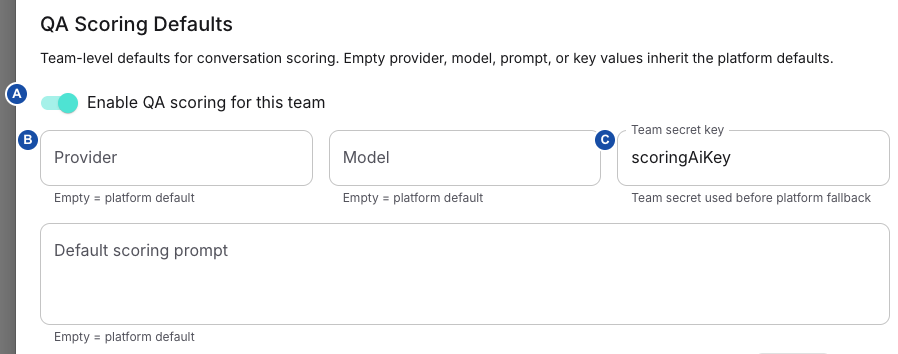
A — Enable scoring: stores the team's enablement choice. B — Provider: stores a requested provider, which must match runtime credential resolution. C — Team secret key: stores an identifier; the scorer does not use this override. The image shows the platform Team create form, which has different visibility from Settings → Team. Select the image for full size.
What creation establishes
The server creates a team and a default dashboard, then adds the submitted assignments. It creates an active monthly local subscription and an initial usage record only if it finds the selected default plan: the internal plan when subscription management is disabled, or an active default plan when enabled. This does not establish successful payment-provider setup; review Subscription and usage.
Example applications are attempted on a best-effort basis; their absence does not alone mean team creation failed. Team-default provisioning runs afterward and can fail after earlier records were saved. Continue with the resource-readiness checks before handing the team to its users. A saved team, provisioned secret metadata and usable secret values are separate outcomes; see Team secrets.
Update assignments without losing track of partial changes
Open the team's edit action, change the intended fields, submit, and reopen it. The form submits the complete member and server-group assignment sets, so review retained entries as well as additions. It also submits the displayed API and QA defaults.
For membership removals, the update handler checks that an administrator remains, removes relationships, repairs affected default-team pointers and reassigns a removed billing contact where applicable. Adding members or promoting them can encounter subscription limits. These operations are separate writes before the final scalar team update: a later error can leave some removals or additions applied. Do not assume a failed Save rolled everything back. The membership-removal guard also does not establish a universal last-admin protection for every role-demotion path; retain a working Team Admin deliberately.
Removing a membership does not delete the person's global identity. Follow Provision users and memberships for the dedicated member workflow and its distinct guards. After a failed or interrupted team update, compare the persisted member list, roles, server groups and scalar fields before retrying only the remaining change.
Configure shared settings
Select the intended team, then open Settings → Team (/settings/team). This page configures shared defaults; it does not publish an application's draft or create the external AWS resources named in the form.
Availability: Read access and save authority differ. Team policy queries permit Team Viewers and platform readers. Saving this full form requires Team Admin or Super Admin authority and passes the subscription-active check. The UI's read-only switch specifically covers Super Viewers; editable-looking controls for another role do not prove save permission. The form always sends transfer/resilience fields and publishing policy, so its save is subject to the corresponding Team Admin guards even if you only edited another field. Diagnose roles in Access and teams and payment restrictions in Subscription and usage.
Choose the right control and save boundary
| Section | Controls and outcome |
|---|---|
| Team Name | Displayed in a disabled field. Rename belongs to platform team administration. |
| Enable Members to publish Apps | Off – only Team Admins may publish Apps / On – Members may publish Apps. Saved with team settings; default false. Follow publishing permissions for role and application checks. This is not publishing approval for a particular draft. |
| QA Scoring Defaults | Team enable switch and optional Provider, Model, Team secret key and Default scoring prompt. See the scoped instructions below. |
| Base Numbers | Assigned number/description are read-only here. Header Manipulation Configs selection performs its own update immediately; it does not wait for Save Changes. |
| Secrets Manager | AWS Region, Secrets Manager Key, optional AWS Assume Role ARN; suggestion and ARN-copy helpers. These are connection settings, not stored credential values. |
| Call Recording | S3 bucket, region and role ARN. Configure storage with recording storage; app recording selection and actual retained output are separate. |
| Transfer restrictions | Optional team override of the platform outbound-target policy; save and activation are described below. |
| Resilience defaults | Optional team provider/failover defaults; inherited versus explicit policy matters. |
| Egress (outbound) routing | Embedded manager with its own mutations. Use SIP routing; Save Changes is not a transaction around its edits. |
There are no API-access, WebRTC-enable or SMS-enable switches in this Team tab. API scopes and maximum requests per day belong to the platform team form; API-key access explains the relevant access path. Feature flags, custom-agreement channel entitlements and provider credentials are separate from this page. A returned team smsEnabled value is not evidence of a writable switch here.
Before editing, record the selected team and whether each policy currently inherits or overrides. Make the smallest intended change, leave list/text fields so their blur handler commits the draft, then choose Save Changes. Reload the saved settings and verify the effective policy, not just the success message. There is no general per-section save/rollback for the full form. Other embedded managers save independently.
Configure QA defaults when available
Availability: In this TeamSettings view, QA Scoring Defaults is rendered only when the UI's development-version predicate is true and FEATURE_QA_SCORING is not literal false. Do not infer that a missing section deletes stored overrides, or that a development UI flag guarantees scoring execution. Platform team administration may expose a different form; runtime scoring has its own feature and producer checks.
- Set Enable QA scoring for this team (form fallback true).
- Enable Override platform scoring defaults only when the team needs its own Provider, Model, Team secret key or Default scoring prompt. The override control governs visibility of those fields; blank values submit as null after trimming.
- Verify the intended secret through team variables and secrets. The form's default key template is
scoringAiKey; it is not a credential and does not prove a secret exists.
Runtime precedence: the scoring handler takes prompt from app → team → platform QA prompt → built-in prompt; model from app → team → resolved platform-role model → scorer default. Provider selection similarly prefers app/team metadata over the resolved role provider, but credentials still come through the role key resolver. A requested provider that differs from the resolved credential provider is rejected; changing Provider alone does not configure another backend. For non-Azure scoring, the base URL comes from the scoring configuration.
The key resolver chooses the platform scoring role’s keyName, then a permitted team secret, platform secret and provider environment fallback. Custom team keys depend on plan entitlement when subscription management is enabled. It does not read the saved qaScoringKeyTemplate field: changing Team secret key here is therefore not a verified way to change the key used by the scorer. Ask the platform operator to confirm the actual role key and source. Runtime scoring also checks the plan, team and app enable flags; the Team switch alone cannot enable an ineligible plan.
Save and verify a separately authorized scoring run using its result and job evidence. Saving a prompt does not rescore old conversations.
Turning off the override clears the four team override fields on the next form save. Disabling scoring is a separate boolean; do not equate the two controls. The form initializes these values even when the QA section is hidden, so review the whole saved team configuration after changes in a deployment with restricted UI availability.
Connect team secret storage
- Set AWS Region and Secrets Manager Key for the intended deployment. The form falls back to
eu-central-1for an absent AWS region. - Use Generate suggested key only if the suggested deployment-specific path is appropriate. It changes the draft key; it does not create a secret or migrate existing values. Keep paths distinct across deployments that share an AWS account.
- Supply AWS Assume Role ARN (optional) for the intended cross-account role where needed. The displayed AWS Account ID is parsed from that ARN. Complete AWS Secrets Manager ARN and its copy action are derived helpers; copying one does not test access, resource existence or a secret version.
- Save, then use the variables/secrets procedure to verify authorized access without exposing credential values.
The suggestion uses deployment environment, falling back to platform secret namespace, together with the team's slug/name seed. Clearing connection text stores null rather than retaining the former value. Changing these pointers can make existing secret-backed configuration inaccessible; it does not copy the old secret store. Record and verify the previous location before changing it.
Apply transfer restrictions at team scope
Enable the team's override switch to edit the policy. Turning the switch off and saving stores null, restoring platform inheritance. Platform and team values merge by top-level field; arrays replace, not append. The form seeds an override with the displayed effective/platform fields, so enabling it can pin values you did not edit. Later platform changes need not affect those pinned fields.
| Control | Interpretation and limits |
|---|---|
| Block premium-rate and service numbers | Defaults on at the schema level; reveals prefix and regex lists. This configured list is not a complete universal catalogue of premium numbers. |
| Premium number prefixes | One per line (commas/semicolons are also split); each schema entry is 2–6 digits. Compared with the normalized national portion. Empty explicitly replaces the inherited list. |
| Premium number patterns (regex) | One per line; entries 1–200 characters. Tested against normalized E.164 digits without +. Runtime skips invalid regexes; save-time length validation does not prove regex validity. Avoid delimiter commas in a pattern: the list editor splits them. |
| Restrict transfers to allowed country codes | Defaults off. When on, an empty effective country list rejects dialable targets rather than allowing every country. |
| Allowed country codes | Conditional list; entries accept a leading + and normalize to digits for checks. Not a full country-name/telephone-number validation service. |
| Default domestic country code | Digit-only input, schema 1–3 digits, default 49. See the implementation limitation below before relying on another national numbering plan. |
| Preview chips | Summarize switches/list size; they do not execute a sample transfer or validate reachability. |
Despite the inherited-mode helper text, an empty saved array is an explicit empty override. To inherit the entire policy, disable the team override and save. restrictSipUriWithoutPhone exists in the schema but has no control in this editor; its default false permits targets with no extractable phone number through that branch. Do not describe the country toggle as a restriction on every possible SIP URI.
Domestic-number limitation: the extractor constructs E.164 digits using hardcoded 49; the configurable domestic code is used later when removing a country prefix for premium checks. Changing that field alone therefore does not establish correct national-number normalization for another country. Prefer explicit international test targets and verify the actual normalized target with the operator before relying on this policy.
The call-action service validates dial-target transfers against platform plus team policy. The sip_bye handoff has no dial target and bypasses this check. A blocked target returns an error and logs transfer_blocked; the policy does not choose an egress route or guarantee carrier acceptance. Use SIP routing and SIP diagnostics for routing/protocol outcomes.
Saving transfer restrictions updates the database, then increments a Redis revision. Runtime resolution checks revisions and maintains platform/team caches (60/30 seconds respectively). If the Redis increment fails, the form can report an error after the database write; reload before retrying. This is not a promise that every in-flight action sees the new policy instantly. Verify the saved effective values and a controlled subsequent transfer; no flow republish is implied for this separately resolved policy.
Set team resilience defaults
Availability: this editor appears only when resilience controls are enabled for the deployment and, with subscription management on, the team uses the custom plan; resilience controls explains both conditions. Saving another Team setting while this editor is hidden does not clear a stored resilience override.
Enable the team override to edit Provider defaults and Call-level failover. Disabling the override and saving stores null. An existing resilience override is loaded as its own object; when no override exists, the editor starts from effective defaults. Enabling it can thus copy inherited settings into explicit team values.
The provider grid has Speech-to-Text (STT), Text-to-Speech (TTS), Realtime / Unified and Bot / LLM rows:
| Field | Accepted saved values |
|---|---|
| Timeout (ms) | Integer 10–600000. |
| Retries | Integer 0–10. |
| Retry delay (ms) | Integer 0–60000. |
| Backoff factor | Number 1–10. |
| Retry HTTP status codes | Comma-separated integers 100–599; schema at most 32 entries. Draft text commits on blur or Enter; invalid text does not replace the stored draft value. |
Blank numeric fields remove that field from the team role block. Empty roles are removed, restoring role-level inheritance. Leaving one other field in that role still overrides the entire inherited role block. For example, team STT {retryCount: 2} replaces the platform STT timeout/retry block; an omitted timeout is not merged from the platform. Adapter defaults may then apply. Set the full intended role configuration or remove the role override.
The flow/provider's concrete resilience object takes precedence as a unit over inherited role defaults; null/undefined/empty provider objects inherit. An explicit array, including an empty array, counts as concrete in that application step. These are not universal per-field fallback rules. Provider retries and fallback owns adapter behavior and flow-level configuration.
Call-level failover reuses the same ordered-step editor as the flow policy: enablement, bot/no-input give-up timing, trigger selection, ordered transfer/hangup actions and their conditional controls. Follow final call actions for the field-level procedure. Here the resulting object is a team default, not a change to an individual flow draft. Failover objects merge fields across platform → team → flow, while the policy array replaces the inherited array wholesale. An explicit disabled setting can override inherited enablement.
Resilience settings are included during flow preparation/provisioning and in serialized runtime flow data. Saving the team does not publish flows, invoke flow sync or broadcast resilience invalidation; the update hook invalidates UI queries only. A stored team change is therefore not proof that an already cached/published browser flow or active call has changed. Use the normal application/provisioning activation path for the affected channel, then test a new controlled interaction and inspect the resolved policy. Do not restart services or assume active calls are rewritten simply to make the form's values appear effective.
Change a base-number header assignment separately
The table lists numbers already assigned to the team; it does not assign or create a number. Choose the intended non-default Header Manipulation Configs. On selection the UI fetches the current number, preserves its default config IDs and sends an immediate base-number update. Default rules are not removed just because they are absent from the team's multi-select. Backend mutation requires Admin in an assigned team or Super Admin; the full page's Save Changes is not its commit boundary.
Number and description are read-only in this table. Team-owned configuration filtering and the bounded configuration query can limit choices; absence is not proof the configuration was deleted. Header editing and embedded egress management have their own permission/activation checks. Use SIP routing for the protocol-specific verification before putting a changed route or header into service.
Verify or reverse the change
Record the team, prior override state and intended value. After saving, reopen the page and compare stored versus effective policy. For inheritance reversal, disable the relevant override and save rather than blanking arbitrary lists. For AWS/recording pointers, restore the known prior location only after checking where new values or objects were written. If save fails, reload before retrying because some side effects occur after storage. Verify channel behavior through a controlled test and retain bounded logs; do not copy secrets or claim external resource access from a successful form save.
Check resource readiness before handover
A saved team needs more than its name and assignments before users can make calls. Verify each relevant path with its owner:
| Need | Check and next guide |
|---|---|
| People can enter and administer the team | Persisted membership, usable account, selected team and a working administrator: provisioning. |
| Plan permits the intended usage | Active local subscription, limits and any separately required payment state: subscription and usage. |
| Providers can authenticate | Actual authorized secret values at the intended storage location: team variables and secrets. A provisioned key name alone is insufficient. |
| Phone calls reach the application | Enabled server resources, default/group selection, number/trunk bindings and a published application: SIP routing and application entry points. |
| Browser/API clients can connect | Deployment availability, team scopes, issued credentials and application endpoint: API access and browser integration. |
| Recordings can be retained | Writable configured destination plus application output selection: recording storage. |
| QA or resilience changes take effect | Relevant flags, plan and app policy, actual credential resolution and the activation checks above; a successful settings save is insufficient. |
Record the selected team, application and test time. Use Logs and diagnostics to choose evidence when the observed result differs from the saved configuration.
Treat Sync All Apps as a legacy action
Do not use the Teams toolbar's Sync All Apps as a routine publication or routing repair step in these documented versions. It is a global Super Admin action across teams, not a synchronization of only the selected team.
The action prepares an empty lookup, then scans existing Redis keys matching voiceai:apps:* and deletes keys absent from that empty result. Consequently it can remove those legacy entries without preparing replacements. The UI can report Nothing to sync / No active endpoints found even though the cleanup path ran; that message is not evidence that nothing changed.
This action does not publish draft flows or validate active FlowEngine routing. Use the application lifecycle for draft and publication work. If this toolbar action was used while investigating an incident, record its time and outcome and ask your deployment operator to inspect the affected configuration and lookup state before another attempt.
Decommission a team
Before selecting the team's delete action and confirming it, identify its active users, application entry points, API clients and subscription. Use this action when decommissioning the whole team, not to remove one member or cancel renewal while retaining a workspace.
Deletion commits a soft decommission transaction:
- Marks the team deleted while retaining application/flow data; retained data is not a self-service restore guarantee.
- Revokes active team API keys and invalidates pending custom-deal checkout activations.
- Marks local subscriptions canceled. Payment-provider cancellation/customer deletion is queued separately; a removed Teams row does not establish that external billing cleanup finished.
- Releases the team's links to automatically provisioned numbers. A shared number becomes globally available only after its last team assignment is gone; this does not release every manually assigned number.
- Clears affected default-team pointers and invalidates sessions for all affected users, including multi-team and privileged users. Active Standard Users with no other non-deleted team are deactivated; users who retain another active team are not all globally disabled.
After commit, tracked-session cleanup is best-effort. A cleanup failure does not roll back decommissioning; a security audit can record the failure while the database session invalidation remains authoritative.
Verify the team is absent from active lists, inspect the decommission audit, and ask your deployment operator to check any queued payment cleanup in Background jobs. Use Security event export for audit investigation. Do not recreate a team merely to reverse this action: new credentials, assignment records and billing state are not a restoration of the original team.
Verify readiness and recover
| Observed result | Check and owner |
|---|---|
| Create or Save failed | Super Admin refreshes the list and reopens any saved team; compare assignments and scalar settings before retrying. |
| User cannot select the team | Verify persisted membership, account state and default-team selection through the provisioning/access guides. A form entry alone is insufficient. |
| Saved team cannot run an application | Check subscription, provider secret values, resource bindings and application publication; use the resource-readiness checks. Do not use Sync All Apps as a blanket repair. |
| API client is rejected | Check issued key scopes, team allowed scopes, daily limit, feature/contract access and the application's endpoint separately. Raising the daily limit alone does not grant access. |
| Deletion succeeded but billing cleanup is pending | Your deployment operator checks the queued cleanup result; preserve the team identity and audit timestamp when escalating. |
Related
- Provision users and memberships — to create accounts and verify team roles.
- API-key access — to issue, rotate or revoke team integration credentials.
- Configure team recording storage — to set the shared destination before apps retain recordings.
- SIP routing — to bind numbers and verify call routing for the team.
- Understand feature availability — to diagnose missing sections and disabled controls.