Choose what a call recording retains
Use app recording settings to retain the outputs you need—for example, a transcript without audio. Storage destination and retention are separate administrative tasks.
Availability: Work in the team that owns the app. Publishing requires a Team Admin, a platform administrator, or a Member whose team permits Members to publish apps. Team/subscription checks can also prevent publication. If you can edit a draft but cannot publish it, ask your Team Admin to review the change. The team's recording destination must be configured before a recording can be stored.
Select the outputs
Open the app's Flow Designer and choose Settings in the editor toolbar. In App Settings, find the Recording artefacts section. Its caption explains that an empty selection disables recording. Accept incoming calls in App availability controls whether the app accepts calls; it is separate from recording.
-
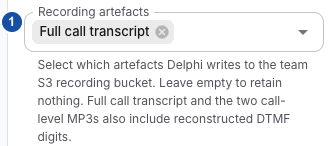
Choose the outputs (marker 1). For transcript-only storage, choose Full call transcript and remove all audio selections.
-
Set the frequency (marker 2). Set Record every N calls to
1when verifying every test call. This field appears when at least one artefact is selected.
-
Save the draft, review the change, and Publish the version through your team's normal approval process. Saving a draft alone does not apply these app settings to the published flow.
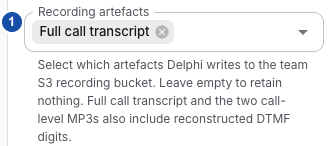
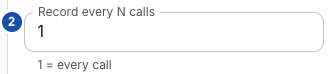
The images use synthetic data from 0.9.17-patch2. The illustrated artefact and frequency labels and values remain applicable to 0.9.19. The settings also separate app availability from recording, and the helper text explains that 1 records every call and N records every Nth call only when artefacts are selected; these captions are not shown in the historical crops.
| Selection | Intended retained output |
|---|---|
| Full call transcript | Call transcript and context, including captured keypad events where applicable |
| STT transcript | Caller speech-turn transcript |
| TTS transcript | Bot speech-turn transcript |
| Full call audio with denoise processing (if applicable) | Call mix using processed caller audio, when available |
| Full call audio | Call mix using caller audio before preprocessing |
| STT audio per turn | Individual caller speech excerpts |
| TTS audio per turn | Individual bot speech excerpts |
Selections control which outputs are requested. They do not guarantee that the corresponding audio/turn data exists or that processing/upload succeeds. If your integration needs per-turn audio references, select the matching STT/TTS transcript as well as that turn's audio.
From 0.9.18, a call without a captured caller speech turn has no
transcript-stt-input.json object, even when STT transcript is selected.
The full call transcript is a separate output. See the
recording output reference for the conditions
under which each object is written.
Choose the starting storage protection
Availability: from 0.9.19, the Disable sensitive information transcription switch appears under Recording artefacts in Flow Settings when at least one artefact is selected. Only a Team Admin or platform administrator can change it. Members see the current value and a note that only an Admin can change it. If the switch is absent, select an artefact first; if it is still absent, check the deployed version with your administrator.
The switch sets how new calls of the App start:
| Choice | New calls start |
|---|---|
| Switch on | Protected |
| Switch off | Unprotected |
| Use platform default | With the platform setting; unprotected if no platform administrator set it |
An on or off choice on the App takes priority over the platform default. The caption under the switch shows how new calls start. Clearing all recording artefacts hides the switch but does not clear the App's choice; new calls still start with it. A pending change in the draft is also kept and applies when you publish.
Apply the change
- Change the switch, or choose Use platform default to remove the App's own choice. The draft now holds a pending storage change. Saving the draft does not affect any call.
- Publish the draft. Publication changes the App's value, and new calls across all flows in the App start with it. Calls already in progress keep their current state.
If an administrator changes the App's value outside a flow draft, the change applies to new calls immediately.
Who can do what:
- Only Team Admins and platform administrators can make, change or withdraw a pending storage change. This holds for every way a draft is saved.
- Members can view the value and, if their team permits it, publish other edits. Publication is refused for a Member while the draft holds a pending storage change; ask an Admin to publish it.
- Restoring an earlier version or AI checkpoint does not change the App's live value. An Admin's restore can bring back a pending storage change saved in that version or checkpoint; a Member's restore keeps the draft's current one. Check the switch before you publish.
- The AI assistant never changes this setting.
If the App's live value changed after your pending change was made, for example by another Admin or by publishing another flow of the same App, publication reports a conflict and nothing is published. Reload the draft, compare the current App value with your intended choice, choose again and publish. Publishing unrelated flow edits never reapplies an old value from version history.
Each change of the App value, by publication or by a direct App update, is recorded in the App's Activity History as Sensitive storage default, with the user who made it and the previous and new value.
What protection retains
Protected turns keep transcript activities with redaction markers instead of their text, omit protected STT/TTS audio snippets, and use silence of equal length in the full call recording. This setting does not enable unselected recording outputs, delete existing recordings or configure application-log PII masking, which is separate.
Verify the change
Start a synthetic test call after publication and inspect the first recorded turn. Then exercise runtime protection changes if your integration supports them. Confirm both the transcript markers and the audio output; a disabled player or missing snippet alone does not prove that protection worked. To return to inheritance, select Use platform default, publish, then make a new test call. After a failed publish, check the App's current value in Activity History or the switch before retrying.
Verify after publication
Make an approved test call after the new version is published. When it finishes, inspect the conversation and allow recording processing to complete. For transcript-only storage, the absence of an audio player is expected; ask the storage operator to confirm the selected transcript object if you need to verify S3 retention.
If an expected output is absent, follow Diagnose recording storage and processing. That procedure separates unpublished settings, frequency selection, missing source data, upload failures and playback lookup.
To interpret call-transcript.json, including its call fields, source stages and
dtmfEvents, use the recording output reference.
Turn recording off
Clear all Recording artefacts, then save and publish the change. The UI also resets the recording frequency to 1 when the selection is cleared. This stops requesting new recording outputs for the app; it does not delete existing recordings, conversation records or diagnostic logs.
Apply changes before the calls you want to verify. Do not assume a settings change rewrites an already-running call's prepared configuration.
Keep the ownership boundaries clear
- A Team Admin configures the shared destination using Team recording storage.
- An AWS/storage operator verifies bucket access, lifecycle and existing-data handling. A Delphi role does not grant AWS access.
- Runtime storage-protection controls can suppress retained content independently of the selected outputs. Recordings and storage connects the related responsibilities; selecting an artefact is not a promise that protected content will be retained.
Related
- Diagnose recording storage and processing — to trace an output that is missing after a test call
- Recording output reference — to read the files and fields that each selection produces
- Configure team recording storage — to set the shared destination that recordings upload to