Flow data and transitions
Use transitions to decide where a flow continues and context to carry data between steps. These are the execution rules behind the canvas connections described in Build and edit a flow.
Main-flow transitions
A transition names an event and a targetNode, with an optional condition and setContext mapping. The main engine examines transitions in array order. It selects the first transition whose event matches, whose tool name matches for tool_call, and whose condition evaluates truthy. It then applies that transition's context updates before entering the target node.
| Event/configuration | Meaning |
|---|---|
complete | The runner completed that step. Inspect its result/error separately when an external action or query can fail. |
tool_call | Match the named tool; tool arguments are available as tool_args during main-flow evaluation. A transition name alone is not a general implementation of an external tool. |
signal | Match a runner's signal, commonly by a condition using signal.intent. |
feed | A schema-level continuous-data connection used around stream processing. The ordinary main engine does not emit a feed runner event; do not expect it to behave like a sequential complete edge. |
A runner can also return wait, which pauses the main engine. This is not a transition event you should replace with a timeout edge. The host/runtime must supply the applicable continuation behavior.
If no transition matches, the main engine completes. Therefore a fallback is important when you intend execution to continue. Place specific conditions first and an unconditional fallback for that same event last. A fallback for complete does not catch an unmatched tool_call or signal.
The following is an illustrative transition fragment for a normal main-flow Condition node, not a complete importable flow. Both target IDs must exist. It assumes an earlier step set a Boolean lookupSucceeded:
[
  {
    "on": "complete",
    "condition": {"==": [{"var": "context.lookupSucceeded"}, true]},
    "targetNode": "answer"
  },
  {"on": "complete", "targetNode": "fallback"}
]
The structured decision-row editor is a way to author conditions and targets. Check the resulting transition order when mixing structured edits with Source view; moving a card on the canvas does not change that order.
Data scopes
| Scope | Meaning and lifetime |
|---|---|
context / ctx | Mutable execution values. Declared context defaults initialize them, and supplied initial values override those defaults. Runners and selected transitions can update them. |
system / sys | Call/session metadata supplied to the FlowContext. It is separate from the mutable context map. |
team | Team-variable values supplied to the execution context. Setting a flow-context value does not update the team's stored configuration. |
| Event data | Additional data supplied for evaluation, such as signal, tool and tool_args for main-flow transitions. Availability depends on the event, not merely on a name in the variable catalogue. |
Declare the values your flow owns, use consistent names and define what an absent value means. Do not assume every path populated a result field. Avoid using an old _lastError value as proof that the most recent step failed: it is mutable context, and a later successful step does not universally clear it. Set/check a deliberate per-operation status where your design needs one.
Templates and conditions
Template rendering and JSONLogic conditions are different mechanisms:
- A rendered string can reference values such as
{{context.customerName}},{{system.callId}}or{{team.supportLabel}}. These examples show scope syntax, not a guarantee that those example keys exist. - JSONLogic uses expressions such as
{ "var": "context.lookupSucceeded" }to read the evaluation data. - Rendering a missing or null value produces an empty string. Objects render as JSON text. A request URL or spoken sentence can therefore become invalid or misleading without producing a template exception.
- Only fields whose implementation renders templates have this behavior. Do not assume every JSON string in a FlowDefinition is templated.
Prefer explicit scope prefixes. An unqualified template name can fall back to a team variable, which can conceal a mistaken scope. Review the Variable Catalogue to locate uses, then verify the actual values on each relevant execution path. Do not put secrets into prompts, ordinary diagnostic output or screenshots merely to inspect a variable.
Transition context updates
A main-flow setContext mapping can contain primitive values, rendered strings or JSONLogic expressions. Every mapping value is evaluated against the context before that transition's updates are applied. One entry cannot rely on another entry in the same mapping having already changed the context.
For example, when a mapping sets firstName and also renders displayName from context.firstName, the display name uses the old first name. Split dependent calculations across explicit steps or derive both from the same original input.
Context state can be serialized by the runtime, but writing it does not mean the change is saved into the app's flow definition, team settings or a customer database. Use an explicit permitted persistence action when durable business data is required.
Tools and result mappings
A tool name, its parameter description, its executable implementation and the transition after a tool call serve different purposes. Check all four when a tool appears in an agent configuration. Custom embedded implementations belong in the definition's actionTools; platform tools depend on the available runtime catalogue. A described transition can also provide a node-local tool to the agent, but it does not create an arbitrary external service implementation.
From 0.9.18, tool resolution also accepts node-local tools defined by a tool-call transition with a description. A bare transition name still does not define a tool.
Use node result mappings to put the relevant response data into named context values, and then branch on those values. Inspect the actual mapping contract for the selected node/provider. There is no universal result shape shared by webhook, LLM query, action request, DTMF and transfer.
Example: branch on a webhook response
Suppose your service's documented response body is JSON with a Boolean success field. An unsuccessful business result looks like this, even if the HTTP status is 200:
{"success": false}
The following are main-flow fragments, not a complete flow to import. Replace the example URL with your approved service and supply its required authentication. Ensure lookup, success and fallback are actual node IDs. Declare lookupSucceeded as a Boolean context variable with default false.
First, reset the operation status on every incoming transition to lookup, including retries. For a preceding node that emits complete, that transition is:
{
  "on": "complete",
  "targetNode": "lookup",
  "setContext": {"lookupSucceeded": false}
}
Then configure the Webhook node. resultMapping keys are destination context keys; $.success reads the response body's top-level success field. It is not an HTTP status path:
{
  "id": "lookup",
  "type": "webhook",
  "request": {
    "method": "GET",
    "url": "https://example.invalid/lookup"
  },
  "resultMapping": {"lookupSucceeded": "$.success"},
  "transitions": [
    {
      "on": "complete",
      "condition": {"===": [{"var": "context.lookupSucceeded"}, true]},
      "targetNode": "success"
    },
    {"on": "complete", "targetNode": "fallback"}
  ]
}
The exact Boolean true takes the first edge. The sample false, a missing field or another value takes the fallback. A fetch or JSON-parsing error caught inside the request block also completes the node; the incoming reset prevents an earlier successful call's value from sending this failed attempt down the success branch. The reset is essential on loops: a context default alone only initializes the value.
The runner does not reject an HTTP non-2xx status by itself. A JSON body containing success: true can therefore select the success branch even with an error HTTP status. Use this pattern only when the service's body contract is authoritative for business success. If your integration requires explicit HTTP-status handling, use an implementation that checks the status, such as a shared team tool. That tool's runtime fetch helper has different error behavior from this Webhook node; they are not interchangeable APIs.
_lastError is useful diagnostic context after a caught error, but the Webhook runner does not clear it on later success. This example deliberately branches on the freshly reset and mapped operation value, not on absence of _lastError. It also does not promise that every setup failure reaches the fallback: request-header/auth preparation occurs before the runner's request catch and can throw separately.
Verify the response cases true, false, absent field and invalid JSON against a controlled service before publishing. No request to the illustrative URL is required or claimed here.
Side flows and continuous processing
Side flows have their own initial node and node list. Their triggers can be a WebSocket message, a context change or a call event, provided the host actually forwards that trigger. Isolation values parallel and interrupt select execution behavior; they do not create separate data scopes. The side-flow manager uses the shared FlowContext, sets context.trigger for the invocation and clears it afterward. It suppresses another invocation of the same side-flow ID while that invocation is active.
Do not copy every main-flow transition assumption into a side flow. In a side flow, routing compares the event and optional condition, but does not apply transition setContext mappings or the main engine's exact tool_call name check. Conditions receive the result's signal; the main-flow extra-data contract is not reproduced wholesale. Use supported side-flow capabilities and explicit node outputs, and verify the actual host path before designing tool-based branching there.
Continuous STT and interpretation are another boundary: transcription can keep the engine waiting while a specialized producer consumes chunks and selects interpretation lanes. A feed connection is not evidence that arbitrary nodes will execute per chunk. See the node reference for the scope of these types.
Diagnose a wrong branch
- Identify the exact flow version and channel that ran.
- Check the node's actual outcome: event type, tool name or signal, plus the fields your condition reads.
- Read transitions in stored order and find the first matching one. Check whether an unconditional edge shadows a later specific edge.
- Check missing variables, empty rendered values and pre-update context when a mapping gives a surprising result.
- Distinguish main flow, side flow and specialized stream processing before applying an execution rule.
- Review the conversation and available diagnostics through Review a conversation, then test the corrected draft through the application lifecycle.
Find and declare flow variables
Open Variables & Resilience beside the canvas, then choose Variables. Use this catalogue to find a reference and understand where the definition uses it. It is not a live view of the current caller's values. The adjacent Resilience tab edits flow-level policy; use the flow-level resilience reference when changing failure behavior.
When resilience editors are unavailable, the drawer is labelled Variables and opens directly to this catalogue. The Resilience tab appears only when the deployment opts in and, if subscription management is enabled, the team uses the custom plan.
Availability: inspect the selected application/team with an authorized account. Flow editing, publishing and team-secret administration are different permissions; a visible control is not proof that the backend will accept a mutation. See access and teams. Platform-managed secret values require the platform administrator, even when the reference appears in the catalogue.
| Catalogue control or indicator | Meaning and next step |
|---|---|
| Team, Context, System groups | Separate reusable team configuration, mutable execution data and host/session metadata. Read the data scopes before choosing a name with a similar meaning in another group. |
| Used/total count | Counts references detected in this flow definition, including known result/mapping fields. It does not prove that a live execution reached that node or populated the value. |
| Variable chip | Expands/collapses its details here. It does not insert text into another field or reveal the live value. Selecting another chip changes the expanded item. |
| Source, Status, Used in, Type | Explain the catalogue origin, detected usage and inferred/declared type. Known node outputs, entry mappings and template/condition references can appear without a manual declaration. Treat unknown types and inferred usage as authoring information, not runtime validation. |
| Read-only / secret value hidden | Describes that catalogue item. Team values are not edited as per-call context here; secret values are not displayed by the catalogue. |
| Warning icon/count | Highlights the variable-readiness findings this panel knows about, such as a referenced team variable missing or its secret value unset. No warning is not proof of successful authentication or a complete application test. |
| Collapse variables | Closes the panel. It does not undo prior edits or team-secret changes. |
The catalogue is derived from declarations, built-in entries, known node/entry outputs and references found in the definition, including side flows. It can list values that only exist in a specific session or event. Test the exact path before using a catalogue entry in a condition; a listed result is not necessarily present on every transition.
Add a context declaration
Choose Add in the Variables tab to open Add Context Variable.
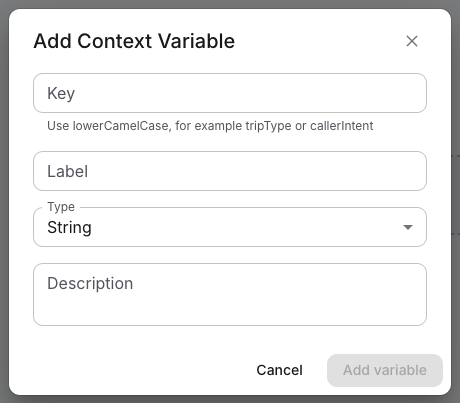
The example shows the blank form. Add variable stays disabled until you enter a valid key.
| Field/action | Effect |
|---|---|
| Key | Trimmed before insertion. Use lowerCamelCase starting with a lowercase letter and containing only letters/numbers, for example lookupSucceeded. Invalid keys and an existing declared key show an error. An empty key cannot be added. |
| Label | Optional human-readable name for the catalogue. Blank is omitted. It does not change the executable key. |
| Type | String by default; choices are String, Number, Boolean, Object and Array. This is the declaration's type, not a value input. |
| Description | Optional explanation of who writes the value and what absence means. Blank is omitted. |
| Add variable | Adds the declaration to the flow's context definitions, resets the small form and closes it. Follow the application save/publish workflow to persist and activate the flow change. |
| Cancel / Close | Does not add the declaration. The unfinished fields can remain when reopening this dialog during the same mounted panel session; dismissal is not a guaranteed reset. |
There is no initial-value/default field or edit/delete-declaration control in this catalogue. Adding a Boolean declaration does not initialize it to false. For example, declare lookupSucceeded as Boolean, then deliberately set it to false on the incoming path before a lookup and set it from the new result. The webhook response example explains why this reset matters. Review Source and its validation for advanced declaration/default changes rather than looking for an invented value editor.
Resolve a referenced team secret
A missing team reference can offer Create secret variable, opening the team-variable form with the referenced key and SECRET type. An existing secret with no value can offer Set secret value. These are real team-resource operations, separate from saving or publishing the current draft. Closing the catalogue does not roll them back.
Use team variables and secrets for metadata creation, value entry, required permissions and managed-key ownership. Creating metadata alone does not populate the secret. If the row says it is platform-managed, ask the platform administrator to set the value; do not insert a literal credential into the prompt or a different field. After correction, recheck readiness and run a controlled interaction. A stored secret may still be rejected by the external provider.
Insert a variable into a field
Some inspector text fields have Variables (count) beneath them. Expand the list and choose a chip to append its template reference, for example {{context.lookupSucceeded}}. This particular picker appends at the end of the field, inserting a separating space when needed; it does not replace the current selection or insert at the caret. Inspect and reposition the result before saving if it belongs inside a sentence or structured value.
The system catalogue includes sipHeaders, a read-only object supplied by telephony. Its availability depends on the interaction path; a browser or non-telephony execution must not assume inbound SIP headers exist.
System variables are excluded from this picker by default unless its caller explicitly includes them. The main catalogue and editor-specific code/instructions variable buttons are separate surfaces; do not assume they all have the same list or insertion behavior. Inserting a reference neither creates a declaration nor sets a runtime value. For a missing value, find its producer and initialization path rather than repeatedly inserting the chip.
Related
- Flow node reference — to check which events and outcomes each node emits
- Build and edit a flow — to connect the transitions on the canvas
- Manage team variables and secrets — to supply a team value or secret that a flow references