Choose a channel and AI provider configuration
Use this task when an existing application needs a different way to receive conversations or process speech and text. The channel determines how a conversation enters the flow. The provider configuration determines how its AI nodes process that conversation. Changing one does not automatically make the other ready.
Find a provider setting
Use the task steps below for a configuration change, or jump to the field reference:
| Area | Reference |
|---|---|
| Scope, mode and credentials | Editor workflow, mode changes, keys |
| Unified speech conversation | Realtime controls, Azure URL, advanced settings |
| Text model | LLM controls and runtime differences |
| Modular speech input/output | STT, TTS |
| Audio quality and recovery | Audio/preprocessing, timeouts, retries and fallbacks |
Availability: Work in the correct team with permission to edit the application. Custom AI credentials depend on the deployment's subscription policy and your team's plan. Browser integration requires API access; browser voice additionally requires WebRTC and its gateway services.
Prepare the change
Saving and publishing have different permissions and checks; follow Change an application and verify its published flow for the publication procedure. Use an agreed test application or endpoint, permitted test data, and one expected result before changing a live flow.
When subscription management is disabled, the editor permits custom credentials. If the editor says Your plan uses platform-managed AI providers, ask the team administrator about provider configuration rather than inserting a key elsewhere. A displayed provider option does not prove that its credentials, model access or service are available for your deployment.
The platform administrator owns browser and voice enablement. See Connect a browser application for the exact prerequisites, team API-key scopes and independent SDK version. Selecting a provider mode does not enable a browser channel.
1. Identify the entry point you need
Open the application in Flow Designer and inspect its entry points in Flow Settings → Endpoints. Confirm which endpoint your intended test will use.
| Intended interaction | Entry-point type | Check before testing |
|---|---|---|
| Telephone conversation | Phone (phone) | The entry point has the intended base number; the administrator has prepared routing. Browser voice alone cannot verify the telephone path. |
| Voice in your browser application | Web Voice (web_voice) | The flow and deployment support voice sessions, and the browser integration uses the correct endpoint and access restrictions. |
| Text in your browser application | Web Chat (web_chat) | The flow has the intended text-processing path; the browser integration is prepared for text sessions. Text does not require enabling WebRTC. |
These are entry-point choices, not a compatibility matrix for every node and provider. Inspect the path reached from the chosen entry point. A text channel still needs a flow that handles text; adding an entry point does not convert a voice-only interaction into a text conversation.
For a telephone destination or routing mismatch, ask the administrator to check SIP routing. For browser session setup, continue with the browser integration guide above after preparing the flow.
2. Choose the processing mode at the right scope
Inspect the default provider configuration in Flow Settings. Then inspect the AI nodes on the path you will test: a node can have an Override provider configuration. Check this before assuming a flow-level change applies to that node.
| Editor mode | Processing responsibility | Where it is useful |
|---|---|---|
| Unified Realtime | One realtime provider handles speech recognition, language-model interaction and speech output. | A voice-agent interaction using a realtime provider. |
| Modular Voice | Separate speech-to-text (STT), language-model (LLM) and text-to-speech (TTS) providers. | A voice-agent interaction where you need to configure those stages separately. |
| TTS Only | Synthesizes speech from text. | A TTS node; it is not a complete conversational agent. |
| LLM Only | Processes text with an LLM, without audio. | A text agent or an LLM-query node. |
The editor limits modes by node type: voice agents offer Unified Realtime and Modular Voice; text agents and LLM-query nodes use LLM Only; TTS nodes use TTS Only. A mode selector may therefore be absent when there is only one permitted mode. This is different from a missing plan entitlement.
Changing mode replaces the provider configuration with that mode's defaults. Recheck the provider, model, language, voice, credential references and any audio settings afterward. Do not assume settings from the previous mode survive. Enabling a voice- or text-agent override also starts with its own defaults; it does not copy your customized flow-level provider configuration.
Use an override only when that node should differ. When reviewing an inherited configuration, check the flow default and the node's actual requirements; do not assume all provider settings merge field by field.
3. Check credentials and audio requirements
For each active stage, confirm the selected provider/model and any required region or endpoint with the administrator responsible for that provider. Check the language and voice against the expected interaction. Do not use a credential for one provider as evidence that a different stage is configured.
Credential fields can contain team-variable references such as {{team.openaiDefaultKey}}. That text refers to shared configuration; it is not itself a provisioned secret. Ask the authorized administrator to create or correct missing referenced variables and secret values. Never put real keys in a support screenshot, a browser example or a documentation page.
Availability — audio preprocessing: controls depend on the deployment's audio-preprocessing feature and the team's allowance. They also depend on provider input-audio capabilities. The editor turns preprocessing off when the selected input is incompatible with its PCM requirement. If it disappears or becomes disabled after a provider change, recheck the input configuration and ask the administrator about entitlement; do not assume preprocessing remains active. It is not a prerequisite for every provider change.
4. Save, validate and test the intended interaction
Save the draft and check for a successful result. Resolve blocking readiness messages, including missing referenced team variables or secret values and a phone entry point without a base number. Review warnings too. Validation can detect configuration problems; it does not authenticate against every provider or certify network access and model availability.
Exercise one known input in the designated test context. For voice, check recognition, the response and audible output. For text, check that a message reaches the expected node and returns the expected response. Inspect the conversation result rather than treating a connected session or successful save as completion.
Do not assume every Flow Designer test creates an isolated draft copy. Use the application change procedure to publish deliberately and then verify a new conversation through the intended endpoint. A saved draft does not prove the runtime uses the new provider. If publication reports a synchronization failure, the database publication may already have succeeded; involve the operator before retrying or declaring the new configuration live.
If the result is wrong
| Symptom | First check and recovery |
|---|---|
| A node still uses the old provider | Check its override, the selected application/endpoint and the published runtime configuration before changing credentials. |
| Readiness reports a missing variable or secret | Ask the configuration owner to supply the referenced value, then repeat readiness checks. A placeholder alone is insufficient. |
| Provider setup fails despite successful validation | Record the error and stage; ask the administrator to check credentials, model/region access and service reachability. Do not repeatedly publish to diagnose authentication. |
| Voice connects but recognition or playback fails | Identify whether input, AI processing or output failed; recheck the corresponding stage and audio configuration. Use Logs and diagnostics with the operator. |
| Browser sessions fail before the flow runs | Check channel enablement, endpoint restrictions and session setup in Connect a browser application. |
| The new configuration produces worse results | Preserve work you want to keep, then restore the chosen earlier definition into a draft and review it using the application change procedure. Restoration still needs deliberate publication. |
Record the application, endpoint, conversation ID, test time and published version when escalating. The task is complete when the intended channel produces the expected interaction with the chosen provider configuration and its conversation evidence has been checked.
Configure a provider in the editor
Open the flow's provider configuration, or enable an individual node's provider override when that step needs its own configuration. Confirm which scope you are editing first. A node override does not change every other node; an inherited flow provider can affect several steps. Follow the application save/test/publish workflow after editing.
- Choose a mode appropriate to the node and channel. The available modes depend on the enclosing editor: a TTS step and an LLM step can each restrict this choice.
- Choose the provider type and review its newly seeded model, key reference and endpoint fields. Do not assume switching types preserves only compatible settings.
- Confirm the secret reference with the team administrator, and review the effective endpoint without exposing credentials.
- Set the node's instructions and the provider's applicable audio/LLM controls. An editor fallback label does not always equal the runtime default.
- Save and run a controlled new interaction through the intended channel. Check provider identity, response/output and failure handling; a successful save establishes configuration persistence, not provider acceptance.
When custom keys are unavailable under the selected team's allowance, key fields are hidden and the editor displays Your plan uses platform-managed AI providers. This is an access/configuration condition, not proof that a managed key exists or is valid. Ask the administrator to inspect the team's provider setup. Do not move credentials into a prompt or another visible field to work around the control.
Pipeline mode and changing configuration
| Pipeline Mode | Configuration created when selected |
|---|---|
| Unified Realtime | A single realtime branch, seeded as OpenAI Realtime with model gpt-realtime-1.5, voice alloy, and {{team.openaiDefaultKey}}. |
| Modular Voice | Separate Azure STT, OpenAI Chat and OpenAI TTS branches. STT is seeded with the enclosing editor's primary language and Azure region default; LLM uses gpt-4o; TTS uses tts-1 and alloy. Review all three services. |
| TTS Only | An OpenAI TTS branch seeded with tts-1, alloy and its team-key reference. No STT/LLM branch is created. |
| LLM Only | An OpenAI Chat branch seeded with gpt-4o and its team-key reference. It does not create an audio path. |
The selector is shown only when more than one mode is allowed. Switching mode creates a fresh provider configuration object. Existing provider branches, advanced fields, fallbacks, audio settings and other fields are not merged into that object. Export/review the applied definition before changing a configured pipeline and recheck every required setting afterward.
The displayed mode is inferred from the fields present: a complete STT+LLM+TTS configuration wins, then realtime, then partial modular combinations, then TTS-only or LLM-only. Consequently an imported mixed definition can contain fields that are not obvious from the selected panel. Inspect Source when an imported configuration looks inconsistent rather than assuming every hidden field was deleted.
Changing provider type is a different operation: realtime type changes merge the new type's defaults into the existing realtime object; some advanced values can remain from the previous type. Azure selection explicitly resets URL-related fields. In the LLM panel, changing the type replaces that LLM branch with the newly supplied fields, while its resilience settings are deliberately carried when available. Review source and endpoint/credential ownership after either operation.
Credential fields and safe examples
Use the team secret reference required by the chosen service. Editor defaults are references, not secret provisioning:
| Provider family | Seeded reference |
|---|---|
| OpenAI Realtime, OpenAI GPT-Live, OpenAI Chat | {{team.openaiDefaultKey}} |
| Azure realtime | {{team.azureDefaultKey}} |
| Grok realtime | {{team.xaiDefaultKey}} |
| Gemini Live | {{team.geminiDefaultKey}} |
These fields are ordinary text inputs in this editor when visible. A literal key may be visible in the form or exported configuration. Prefer the established team-secret workflow and redact captures/exports. A missing key field can reflect the team's allowance; a missing referenced secret is a separate setup problem. Platform-managed defaults for one key family do not mean that the other keys exist.
Verify a custom provider connection
A custom URL changes the destination of provider traffic and potentially its credentials. Use an approved service implementing the selected adapter's protocol; a reachable WebSocket or HTTPS endpoint alone is not enough. Pythia is the self-hosted realtime connection option: supply its required URL and verify the deployed server's protocol and audio agreement. Selecting it does not establish data residency, cost or authentication guarantees.
The bundled destinations for these product revisions are:
| Connection | Destination when no override is supplied |
|---|---|
| Gemini Live | wss://generativelanguage.googleapis.com/ws/google.ai.generativelanguage.v1beta.GenerativeService.BidiGenerateContent |
| Grok Realtime | wss://api.x.ai/v1/realtime |
| Inworld STT | wss://api.inworld.ai/stt/v1/transcribe:streamBidirectional |
| Inworld TTS | https://api.inworld.ai/tts/v1/voice:stream |
| Pythia Realtime | No default server; its URL is required. |
These are implementation defaults, not a promise that a vendor keeps every endpoint, model or account enabled. Inworld recognition uses a WebSocket stream while synthesis uses HTTPS streaming; do not exchange their URLs. The provider sections above describe the fields actually rendered for each family. In particular, Pythia's current editor does not expose the optional key/model/voice controls used by other realtime branches.
Ask the deployment operator to verify DNS or IP reachability, destination port, certificate identity and the effective outbound proxy policy from the service making the request. The provider transport helpers use the deployment's proxy selection and NO_PROXY handling; entering a private IP does not by itself bypass a proxy or establish certificate trust. Check deployment verification and provider diagnostics with the exact channel, published version and time window. Do not disable TLS verification as a normal connection procedure.
After changing a destination, use synthetic input and inspect connection/authentication errors, the chosen model and actual speech/text behavior. An editor save or successful handshake is not proof of the complete interaction. For a phone bridge, also verify provider audio settings and the SIP media path; a self-hosted realtime selection does not force a compatible carrier codec.
Azure Speech paths and source-only overrides
Use the URL field for the selected adapter, not just any reachable speech server. Hostnames and literal IP addresses still require routing, protocol compatibility and valid certificate identity. There is no provider-editor switch to skip TLS verification.
| Adapter / URL | Path when your URL has no path or only / |
|---|---|
| Azure STT, WebSocket | /speech/recognition/{mode}/cognitiveservices/v1, where mode is interactive, conversation or dictation. A standard Azure recognition path is also normalized to the selected mode; a custom nonstandard path is retained. |
Azure TTS, wss:// or ws:// | /tts/cognitiveservices/websocket/v1 |
Azure TTS, https:// or http:// | /cognitiveservices/v1; selects REST synthesis instead of WebSocket synthesis. A nonempty custom path is retained. |
For example, wss://speech.example.invalid:8443 with Azure STT conversation mode resolves to that host plus /speech/recognition/conversation/cognitiveservices/v1. This is illustrative configuration, not a working service. A custom gateway must implement the selected Azure protocol; Delphi's direct WebSocket transport does not make an arbitrary HTTP recognizer compatible.
OpenAI TTS supports a source-only baseUrl on the selected TTS provider object; the adapter appends /audio/speech. Its default is https://api.openai.com/v1. The TTS inspector does not expose that field. Edit the actual inline provider branch in Source, validate and review the result rather than copying a universal JSON path into every flow.
For a timeout, check routing and proxy selection from the Voice service; a private address alone does not establish proxy bypass. For a proxy rejection, check the allowed destination host/IP and port with the operator. For TLS errors, check server identity and installed trust. After changing the destination, verify a draft test or deliberately published new interaction using the application workflow; saving the editor does not prove the running provider changed.
Unified realtime controls
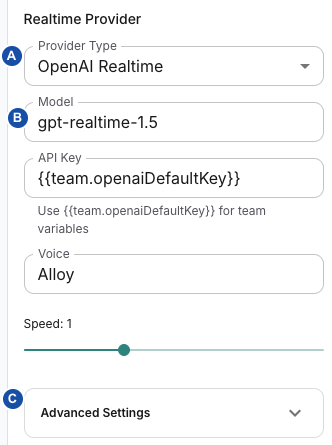
A — Provider Type chooses the connection family. B — Model identifies the configured model. C — Advanced Settings expands that provider's extra controls. This is a synthetic flow example; displayed values are not a recommendation or proof of provider access. The API Key field contains a team-variable reference, not a populated secret. Select the image to view it at full size.
The Realtime Provider section contains Provider Type. The options in this release are OpenAI GPT-Live (Pilot), OpenAI Realtime, Azure Realtime, Grok Realtime, Pythia Realtime and Gemini Live. This is Delphi's configured catalogue; it does not certify every external model, region or account. GPT-Live is a pilot with its own controls; see GPT-Live (Pilot).
Provider-specific connection fields
| Provider | Rendered controls and initial/display defaults |
|---|---|
| OpenAI Realtime | Model, API Key, Voice, Speed, Advanced Settings. Model display/runtime fallback is gpt-realtime-1.5; voice fallback is alloy; speed display is 1. Model and voice accept free text as well as listed suggestions. |
| Grok Realtime | Model, xAI API Key, Voice, Speed, Advanced Settings. Defaults are grok-voice-latest, eve and speed 1. Preview appears only when the selected listed voice has a sample URL; it plays a browser audio sample, not a test of your configured credentials or session. |
| Azure Realtime | API Key, URL construction controls below, Voice, Speed, Advanced Settings. Uses a deployment name and computed WebSocket URL rather than the OpenAI Model field. |
| Gemini Live | Model, Gemini API Key, Realtime URL. Model fallback is gemini-3.1-flash-live-preview. Leaving Realtime URL empty selects the adapter's bundled endpoint. There is no Voice, Speed or the shared Advanced Settings block in this rendered branch. |
| Pythia Realtime | Required URL, with an error state when blank. This branch renders no API Key, Model, Voice, Speed or shared Advanced Settings block. Other fields in an imported definition do not establish visible controls or guaranteed effects. |
Free-text acceptance means the editor can store a value; it does not validate model availability or compatibility. The voice runtime also sanitizes voice choices for OpenAI, Azure and Grok, so a free-text value may not become the effective voice unchanged. Check the resulting provider configuration and output when selecting a non-listed voice.
Realtime instructions come from the flow/node conversation instructions. This generic realtime form does not contain a separate Instructions field. Use the voice-agent inspector to set what the assistant should do.
GPT-Live (Pilot)
Availability: from 0.9.18, GPT-Live runs only on Voice servers when your operator enables the pilot. It is off by default; the operator setting is listed in environment variables. The editor offers the option regardless. On a server without the pilot, calls using it fail at start with "GPT-Live pilot is not enabled on this server". Ask your operator before you publish a flow that uses it.
GPT-Live separates the caller-facing voice from the backend that decides what to say and which actions to run. Selecting OpenAI GPT-Live (Pilot) under Realtime Provider seeds model gpt-live-1, voice marin, the team reference {{team.openaiDefaultKey}} and OpenAI-hosted execution with backend model gpt-5.6-luna.
| Control | Meaning |
|---|---|
| Voice model | Read-only. The pilot always uses gpt-live-1. |
| OpenAI API key | Shown only when custom-key editing is allowed. |
| Voice | Free text; default marin. |
| Voice style instructions | Optional, up to 12,000 characters. Describes how to speak. Business instructions and tools still come from the conversation step. |
| Backend execution | OpenAI-hosted: OpenAI runs the backend with the Backend Responses model in your OpenAI project; Delphi executes your custom tools. Delphi-managed: Delphi runs a backend you select with the same LLM controls as Modular Voice, seeded as OpenAI Chat. |
| Backend Responses model | OpenAI-hosted only. Choose a listed model or enter a model ID available to your OpenAI project. Custom endpoints require Delphi-managed execution. |
GPT-Live has no Speed or Realtime Advanced Settings block. Input and output must use the same format: PCM16 at 16 or 24 kHz, or G.711 μ-law/A-law at 8 kHz. Validation rejects other combinations with INVALID_LIVE_AUDIO_FORMAT. Without an explicit format, PCM16 at 24 kHz is used in both directions. Set both under AI Input / AI Output. Each selector is filtered separately, so a mismatched pair can be chosen and is rejected on save.
After a GPT-Live call, the conversation detail shows one usage line per Live session: execution mode, voice seconds, voice cost, and whether final usage was confirmed. Backend token usage is listed separately where the backend reports it; voice cost excludes backend charges.
To verify a pilot flow, make a test call before real callers reach it. The call should connect and answer, and its conversation detail should show the GPT-Live usage line. If the call fails at start, check the availability condition above.
Azure URL configuration
| Control | Meaning and side effects |
|---|---|
| URL Mode → Auto (dropdowns) | Builds the URL from Resource Name, Domain Suffix and Deployment Name. Switching to Auto clears a stale custom URL and the legacy endpoint field. |
| Resource Name | Resource subdomain, not a full WebSocket URL. Editing it replaces reliance on the legacy endpoint field. Use the resource assigned to your environment. |
| Domain Suffix | Chooses cognitiveservices.azure.com, openai.azure.com or services.ai.azure.com. The editor seeds/displays openai.azure.com; choose the suffix matching your actual resource. The shared builder has a separate cognitiveservices.azure.com fallback if a source definition reaches it with no suffix, so inspect the preview and stored field rather than assuming a single universal default. |
| URL Mode → Custom (full URL) | Allows an explicit WebSocket URL. Switching from Auto seeds the current composed URL without its model query, so deployment selection can still supply that query. |
| Full URL | Shown in Custom mode. Review host/path/query before connecting. Selecting a custom host changes where the runtime connection is attempted. |
| Deployment Name | Free-text or suggested deployment identifier. It is not a command to create a provider-side deployment. |
| Full Request URL (preview) | Read-only output of the same URL builder used by the TelPhi factory. A nonempty preview establishes composition, not reachability, certificate validity or provider authorization. |
For illustration, Resource Name docs-demo, Domain Suffix cognitiveservices.azure.com and Deployment Name demo-voice compose:
wss://docs-demo.cognitiveservices.azure.com/openai/v1/realtime?model=demo-voice
This is a synthetic URL example, not a deployed service. In Custom mode the builder appends the deployment query only when the URL lacks a model or deployment query already. An existing query can therefore take precedence over the separately displayed deployment field. Inspect the preview when the wrong model/deployment appears to be used.
When no stored URL mode exists, the editor infers Custom from an explicit URL or legacy WebSocket endpoint; otherwise it infers Auto. A legacy hostname can be split for display without immediately persisting the new resource/suffix fields. Inspect Source before assuming a displayed migration was saved.
Realtime Advanced Settings
This block appears for OpenAI Realtime, Azure and Grok, not GPT-Live, Gemini or Pythia. The controls express the stored configuration; the runtime caveats below are part of their meaning.
| Control | Visibility, display default and runtime use |
|---|---|
| Custom URL | OpenAI/Grok only. Empty falls back to the adapter's bundled WebSocket endpoint. OpenAI's connector appends the configured model if the URL lacks model=. Review inherited URL values after changing provider type. |
| Transcription Model | OpenAI/Azure show the shared suggestions with whisper-1 fallback; Grok suggests grok-transcribe. The respective adapter forwards the configured transcription model. A transcription model is distinct from the conversation model. |
| Transcription Prompt | OpenAI/Azure only. Optional text forwarded in their transcription configuration; not the assistant's conversation instructions. |
| Transcription Language | OpenAI/Azure selection, with Auto-detect for empty. Empty stores null; the adapter forwards the configured value without inferring a specific user language from the dropdown label. |
| Language Hint | Grok-only free text, initially empty. Sent as language_hint in its transcription payload. |
| Noise Reduction | OpenAI/Azure: None, Near Field, Far Field; display fallback None. See the unset-versus-explicit caveat below. Grok does not render this control. |
| VAD Type | Server VAD or Semantic VAD; display fallback Server VAD. Controls response-turn detection configuration, not STT-node transcript chunking. |
| VAD Eagerness | Tunes how quickly semantic turn detection concludes that the user has finished: Low gives the speaker longer to continue; High favors earlier turn completion. Intended VAD behavior. Only shown when stored vadType is explicitly semantic_vad. Low, Medium, High, Auto; display fallback Auto. |
| VAD Threshold | Only shown when stored vadType is explicitly server_vad. Slider 0–100, display fallback 50. The runtime fallback when absent is 0.5, and a stored number is forwarded without percent conversion. Do not read the slider as a normalized probability. |
| Prefix Padding (ms) | Includes buffered audio from before speech was detected, helping preserve the beginning of an utterance. Intended VAD behavior. Explicit Server VAD only; display/factory fallback 300. Forwarded as prefix_padding_ms in the server-VAD payload. |
| Silence Duration (ms) | Explicit Server VAD only; display/factory fallback 500. Forwarded as silence_duration_ms. Test short pauses and turn boundaries in your real channel. |
| Allow callers to interrupt realtime responses | Explicit Server VAD only; display/factory fallback on. False is forwarded as disabled response interruption in the server-VAD payload; it does not configure other input, DTMF or runtime interruption paths. |
| Action Choice | Auto, None, Required; display fallback Auto. Stored toolChoice is not used in the OpenAI/Azure initial-session or session-update payloads. Do not depend on this dropdown alone to forbid or force actions. |
| Reasoning Effort | Controls how much internal reasoning the model may devote before answering or acting. More effort can help complex tasks but add response latency; evaluate that trade-off with your actual conversation. Realtime reasoning guidance. OpenAI only, when stored model is exactly gpt-realtime-2 or gpt-realtime-2.1. Minimal, Low, Medium, High, Extra High; fallback Medium. The adapter includes reasoning effort in its explicit response-create payload for those model names. |
| Parallel Tool Calls | Same conditional model selection. Default, Enabled, Disabled. The adapter conditionally includes parallel_tool_calls in its explicit response-create payload. See Default behavior below. |
Displayed defaults versus stored values: a newly seeded realtime definition can omit vadType. The dropdown displays Server VAD, while the server-specific controls remain hidden until that exact value is stored. Selecting Server VAD makes those controls appear. For absent VAD eagerness, the UI displays Auto while the factory maps absence to null; selecting a value makes the choice explicit. Do not interpret every fallback label as a persisted setting.
Noise reduction: an unset value sends no noise-reduction object. Selecting None writes the literal none, which is forwarded as a type string. This differs from leaving the field absent; verify the effective session configuration before relying on None to disable noise reduction.
Parallel Tool Calls → Default: the handler writes null, but the selector's display logic distinguishes undefined from a truthy/false value. After choosing Default, it can display Disabled rather than Default; the response builder also checks against undefined and can forward null. Default therefore does not reliably restore the provider default.
Speed: the main control's range is 0.5–2 in 0.05 increments; it forwards a speech-output speed value for OpenAI, Azure and Grok. Test actual audio because a valid stored number is not a universal promise that every provider/model applies it identically.
LLM provider controls
The LLM Provider block appears in Modular Voice and LLM Only when an LLM branch exists. Generic instructions below describe OpenAI Chat. The intended parameter purposes below apply only when the selected model supports them and the runtime forwards them; the path-specific limitations below take precedence.
| Control | Meaning and initial/display behavior |
|---|---|
| LLM Provider | Selects the branch type. A type change replaces the LLM fields supplied by the old branch; review credentials, endpoint and prompt settings afterward. |
| Model | Free-text or catalogue suggestion. From 0.9.18, the suggestions include GPT-5.6 Sol, Terra and Luna, GPT-4.1, GPT-4.1 Mini, GPT-4o, GPT-4o Mini and older GPT-4 and GPT-3.5 models. Seed/display fallback gpt-4o; storage does not prove availability for your account or endpoint. |
| API Key | Shown only when custom-key editing is allowed. Default reference {{team.openaiDefaultKey}}; use the team secret workflow. |
| Advanced LLM Settings → Base URL | Empty uses the bundled OpenAI-compatible base URL. The clients append /chat/completions; provide a base, not an already complete completion route. Confirm the intended server before sending credentials. |
| Max Tokens | Caps generated output tokens, limiting how much text a response may produce; it is not a word count, prompt-size limit or speaking-time setting. Parameter meaning. Optional number; clearing stores null. Runtime behavior differs between the modular chat component and TelAPI runners, below. |
| Temperature | Adjusts sampling variability: lower values favor more predictable wording; higher values allow more variation. It is not an accuracy guarantee. Parameter meaning. Slider 0–1, step 0.05, display fallback 0.7. A zero selection behaves differently in the runtime paths below. |
| Presence Penalty | Positive values discourage reusing tokens that have already appeared, encouraging movement towards new wording/topics, regardless of how often each token appeared. Parameter meaning. Slider 0–1, step 0.05, display fallback 0. Forwarded by the modular Chat component when nonzero; not forwarded by the TelAPI text/query request builders. |
| Frequency Penalty | Positive values discourage repetition in proportion to how often a token has appeared; this can reduce repeated wording. Unlike presence penalty, repeated occurrences increase the penalty. Parameter meaning. Same displayed range/default and path distinction as Presence Penalty. |
| Action Choice | Auto/None/Required, display fallback Auto. The modular Chat request forces auto when it adds tools; TelAPI text/query builders do not forward this field. It is not a reliable action-permission control. |
| Instructions | Optional provider-level string. It is stored, but the flow runners use node instructions/prompt and runtime session instructions. Do not assume this field replaces the node's instructions or is added automatically to them. |
For an approved OpenAI-compatible service, a synthetic Base URL example is https://llm.example.invalid/v1; the request path becomes /v1/chat/completions. This illustrates concatenation only. It does not assert that any server is compatible or that requests should be sent to the example.
Effective LLM values depend on the runtime path
| Field | Modular voice OpenAI Chat component | TelAPI text agent / LLM query |
|---|---|---|
| Base URL | Uses supplied base or bundled default, then Chat Completions route. | Same base/route pattern. |
| Max Tokens absent or zero | Uses 150 through the component's fallback expression. | Includes max_tokens only for a truthy configured value; otherwise omits it. |
| Temperature zero | Falls back to 0.7 in the component's value || 0.7 expression. | Zero is forwarded because the check is against undefined. Clearing can leave null, which the same check may forward. |
| Presence/Frequency Penalty | Nonzero values included. | Not read into the TelAPI request builders. |
| Instructions | Runtime conversation instruction reaches the component through its session-update path; node instructions remain the flow-authoring control. | Text agent uses its node Instructions; LLM query uses its node Prompt. Provider-level Instructions is not incorporated in these builders. |
| Action Choice | Adds tool_choice: auto when tools are attached. | Does not forward provider toolChoice; text runner additionally sets parallel_tool_calls: false when tools are attached. |
These are Delphi implementation boundaries, not generalized statements about a provider's public API. If a requirement depends on exact penalties, action choice or zero temperature, verify the correct runtime path and record the effective request/configuration before accepting the behavior.
Configure modular speech recognition
The Speech-to-Text pane uses STT Provider to choose Azure STT or Inworld STT. Provider selection seeds provider-specific fields and team-key references; review existing settings after changing it. API Key appears only when custom keys are allowed by the editor's entitlement input. A hidden key field does not mean credentials are unnecessary. Prefer the deployment's approved team variable rather than copying a secret into screenshots or examples.
Azure STT controls
| Field/control | Meaning and important limits |
|---|---|
| API Key | Credential/reference; absent display uses {{team.azureDefaultKey}}. |
| Region | Azure resource region; missing display and normalization use swedencentral. It must match the intended resource. |
| Language | Fixed recognition language; missing display uses the flow's primary language. |
| Advanced STT Settings → Endpoint URL | Optional endpoint override; empty clears the override. The adapter builds the recognition path/query and can replace a standard recognition path to match mode. |
| Enable Language Detection | Defaults off in the form. When on, exposes Candidate Languages and Detection Mode. |
| Candidate Languages | Text field with a JSON-array-shaped example such as ["en-US", "de-DE"]. See the compatibility limitation below before relying on it. |
| Detection Mode | AtStart or Continuous; missing display AtStart. |
| Recognition Mode | Interactive, Conversation or Dictation; missing UI display Conversation. The shared adapter's missing/unknown mode fallback is Interactive, so select the intended value explicitly. |
| Partial Results | Missing display off. It does not disable partial transcript events; the adapter processes partial events regardless of this switch. |
| Word-Level Timestamps | Visible configuration switch, missing display off. The Azure STT adapter does not use it; do not expect timestamp output from this control. |
| Voice Activity Detection / Noise Suppression | Missing display off. Values appear in adapter diagnostic configuration but are not sent to Azure. These are not the separate Audio Preprocessing service. |
| Audio Logging | Missing display off. Explicit true adds Azure storeAudio=true when not already supplied by the endpoint. Review the provider's storage/privacy policy before enabling it. |
| Initial Silence Timeout (ms) | Optional nonnegative value sent in the endpoint query when configured. Blank removes the explicit setting. |
| End Silence Timeout (ms) | Optional nonnegative value sent in the endpoint query; not a platform call-duration limit. |
| Segmentation Silence (ms) | Optional nonnegative value used in endpoint/query and recognition-context segmentation configuration. |
| Min Confidence Threshold | Final-result filtering; blank leaves adapter fallback 0.15. Form hints 0–1 in increments of 0.1. |
| Partial Confidence Threshold | Partial-result filtering; blank leaves adapter fallback 0.05. Form hints 0–1 in increments of 0.1. |
Numeric form hints do not replace save-time validation or provider constraints. The advanced timing fields display blank when absent; diagnostic fallback numbers are not proof that those values were transmitted to the provider.
Language detection limitation: the editor stores Candidate Languages as text, whereas the adapter expects a language list. The text is not converted. Have the operator verify the effective runtime payload before deploying detection; fixed-language recognition is not affected.
Example: select Azure STT, the approved resource region and a fixed test language. Explicitly select the desired Recognition Mode, then test silence, a partial phrase and a completed phrase through the real channel. Adjust one timing or confidence field at a time and compare transcript and turn timing. Do not change five switches simultaneously and attribute a difference to one of them.
Speech context phrases
Availability: from 0.9.18, for Azure STT only. The Speech-to-Text pane has no field for it. Set it as sttSpeechContexts in the Azure STT provider configuration through Source view.
Use speech context phrases when callers say terms the recognizer often gets wrong, such as product names, short commands or similar-sounding words. Each entry lists one or more phrases and an optional boost that says how strongly to prefer them.
"sttSpeechContexts": [
  { "phrases": ["weather"], "boost": 1.5 },
  { "phrases": ["whether"], "boost": 0.5 },
  { "phrases": ["tariff", "invoice"] }
]
| Rule | Behavior |
|---|---|
| Entry shape | phrases is a list with at least one non-empty string. boost is an optional number. |
Missing boost | Sent as Azure phrase weight 1.0. |
boost range | The platform passes the number through as the Azure phrase weight without clamping. Keep it within the range Azure documents. |
| Empty or absent list | No phrase list is sent, and recognition uses the provider's normal vocabulary. |
| What the provider gets | Each entry is sent as { phrases, boost } in phraseDetection.phraseList of the Azure speech context when recognition starts. |
Inworld STT controls
| Field/control | Display/default and effect |
|---|---|
| STT Model | Preset list with custom text support; default inworld/inworld-stt-1. A typed model still requires service support. |
| API Key | Entitlement-dependent; absent display {{team.inworldDefaultKey}}. |
| Language | Optional-language helper is shown, but normalization fills blank language with the primary language. Clearing this field is therefore not a verified auto-detect procedure. |
| Advanced Inworld STT Settings → Endpoint URL | Optional streaming endpoint override; empty uses the adapter endpoint. |
| Sample Rate (Hz) | Optional numeric value; placeholder 16000 is not a stored value. Schema permits 8000–48000; actual stream format must agree with the provider/audio path. |
| Enable Voice Profile | Missing display off; when true the adapter includes voice-profile detection configuration. |
| Enable Endpoint Detection | Missing display off; explicit value participates in the adapter endpointing configuration. |
| Max Endpoint Delay (ms) | Default 3000; form/schema range 500–5000, UI step 100. Controls pause-finalization configuration, not a universal response-time guarantee. |
| End-of-Turn Confidence | Default 0.8; range 0–1, UI step 0.1. Sent in transcription configuration. |
| Allow Partial Transcript Early Processing | Default off. The modular audio pipeline checks this flag for the Inworld early-processing path. Verify premature-turn behavior before enabling it. |
| Context | Optional multiline endpointing context; empty clears it. It is not the flow's mutable context map. |
Source-only options such as channel count, voice-profile top-N and inactivity timeout have no controls in this pane. Do not infer a UI field from the provider schema alone.
Example: keep partial early processing off, use the approved model and explicitly selected language, and compare a sentence spoken with long internal pauses at two supported endpoint-delay settings. Confirm both transcription accuracy and whether the agent responds before the speaker finishes. A successful settings save is not that test.
Configure speech synthesis
The Text-to-Speech pane offers OpenAI TTS, Azure TTS and Inworld TTS. API Key visibility follows the same custom-key entitlement as STT. Model/voice pickers allow custom text; accepted text in the editor does not prove the provider accepts it.
OpenAI TTS
| Control | Behavior |
|---|---|
| TTS Model | Missing display/default tts-1; choose a supported model. |
| Voice | Provider voice list plus custom text; default shared voice alloy. |
| API Key | Missing display {{team.openaiDefaultKey}}. |
| Advanced TTS Settings → Speed | Default display 1; slider 0.25–4, step 0.05. The request includes speed when configured. |
| Instructions | Optional multiline voice instructions. Adapter builds request instructions from configuration; support depends on model. Empty clears the field. |
The pane does not expose every adapter option such as custom base URL or output format. Do not assume editing a sample-rate control elsewhere forces an unsupported synthesis format.
Azure TTS
| Control | Behavior |
|---|---|
| Voice | Preset/custom selection grouped by language; default en-US-JennyNeural. |
| API Key / Region | Approved resource credentials; missing region swedencentral, key reference {{team.azureDefaultKey}}. From 0.9.18, key and region travel as a pair: without your own key, the platform key and the platform region are both used. With your own key, your key and region are used. |
| Advanced Azure TTS Settings → Endpoint URL | Optional endpoint override. Verify endpoint transport, certificate and resource compatibility. |
| Sentence Break (ms) | Optional nonnegative pause value consumed by SSML building; adapter fallback 20 ms when absent. |
| Paragraph Break (ms) | Visible/schema field; the synthesis implementation does not use it. Changing it does not change paragraph pauses. |
| Speaking Rate | Display 1, slider 0.5–2 in steps of 0.05. The SSML builder uses 1.1 when absent, so set the desired value explicitly. |
| Use SSML | Missing UI display off, but the adapter treats absent as enabled. Explicitly select and save the intended setting rather than inferring it from an imported empty value. |
| Custom SSML | Visible only with Use SSML on. Optional multiline template; the adapter replaces the first {{TEXT}} with the text to speak. It is not the general {{context...}} template editor. Validate the result against the selected voice. |
With Use SSML on, Azure TTS handles the text to speak in this order:
- A complete
<speak>…</speak>document is sent unchanged. It takes precedence over Custom SSML. - Otherwise, Custom SSML wraps the text at
{{TEXT}}. - Otherwise, supported SSML tags in the text, such as
break,prosody,say-as,phonemeandmstts:*, are kept inside the platform's own<speak>wrapper. - Otherwise, the text is spoken as plain text.
From 0.9.18, Azure TTS adds no speaking style, role or accent unless the provider configuration sets them. These settings are voice-specific, and the editor has no control for them.
Example: explicitly enable SSML and set Speaking Rate to 1 before comparing sentence-break settings on a synthetic two-sentence prompt. Verify rendered speech and provider errors. Do not use real customer text or credentials merely to test prosody.
Inworld TTS
| Control | Behavior |
|---|---|
| TTS Model | Default inworld-tts-2; preset/custom value. |
| Voice | Default Jason; preset/custom value. |
| API Key | Entitlement-dependent; default reference {{team.inworldDefaultKey}}. |
| Delivery Mode | Stable, Balanced or Creative (STABLE, BALANCED, CREATIVE), default BALANCED; sent to the synthesis service. |
| Advanced Inworld TTS Settings → Endpoint URL | Optional synthesis endpoint override. |
| Language | Optional synthesis language; blank removes the explicit value. |
| Sample Rate (Hz) | Optional numeric value; placeholder 24000 is not a stored value. Must agree with negotiated output/audio handling. |
| Speaking Rate | Uses speakingRate, otherwise legacy speed, otherwise 1; slider 0.25–2, step 0.05. Editing writes speakingRate. |
Temperature, text-normalization policy and audio encoding exist in the adapter contract but have no dedicated controls in this pane. Check the selected provider/channel contract rather than adding arbitrary fields to a form export.
AI audio format and preprocessing
Open Audio to select the AI-side format; this is distinct from choosing the SIP wire codec. Input/output selectors are shown only when the selected provider capability has that audio direction. A text-only provider has no Audio section; STT-only has no output selector.
| Control | Effect |
|---|---|
| AI Input (caller → AI) / AI Output (AI → caller) | Inherit provider default is offered, but does not reliably remove an existing explicit descriptor; see the limitation below. Other choices are filtered to the selected provider's supported codecs. The available catalogue includes PCM16, G.711 μ-law/A-law, G.722 and Linear PCM 16/24/48 kHz, filtered by provider. Selecting PCM16 exposes Rate where supported. |
| Rate | Selects an allowed PCM sample rate for that direction. A format accepted for one provider may be unavailable for another. |
| Audio Preprocessing | Default off. Requires installation availability, team entitlement, an audio input with PCM support and PCM16 input selection/default. |
| Denoising | Visible when preprocessing enabled; missing value displays on. Controls denoise configuration, not provider-side noise suppression. |
| Denoise Backend | RNNoise or DeepFilterNet; missing value RNNoise. Verify service support and measured processing cost. |
| DeepFilter → Attenuation Limit (dB) | Shown for explicit DeepFilter backend; default 100, slider 0–100 step 1. Lower limits preserve more ambient sound. |
| DeepFilter → Post-Filter Beta | Default 0.02, slider 0–0.1 step 0.005; 0 disables post-filtering. |
Inheritance limitation: selecting a format for one direction seeds both input and output descriptors; an absent opposite direction is filled with PCM16 at 24000 Hz. When the opposite descriptor exists, selecting Inherit can retain the current descriptor instead of clearing it. The editor removes the whole ai setting only when the selected value is absent and the opposite direction is also absent. Do not repeatedly toggle Inherit and assume the stored override is gone. Inspect the applied Source; restoring fully inherited formats may require deliberate removal of the whole ai object, followed by validation and an actual channel/audio test. PCM16 at 24000 Hz is not supported by every provider.
Switching to non-PCM input or a provider without PCM input automatically writes preprocessing disabled in the working configuration. Installation/team restrictions disable controls; they do not provision the processing service or prove every backend path rejects an unsupported request. The client sends preprocessing settings to the audio-processing service, so service health and actual audio routing must be verified separately. Use feature availability and service topology.
Example: with an approved PCM voice path and installed preprocessing service, compare the same synthetic noisy utterance with preprocessing off, RNNoise, then DeepFilter. Measure recognition quality, latency and speech distortion. The UI's quality descriptions are not measured guarantees for your workload.
Retries, timeouts and fallback providers
Open Timeouts & retries where offered. Resilience controls are shown only where the containing editor enables them. Some shared flow-provider surfaces suppress the inline controls because flow-level resilience is edited separately. Hidden controls do not imply an absent inherited policy.
Availability: from 0.9.18, these editors appear only when resilience controls are enabled for the deployment and, with subscription management, for teams on the custom plan; see resilience controls. Hidden editors do not stop saved recovery settings from running.
| Control | Behavior |
|---|---|
| Request timeout (ms) | Optional explicit timeout. Generic fallback: STT 10000, TTS 5000, realtime/bot 15000. This is adapter-operation policy, not whole conversation duration. |
| Retry count | Optional additional attempts after the first; 0 means one request total. UI range hint 0–10. Generic fallback STT 0; TTS/realtime/bot 1. Adapter-specific policies may differ. |
| Mid-call reconnects | Azure STT/TTS reconnects after an established WebSocket drops. An empty field uses the separate built-in limit of 5; 0 disables those reconnects. |
| Retry delay (ms) | Optional delay; generic fallback 500. |
| Backoff factor | Optional multiplier; generic fallback 2; UI minimum 1, step 0.1. |
| Retry HTTP status codes | Comma-separated three-digit codes 100–599. Commits on blur or Enter; invalid text shows an error and does not commit. Duplicates collapse. Blank removes the explicit override. Generic set: 408, 429, 500, 502, 503, 504. |
Clearing a numeric field removes that explicit setting. A concrete provider resilience object takes precedence as a whole over inherited provider defaults; it is not necessarily a field-by-field merge. After adding one override, recheck the other effective settings. Generic runtime retry categories also differ by role; a configured code does not guarantee that every operation is retryable. Retries can affect latency and repeat external work. Provider-specific session reconnect behavior is not a promise that an interrupted conversation resumes seamlessly.
Retry HTTP status codes
Use Retry HTTP status codes to specify the response statuses eligible for the
configured retry policy. Enter a comma-separated list such as
408, 429, 500, 502, 503, 504, then leave the field or press Enter. Invalid text
shows an error without committing it. Clearing the field removes the explicit
list; it does not disable retries. Set Retry count to 0 when you need that
policy's retries disabled, and verify the effective inherited configuration.
Resolve the complete retry policy
Choose platform defaults in Platform Settings → Resilience defaults, a team override in Team → Resilience defaults, or the particular provider's Timeouts & retries block. The closest concrete role/provider block wins as a whole. An unset field in the winning block uses the built-in runtime value; it does not inherit that field from the block it replaced. Primary and fallback speech providers use the effective role default unless they contain a concrete override.
In the request retry helper, the generic built-in retry categories are timeout and network for STT; TTS, realtime and bot additionally include rate_limit and server_error. A failure carrying an HTTP status, including an unsuccessful initial WebSocket upgrade, is controlled exclusively by the exact status allow-list. Removing 429 prevents that response retry even when rate_limit remains enabled. Without an HTTP status, the category controls eligibility.
The schema permits at most 32 status codes, each an integer from 100 to 599. Clearing the UI field removes that list: with other concrete settings remaining, the built-in list applies; when the entire block is empty, inheritance resumes. To disable only status-based retries while retaining category-based retries, set an explicit empty list in that provider's source configuration:
{"resilience": {"retryCount": 1, "retryStatusCodes": []}}
An empty array is a concrete override. It does not mean “inherit.” To disable all retries in the selected policy, use retry count 0.
Retry count means additional attempts after the initial attempt. With count 2, initial delay 500 ms and factor 2, the generic retry helper permits three attempts with delays of 500 and 1000 ms. Each delay is capped at 60 seconds. Its cancellation signal aborts active attempts and pending delays; provider stop/destroy and call lifetime must be wired to that signal. After a nonretryable or exhausted failure, the applicable provider fallback or call-level error handling decides what happens next; this is distinct from the retry count itself.
Speech recovery: for Azure STT/TTS, request retries apply to the initial WebSocket connection, while Mid-call reconnects applies after an established socket drops unexpectedly. Its default is five even when request retries is zero. A normal client-initiated close at call end does not start a reconnect. A provider-level resilience block replaces the inherited role block as a unit, so recheck both limits, delay and status codes when setting an override. The status allow-list governs initial connection/request retries. Mid-call recovery uses its separate reconnect budget without that status filter, including when a reconnect upgrade fails.
For an affected-call check, record the effective platform, team and flow values, actual provider request or WebSocket-open timestamps, and the call end. The provider_request_retry entry records a scheduled attempt, and delayBeforeRetryMs is a planned delay. Neither proves that another request was sent. attemptNumber and nextAttemptNumber are one-based, while legacy attempt is zero-based. maxAttempts includes the initial request. Check that no further attempt occurs after disconnect. An HTTP 401 is absent from the generic speech status list, so an initial connection rejected for a wrong speech key should not be retried under that list; this does not describe the separate mid-call reconnect loop.
If a retry does not occur, check count, exact returned status and the winning block. If an inherited value appears ignored, inspect all concrete flow-level fields. If recovery is too slow, reduce the timeout/count/delay and verify the complete fallback path in an approved test environment. Do not add authentication or invalid-request statuses merely to repeat an unchanged failing request.
STT and TTS fallback providers
In modular mode, STT fallback providers and TTS fallback providers expose an ordered list with Add, expand/collapse and Remove, up to five entries each. Each entry has its own provider fields and resilience controls. Add seeds Azure STT or OpenAI TTS defaults respectively. There is no reorder button in this list; preserve the intended stored order when editing Source. Removing the final entry clears the list.
The modular voice pipeline uses an ordered chain of primary, configured fallbacks, then a final primary retry, when a fallback chain is supplied. Initial connection failure and supported later failure paths can advance the chain; this is not automatic redundancy for every provider mode or every channel. Credential, language, format and available-service checks apply to every entry. Do not equate a fallback list with tested high availability.
Example: keep one approved fallback, explicitly record the primary/fallback policy and test a controlled provider outage in a designated environment. Inspect which provider ran, whether output repeated and the latency/error seen by the caller. Use service health to separate provider failure from an unavailable local media path. No failure injection is performed by these instructions automatically.
Check the configured result
Check the saved definition first, especially after changing mode/type: mode, provider identity, model/deployment, URL, key reference, node override and advanced values. Use a new controlled interaction to establish the actual path; an existing session may already hold configuration.
For realtime, verify connection, input transcription, output voice and a deliberate action/exit. Test interruption and turn-boundary changes with a short synthetic script. For a modular or text LLM, verify the expected node prompt, response and failure branch. Use conversation/trace correlation and redacted diagnostics, not raw credentials or complete authorization URLs. Link failures back to team-secret setup, provider/channel prerequisites and runtime logs.
Stop interpreting the editor as proof of behavior when a control is documented as stored-only or differs by runtime. Preserve the actual desired requirement for product correction and acceptance testing. Changing documentation cannot make an unconsumed field effective.
Set flow-level resilience
Open Variables & Resilience, then select Resilience. The two groups address different moments:
This tab has the same availability as provider recovery controls. When unavailable, the drawer is labelled Variables and contains only the variable catalogue.
- Provider retries and alternate providers configures provider-local recovery. Its STT/TTS fields are documented in provider recovery controls; they do not define the final call action.
- Bot delay and terminal failover controls waiting feedback and the ordered actions used when a terminal failure reaches the call.
These edits are part of the flow draft and require normal save/publication. The provider recovery editor needs an inline default provider; a reference provider is not an editable inline provider here.
Override inherited call-level failover for this flow off removes the flow's failover block. Effective resolution can then use team/platform defaults. Turning it on copies the current inherited block (or a disabled default block) into the flow. Runtime resolution shallow-merges platform, team and flow fields in that order; fields stored in the copied flow block therefore shadow later inherited changes. The ordered policies array replaces the inherited array as one unit, rather than appending steps. Turning the override back off discards the flow block. Review the inherited enabled state and action count before choosing an override.
Give callers feedback while the bot is slow
Comfort and recognition-resume behavior belongs to the modular audio pipeline. Do not assume the same controls execute for every unified realtime provider. These intermediate actions can be useful independently of enabling final runtime error actions.
| Control | Meaning and condition |
|---|---|
| Comfort prompt timeout (ms) | Delay before comfort media while a response is outstanding. The form advertises 500–60000; a positive timeout and nonempty text or URL are both needed to schedule comfort. Blank removes the value. |
| Comfort prompt text | Text to speak while waiting, for example “Please hold while I check.” |
| Comfort audio URL | Alternative audio to play. The runtime tries its URL player first and can fall back to the text if URL playback fails or the player is unavailable. |
| Comfort prompt retries | Additional comfort attempts, not provider request retries. Display default 0; the form advertises 0–10. Runtime maximum attempts are retries plus one. |
| Stop comfort playback when the bot responds | Display default on. Allows an arriving bot response to interrupt the waiting media. |
| Resume recognition timeout (ms) | A positive delay allows recognition to resume while the bot is still outstanding. The form advertises 1000–60000. When comfort is used the resume timer is scheduled after that comfort work; without comfort it starts from the outstanding request. |
| Resume recognition prompt / Resume recognition audio URL | Optional feedback for that recognition-resume action; they do not request a new bot answer themselves. |
For example, one comfort prompt with retries 0 requests at most one comfort attempt per tracked response expectation. It does not extend the final give-up timeout or the overall call-duration limit. A bot response clears pending delay actions. Check the modular call timeline before relying on these timings in production.
Configure final call actions
Enable Enable final runtime error actions to use the ordered ladder. Give-up timeout (ms) controls the bot response watchdog, not overall call length. The editor commits a whole number from 1000 to 120000 on blur or Enter; invalid drafts revert. Display resolution is the explicit give-up value, then the older response-timeout value, then 15000.
Use Add step, reorder arrows and Remove to build up to ten steps. A new step initially targets bot timeout and Transfer; complete its destination before publishing. Each step selects one or more failure categories: bot timeout, bot error, STT error, TTS error or internal/system error. Only steps matching the actual trigger are considered, in their configured order. Provider-local recovery may occur before a speech error reaches this ladder.
For STT or TTS, an eligible retry or mid-call reconnect and any configured alternate speech provider run before the final stt_error or tts_error reaches the ladder. A filled trigger chip is selected; an outlined one is not. From 0.9.18, an unselected trigger runs no step of the ladder, not even its last-resort hangup. If no step selects the fired speech trigger, the unrecoverable call ends through the ordinary provider-error path. To exclude a configured transfer or hangup action for that trigger, deselect its chip in every relevant step and save the effective policy. A system_error selection does not stand in for an unchecked speech trigger. Verify selected and unselected cases with correlated provider attempts, trigger and call outcome; unit tests do not establish the affected deployment's behavior.
Choose Action Transfer or Hangup. Hangup exposes caller message, reason, SIP headers, delay and waiting-for-silence options. Transfer exposes destination/routing and method-specific SIP fields, caller message and waiting-for-silence options. REFER outcome tracking matters: a blind REFER can count as handled before the downstream call result is known, preventing a later fallback for the same trigger. The form flags that combination. Use SIP routing and SIP termination for method and transport limits, and verify method-specific fields for your deployment.
The connected-call executor skips invalid action configurations, continues after thrown/unsuccessful actions and stops after a handled result. If the enabled ladder is exhausted, it attempts a safety hangup. A caller-message failure is logged and does not prevent a transfer attempt. From 0.9.18, typed STT/TTS provider initialization failures use their stt_error or tts_error trigger; other initialization failures use system_error. Setup failures lack working speech or the ordinary connected-call context. Test these cases separately: unanswered preparation failure, provider setup failure, and a failure during a connected call are not interchangeable.
Verify in an approved nonproduction flow: confirm the stored override, trigger category, selected step, action result and fallback outcome in the conversation/telephony logs. A saved policy does not establish carrier transfer acceptance. Keep a known good published version for rollback.
Related
- Flow node reference — to set a provider override on a single node
- Connect a browser application — to check browser channel prerequisites and API-key scopes
- Save, test and publish a flow — to publish the provider change and verify a test call
- Understand feature availability — to find out why a provider control is missing