Flow node reference
Use this reference to choose a step for building a flow. It accounts for all twelve executable-node types in the FlowDefinition schema. Palette visibility and schema validity are not evidence that a particular channel implements the node.
Execution paths
The table shows which runtime path can run each node. Registered means that path can dispatch the node; provider setup, input, services and channel constraints still apply. Not registered means you must not rely on that path dispatching it. Channel and deployment prerequisites still apply.
| Node type | TelPhi call-flow runner path | TelAPI text-session path | TelAPI browser-action side-flow path |
|---|---|---|---|
voice_agent | Registered | Not registered | Not registered |
text_agent | Not registered | Registered | Not registered |
stt_transcribe | Registered | Not registered | Not registered |
interpretation_transform | Specialized interpretation producer, not ordinary node dispatch | Not registered | Not registered |
tts_playback | Registered | Registered; needs audio service | Registered; needs audio service |
llm_query | Not registered | Registered | Registered |
dtmf_collect | Registered; needs call/DTMF services | Not registered | Not registered |
webhook | Registered | Registered | Registered |
action_request | Registered; needs host action support | Registered; needs host action support | Registered; needs host action support |
condition | Registered | Registered | Registered |
transfer | Registered; channel/method constraints apply | Not registered | Not registered |
end | Registered | Registered | Registered |
The TelPhi path handles call processing; selecting a browser channel alone does not create its required voice infrastructure. Use provider and channel selection and browser integration for those prerequisites. No additional internal-only discriminator is hidden from this twelve-type inventory; structural canvas objects below are a different category.
Conversation and speech
| Type | Main configuration | Outcome and design constraint |
|---|---|---|
Voice agent voice_agent | Instructions, tools, optional provider override, context hints, session handoff and initial-response behavior. | Runs the voice conversation. Named tool-call transitions can hand control to another node. Check provider capabilities and an intentional finish route; do not expect a graph transition after every spoken turn. |
Text agent text_agent | Instructions, tools, provider override, context hints and session handoff; an optional voice-upgrade target identifies a separate upgrade destination. | Multi-turn text conversation in the text runtime. Configuring a voice-upgrade target does not itself provision voice access or a working upgrade integration. |
STT transcribe stt_transcribe | Provider, source language, identifier template, chunking, original-audio/output options and translation configuration. | Activates continuous transcription and returns a waiting state to the main engine. It is not an ordinary one-shot complete step. Transcript processing updates lastTranscript and lastTranscriptChunk; chunking determines when downstream interpretation work is produced. |
Interpretation transform interpretation_transform | Optional source-node association, target language, prompt, result-variable setting, voice, stream/cache options and error policy. | Describes a translation lane consumed by the specialized interpretation producer. Connected STT targets can select lanes. Do not use it as a generic main-flow LLM step: it has no ordinary runner in the paths above. Check the interpretation services and downstream consumer as a complete integration. |
TTS playback tts_playback | Text, optional provider override and outgoing transitions. | Renders text and requests audio playback using the configured audio service. Empty text can complete without speech. A registry entry does not supply audio output to a text-only client. |
LLM query llm_query | Prompt, optional provider override, result mapping and transitions. | One-shot query in the registered TelAPI paths. Outputs include llm_response and llm_model; mappings can copy result data into context. Missing LLM configuration or a caught query error sets _lastError and can still emit complete. |
Chunking choices for STT include sentence, sentence pair, pause, token count and time window. Choose them for the latency/utterance boundaries of your integration; they are not interchangeable with conversational turn detection. Interpretation streaming, cache retention and error-policy details require a deployment-specific check before relying on them for production delivery.
Decisions and external effects
| Type | Main configuration | Outcome and design constraint |
|---|---|---|
Condition condition | Decision rows and outgoing transitions. | Emits complete; ordered transition conditions choose the next step. Runtime transitions are authoritative even when the inspector presents structured decision rows. |
Webhook webhook | Request method/URL/headers/body, optional authentication, result mapping and transitions. | Makes the configured request and maps the result. The runner parses a JSON response without rejecting HTTP non-2xx status by itself: an error-status JSON body can still map and complete without _lastError. A caught request/parsing error records _lastError and also returns complete. Branch on explicit business-response data, not just the absence of an exception. Keep credentials out of shared examples and exports. |
Action request action_request | Action name, parameters and waitForResult. | Delegates to the runtime host. String parameters are template-rendered. Waiting can store the host result in _actionResult; not waiting does not confirm completion of the external effect. A missing host action handler can still leave this node returning complete. |
DTMF collect dtmf_collect | Maximum digits, timeout, termination key, result variable, prompt and attempts. | Collects call keypad input. Use the canonical DTMF collection contract for exact outcomes and retry behavior rather than treating no input as a successful value. |
Transfer transfer | Method, destination, optional announcement/confirmation, ring time, caller ID, outbound SIP values and routing pool. | Requests a call transfer and exposes transfer outcome through transferResult. Runtime permission, routing and method constraints still apply. Read SIP routing and termination behavior before choosing a method or fallback. |
End end | Optional reason. | Ends the graph branch. The main engine reports completion; the surrounding runtime owns call/session teardown. An End node is not interchangeable with every provider-specific hangup action. |
For WebRTC-only flows, SIP REFER methods are not supported by flow validation. Choose the applicable INVITE-based design and verify its routing prerequisites; a valid transfer node cannot bypass destination restrictions.
For a concrete response-to-context mapping and ordered success/fallback branch, follow the webhook response example. It also explains why the Webhook node and a shared tool’s HTTP helper handle error statuses differently.
Canvas objects that are not executable node types
The canvas also shows Start, entry points, default providers, surface groups, action capabilities and side-flow triggers. These project surrounding configuration into the diagram. Selecting them edits that configuration; they are not extra type values for the nodes array.
Enabling a UI control does not grant permission to invoke an action or make it available on every adapter.
Read outcomes before connecting nodes
Use Flow data and transitions for event names, condition ordering, context scopes and side-flow limitations. Test the emitted outcome, result data and next node together. In particular, complete is an execution event, not a universal business-success flag.
Node inspectors
Availability: You need permission to edit the application. Provider-key and audio-preprocessing controls depend on team allowances and deployment features; text-agent settings omit voice-only controls. Use feature availability to distinguish missing capabilities from permissions. The execution-path table above still applies: a visible field does not make a node supported on every channel.
Select a node on the canvas to open its inspector. Check the node ID and whether it belongs to the main flow or a side flow before changing it. Settings changes the step itself; Next steps changes how execution continues. For STT, the second tab is Output lanes instead.
Most controls update the working draft immediately. Closing the inspector does not undo changes. There is no separate inspector Apply or Cancel transaction. Follow Save, test and publish to check persistence and activation; an automatic save attempt is not proof that the change was saved. Source Apply JSON is a separate whole-flow operation, not an inspector save.
Find your inspector
| What you want to do | Inspector |
|---|---|
| Hold a voice or text conversation | Voice agent, Text agent |
| Transcribe, translate or speak audio | STT, Interpretation, TTS |
| Make a single model request | LLM query |
| Choose a branch or collect keypad input | Condition, DTMF |
| Call an HTTP service or host action | Webhook, Action request |
| Transfer a call or finish a branch | Transfer, End |
Shared controls and next steps
Node ID identifies the step in targets and source configuration. Keep IDs stable. Editing this field is not a verified rename-and-rewrite operation for main flows; review all references before attempting a structural rename in Source. The header's Close button dismisses the panel. Delete is available only where the editor allows it; deleting a node or exit changes the draft, not just the display.
| Control | What it changes and when to use it |
|---|---|
| Add exit / Add output lane | Appends a transition. Voice/text agents start with an AI tool-call exit; STT starts with feed; other eligible nodes start with complete. Inspect the generated target: without another node it can point back to itself. End has no Add exit action. |
| Exit type | Chooses Feed / stream, Automatic / deterministic, AI exit or Signal. Switching type reconstructs the transition and can discard type-specific metadata. Recheck its fields after switching. A visible choice does not establish runtime support. |
| Target node | Chooses the destination within the offered main/side-flow scope. It does not validate every channel prerequisite. |
| AI exit name, description and instructions | Describe the tool-like exit the model may choose. Use a unique, meaningful name and state when to leave the conversation. These fields do not implement an external service. |
| AI exit parameters | Describe arguments the model should provide on this exit. Verify required values and malformed/missing inputs; adding a schema does not guarantee model output. |
| Structured condition | Variable, operator, value where applicable, and target create a routing condition. Operators include existence, emptiness, equality, containment, numeric comparisons and true/false checks. Entering digits in a text field does not by itself establish a numeric literal. |
| Add mapping, context variable and value | Copy exit data into context. Rename the initial new_variable before adding another row. Duplicate keys collapse; row values are strings. Use valid advanced object JSON deliberately when structured values are needed. |
| Delete exit/mapping | Removes the item from the working draft. Preserve necessary fallback routes. Canvas position does not establish transition priority. |
For example, give a voice agent a clearly described lookup_account exit, capture
the account identifier from its tool arguments, and route to a Webhook node. Then
test the absent-identifier path as well as a valid lookup. Context mappings on AI
exits can add string parameters automatically; removing a mapping does not
necessarily remove previously generated parameters, so review both editors.
These text areas apply on leaving the field. Empty, invalid or non-object JSON can clear the stored condition or mapping. A cleared condition can broaden a route. Use a valid JSON object, inspect the resulting Source, and test branch/fallback behavior before saving or publishing. Do not assume a parsing failure preserves the previous rule.
Conditions on AI exits appear under advanced routing. Changing a structured
condition can replace a hand-written one. Use the data and transition reference
for ordered matching, context evaluation, events and side-flow differences.
complete means that the step emitted that event; it does not mean an external
business operation succeeded.
Provider overrides
An override uses the node's provider configuration instead of relying on the applicable shared provider selection. Enabling it seeds a node-specific configuration; do not assume it copies your customized flow defaults. Disabling it removes that node configuration. Changing provider mode replaces the previous configuration, so recheck model, credentials, audio and resilience settings.
Allowed modes and available controls depend on node type, feature availability and provider capabilities. See channel and provider selection for setup and the provider editor field reference, and feature availability when a control is missing. A visible override is not proof of valid credentials or a working channel. The per-node sections below distinguish visible controls from settings that require Source and limitations of the runtime path.
Voice agent settings
Select a voice_agent to configure one conversational step. It can use a unified realtime provider or a modular speech/LLM pipeline. It is not the same as a one-shot LLM query. Before adding capabilities, decide what the agent should accomplish and which exit ends or transfers that responsibility.
| Control | What it changes and what to check |
|---|---|
| Instructions | The node's prompt. It supports the normal context-template renderer. A newly added node starts with a generic focused-conversation instruction; replace it with the task, allowed actions and exit criteria. Missing template values can render empty. |
| Session Handoff → Fresh (clear history) | Requests history clearing when reusing an active compatible voice session before applying the new node instructions/tools. Fresh does not mean a new call, new team or fresh application configuration. |
| Session Handoff → Continue (keep history) | Keeps the compatible reused session's history while applying this node's instructions/tools. A provider change can require a different session; this is not a guarantee that arbitrary providers share their internal history. |
| Actions and capabilities | Shortcuts that modify tool references, embedded action definitions or exit structure. The resulting definition still requires review and a test. These buttons do not execute the action immediately. |
| Actions (…) → Manage | Opens Manage Actions for attached tools. Inspect whether an action is local, shared or browser-provided, its parameters, and any node-specific instructions. An instructions override is not a new implementation of a shared tool. |
| Action name… and the add icon / Enter | Adds the named action through the editor's tool logic. Review the resulting definition: when no embedded action with that name exists, this control creates an embedded starter definition, even if a shared tool has the same name. Do not use a name-only add as proof that the shared implementation was selected; inspect the resulting source/reference. |
| Per-action remove control | Removes the reference from this agent. Do not assume it deletes a shared tool or removes every other consumer. |
| Override provider | Off removes the node provider field so runtime resolution can use the flow default. Turning it on seeds a new inline provider configuration; it is not a field-by-field overlay on the flow default. |
The inspector displays Fresh when sessionHandoff is absent, but the voice runner resolves node value → flow sessionConfig.handoff → fresh. For an imported flow with a flow-level Continue setting and no node value, the displayed fallback can therefore differ from effective runtime behavior. Choose an explicit value if the node must override that policy, then inspect the saved source.
Turning on the voice provider override seeds OpenAI Realtime (openai_realtime, model gpt-realtime, voice alloy, team-key reference {{team.openaiDefaultKey}}). These are editor defaults, not evidence that the team has a populated secret, provider entitlement or a successful connection. Review the entire provider configuration before testing. Turning off and on again may replace prior inline choices with the seeded configuration.
Capability shortcuts and their concrete effects
| Button | Result to review |
|---|---|
| Collect keypad input | Adds a collect_digits tool reference and guidance; it does not insert a standalone DTMF node. Use the DTMF contract for outcomes and call-channel requirements. |
| External API | Adds an embedded call_external_api starter tool and references it. Its starter URL is an example, not your API; supply your own request, authentication and result handling before using it. Shared reusable behavior belongs in Team tools. |
| Browser Targeted Actions (BTA) | Shown when a browser endpoint exists; attaches browser_action. The connected browser host must implement/allow the action. A phone-only caller does not acquire a browser merely because this reference exists. |
| Transfer call | Adds an embedded transfer_call tool, with a sample destination and call helper code. The WebRTC-only branch uses INVITE; other starter cases use REFER/blind. Replace sample routing, review announcement/confirmation and destination policy, and verify the intended channel. It does not insert a Transfer node. |
| Wait for silence | Adds embedded wait_for_silence code using a 5000 ms timeout. Review how the host handles that request and whether the preceding playback/input state fits the task. |
| End call | Builds the end-session capability through tools, transitions and an End target as needed. Inspect the resulting graph and actual finish path; adding the button is not a test of hangup timing. |
Browser Originated Actions (BOA) appears when voice-invocable browser actions exist. Each switch attaches/removes that action's callable tool reference for this agent. BOA begins as a user/SDK action family; BTA sends a command towards the browser. The action configuration and host integration remain necessary even when a switch is enabled. Capability chips summarize the definition; they are not live service-health indicators.
Voice fields outside this settings form
The schema also has initialResponse, context_hints and contextSummary, but this settings component renders no dedicated controls for them. Do not direct a reader to an invented switch/tab. In the runner, initialResponse !== false controls whether an initial response is requested; context_hints is passed when creating a session. The runner does not use contextSummary; setting it does not generate a summary. Advanced source edits need their own validated use case.
To verify a voice edit, test entry into this node, one allowed action and one deliberate exit using the intended channel. For history behavior, test a transition into another agent step and inspect whether information that should be retained or cleared actually appears. Do not infer this from the selected dropdown alone.
Manage an agent's actions
Open Actions (…) → Manage in a voice or text agent's settings. Select the attached action in the left list before editing. An action supplies a callable capability; it is different from an AI exit that moves to another node.
Availability: use an account permitted to edit the application in the selected team. Access to an editor does not establish permission to publish or execute a service. See access and teams for the permission boundary. Browser-backed actions additionally require their configured browser integration and applicable session path.
| What you see | What you can change here | Scope to check |
|---|---|---|
| An embedded action with Name, Description, Properties and Code | The definition stored in the flow's actionTools, plus a separate node instruction override | Other nodes in this flow can reference the same definition. Editing its code/default instructions is not limited to the selected node. |
| A Shared item with read-only details | This node's instruction override; the external definition is not editable here | Inspect the actual reference and Team tools before changing library behavior. The generic Shared badge means no matching embedded definition was found; it does not prove that the item is platform-owned or that resolution succeeded. |
| An attached browser action | Its node instruction override may use the same external-details view | Browser invocation/host configuration remains separate. A Shared badge or Loading action details… message is not proof that browser metadata or an executable service was resolved. |
The list shows attached names, available summaries and a parameter count. Select another row to switch the editor. Removing a row detaches that reference from this node; it does not delete the embedded definition, shared library record or other consumers. Removing the last attached row closes the dialog.
The outer Close button dismisses Manage Actions. It is not Cancel: fields update editor state, and code/instructions have buffered updates with flush paths. There is no outer Save/Apply/Cancel transaction. Wait for edits to propagate, close the dialog, then inspect the flow source and follow the application save/test/publish journey. Do not use closing as proof that server persistence succeeded, or as a way to discard edits.
Edit an embedded action
| Control | Effect and verification |
|---|---|
| Name | Changes the flow-level action name. The handler also rewrites matching references in the selected node. It does not perform a guaranteed whole-flow rename: inspect other nodes, side flows and references before validation. Choose a distinct name; do not rely on this form to prevent collisions. |
| Description | Explains the callable action to the AI. Describe when it is appropriate and what result it returns. This text does not implement the action. |
| Instructions, override switch off | Edits the embedded action's default AI guidance, which can affect other references to that definition. |
| Override instructions for this node, on | Shows guidance stored on this node's tool reference. It does not copy or modify the implementation. Merely turning the switch on with empty text does not create a useful override. |
| Override switch off after entering text | Clears that node override and displays the default again. Preserve any text you intend to reuse before clearing it. |
| Properties chips | Show parameter names/types and * for required entries. Click a chip to edit, its delete icon to remove it, or + Add to define a parameter. |
| Code | Edits the embedded implementation. It updates the flow definition, not the Team tools library. See the execution limits below before using external services. |
The embedded form does not render an active/available switch, version-history control, Summary field, timeout field or Final action switch in this dialog. The shared field component supports some of these in other screens; that is not a reason to tell readers to find them here. Imported source fields may still exist.
For an external/shared action, default instructions are read-only. Turn on the node override to customize guidance, for example: Ask for the reference before calling this action. Explain the returned status without inventing a result. Keep authentication and business checks in the implementation. An instruction override is not an authorization boundary. In the voice path, some resolved browser capabilities retain their default guidance and append node guidance, so do not promise that an override universally erases all built-in instructions.
Define an action parameter
Use Properties → + Add for a value that the model must supply to the implementation. Unlike the outer Manage Actions dialog, this small dialog has its own uncommitted form and explicit Add/Save and Cancel controls.
| Field/action | Initial value and behavior |
|---|---|
| Name | Empty for a new property. Add/Save is disabled for whitespace-only names. Use a stable key such as reference; code must read that same key. |
| Type | New property defaults to string. Choices are string, number, boolean, object. This form is not a full nested JSON Schema editor; it has no array/item-schema or nested object-property designer. |
| Required | On for a new property. Records the key in the schema's required list. It describes expected arguments; it is not proof that every execution path enforces all schema constraints. |
| Description | Empty initially. Explain the expected value and format to the AI, e.g. Reference supplied by the caller; do not invent one. |
| Add / Save | Writes the property to the embedded action's parameter schema and closes this small dialog. Renaming removes the old key and its required entry. It does not rewrite code or mappings. |
| Cancel / dismiss small dialog | Discards this small form's unsaved edits. It does not revert earlier changes elsewhere in Manage Actions. |
| Delete property chip | Immediately removes the property and its required entry from editor state. Check code and callers before saving/publishing the flow. |
Avoid duplicate property names: saving to an existing key overwrites that property's definition rather than producing a duplicate-name error. Editing a property rebuilds it from Type and Description; advanced constraints on that property can be lost. Review source before using this form on an imported complex schema. An unsupported imported type is displayed using the form's string fallback and can become string when saved.
A bounded synthetic example uses Name reference, Type string, Required on, and the description above. In JavaScript, the implementation can return a result without contacting a service:
if (typeof args.reference !== 'string' || !args.reference.trim()) {
  return {success: false, error: 'A reference is required'};
}
return {success: true, reference: args.reference.trim()};
This example validates and echoes an argument only. It does not look up a record, demonstrate an endpoint connection or prove that the AI selected the action. Test both a valid and missing argument on the intended host, inspect the actual returned result, and ensure the next conversational step handles failure.
Edit and check action code
The code toolbar provides JavaScript / TypeScript, Format code, Check for errors, variable insertion where enabled, and a character count. The instructions editor provides word-wrap and variable insertion controls. These are authoring aids; none executes the business action or confirms an external API request.
- Format code changes formatting. Check for errors collects editor syntax/semantic diagnostics and a missing-return warning; a clean list does not validate credentials, requests, runtime helpers or response handling.
- Language changes editor language and attempts TypeScript emission. In these versions the Manage Actions callback discards the compiled output, and inline tool resolution copies the stored source into the executable-code field. Use JavaScript-compatible source for this bounded path; selecting TypeScript is not evidence that TypeScript-only syntax will execute. Compilation/runtime correction remains a product gap to verify.
- Variables inserts an expression at the cursor. Review scope and quoting in the generated code. Do not paste secret values into code, descriptions or model instructions; use the appropriate team variables/secrets and tool execution guidance.
- Code and instructions use a roughly one-second debounce and flush paths, including editor unmount. The UI does not provide an atomic per-action save with publication or a guaranteed rollback on Close. Inspect the resulting flow source before leaving or publishing.
For network tools, deliberately handle the actual runtime helper's request/response/error contract. The TelAPI text-action executor exposes native fetch, while the Team tools chapter describes a different helper path; do not assume their HTTP-error or response contracts are interchangeable. Do not copy native-fetch assumptions or the Webhook node's complete/error behavior into action code without checking Team tools. An embedded name takes precedence over a same-name shared tool; attaching a name-only starter may therefore change the implementation used. Check the definition and intended consumer rather than trusting the displayed name.
If a tool disappears after renaming, examine every reference to its old name. If a parameter rename causes an empty argument, update code and callers rather than only changing the schema. If a tool appears successful but the intended change did not happen, inspect its returned business result and external evidence; a selected action, saved definition or diagnostics-free editor is not execution proof.
Text agent settings
A text_agent reuses the voice-agent settings layout in text mode. Use Manage Actions for its nested action, parameter and code editors. It runs the registered TelAPI text-session path rather than the ordinary TelPhi voice-agent runner. Use it for a multi-turn text conversation, not just a single prompt/response transform.
| Control or difference | Meaning |
|---|---|
| Instructions | The text system instruction, template-rendered before a turn. The newly added text node starts with a generic helpful-text-assistant instruction. |
| Session Handoff | Defaults to Continue (keep history) in the added node and in the runner. Fresh clears conversation_history as the runner builds turn messages; in a repeated text-node execution this can clear history on every turn, not only once when a card is entered visually. |
| Voice upgrade target | Shown only when the flow contains voice-agent nodes. Selects a node ID, or Use flow default / first voice step to remove the node-specific choice. See the actual precedence below. |
| Capability shortcuts | External API, conditional Browser Targeted Actions (BTA) and End chat are available. Voice-only Collect keypad input, Transfer call and Wait for silence shortcuts are omitted from this text variant. |
| Override provider | Restricts the nested editor to an LLM-only configuration. Enabling it seeds OpenAI Chat, gpt-4o, with {{team.openaiDefaultKey}}. Removing it leaves flow-default resolution to the runtime. |
| Audio preprocessing | Disabled in this text variant; it is not a missing STT/TTS tab. |
Voice-upgrade target precedence: the actual resolver checks flow sessionConfig.textToVoiceTargetNode first, then this text node's voiceUpgradeTarget, then the first voice-agent node, and finally the flow's initial node. A flow-level target can therefore override the visible node choice. Rely on this order, not on the schema description. Selecting a target does not establish a voice connection, credentials or upgrade permission.
Continue mode also includes available prior-chat and last-read-aloud context in the instruction construction. That is bounded runtime behavior, not a promise that every external channel or previous provider has supplied a transcript. The text runner does not use context_hints; do not assume parity with the voice create-session path.
Test two turns and an exit. If Fresh was selected, check that losing prior conversational content is intentional. For a voice upgrade, check the flow-level target and use the browser integration upgrade prerequisites before attempting it.
STT transcribe settings
A stt_transcribe is a continuous transcript producer. It enters a waiting state in the main engine; incoming transcript events drive its chunking handler. It is not an ordinary step that emits complete for every sentence. The following limitations apply, even though the labels suggest richer options.
| Control | Initial/default value | Implemented meaning or limitation |
|---|---|---|
| Source language | de | Stored in active-transcription context and transcript/chunk output; passed to interpretation production. Changing this field alone is not evidence that the upstream recognizer was reconfigured. Review its provider language separately. |
| Identifier template | {{context.browser.identifier}} | Stored configuration. The producer resolves the identifier directly from browser context/metadata, with its own fallback; it does not render this field. Do not use it as a custom correlation key. |
| Chunk mode → Sentence | sentence | Buffers split sentence pieces and emits groups at Max sentences, or flushes the accumulated pieces when Max characters is reached. Splitting is punctuation/whitespace based, not model sentence understanding. |
| Chunk mode → Every 2 sentences | sentence_pair | Uses at least two sentence pieces, even when Max sentences is 1; a larger Max sentences remains effective. The character threshold can flush a smaller group. |
| Chunk mode → Pause boundary / Token count / Time window | Not the default | All three modes use accumulated character count versus Max characters. They do not implement distinct pause detection, token counting or timed windows. |
| Max sentences | 1, schema range 1–10 | Group size for the sentence modes. Empty/zero input falls back to 1 in the UI parser; schema checks other invalid ranges. |
| Max characters | 320, schema range 20–4000 | Flush threshold, not a hard truncation/splitting limit: one incoming text can exceed it. Empty/zero input falls back to 320. |
| Max delay (ms) | 1200, schema range 100–30000 | Stored but not read by the chunker. It does not start a flush timer. Empty/zero input falls back to 1200. |
| Dedupe final transcripts | On | Suppresses a final normalized text identical to the immediately previous final for that node. It is not permanent deduplication of all past speech. |
| Cache original speaker audio chunks | Off | Shows the two original-audio options below when enabled. The runtime does not cache original audio for this node; enabling the switch does not retain audio. |
| Audio chunk mode | Align to transcript chunk (transcript_chunk) | Conditional on cache switch. Other stored choices: Pause boundary, Fixed duration, Max bytes. No implemented node-level chunk-mode effect was found in this runtime path. |
| Hash strategy | Content hash (content) | Conditional on cache switch. Alternative: Content + sequence. Stored choice; do not promise content deduplication or unique retained audio based on this control alone. |
Example: with Sentence mode, Max sentences 1 and an incoming final Hello. How can I help?, the splitter can emit two pieces. With Every 2 sentences it groups them. An unpunctuated short final can remain buffered below the configured threshold in other modes; Max delay does not guarantee it is emitted later. Test short utterances and the final utterance before relying on delivery.
lastTranscript updates for nonempty partial and final input; only final input proceeds to chunk production. lastTranscriptChunk records emitted chunks. Actual interpretation output requires the host's producer service. The handler visits STT nodes in the definition when transcript events arrive, so canvas reachability alone is not a complete description of this stream path.
The schema's provider override, output.includeOriginalStream, output.speakerPlayback, original-audio retention and translations settings are not rendered by this settings component. Preserve imported fields when you edit Source, but do not infer runtime behavior from their presence.
Interpretation transform settings
An interpretation_transform configures a lane consumed by the specialized interpretation producer. It is not dispatched as a normal sequential runner. Select its STT source, target language and prompt first; then verify real translated output and audio. Several visible settings are stored but not applied in this producer path.
| Control | Initial/default | Implemented meaning or limitation |
|---|---|---|
| Lane label | English interpretation for a new node | Human-readable stored label. Empty input removes it. Stream payload identity comes from the node ID, not this label. |
| Source STT node id | Empty | Fallback source association. Prefer a drawn STT-to-lane edge: when connected interpretation targets exist for an STT node, those connections select the lanes; otherwise source-node matching is used. Empty input removes the explicit association. |
| Target language | en | Used in translation instructions and target stream naming. A target-language label alone is not proof that translation happened. |
| Translation prompt | Translate from trigger source language to trigger target language; return only translated text | Rendered by this producer's limited renderer from context/ctx.trigger and context/ctx.browser. It is not the full FlowContext template resolver: arbitrary team/system/context variables are not automatically available here. |
| Result Variable | translatedText | Stored field; this producer writes translated text into its stream payload, not into this named FlowContext variable. Do not branch on a presumed context result. |
| Voice override | Empty / Provider default | Stored field; this producer resolves voice from the chosen provider configuration and does not apply this lane-level value. Use a correctly configured provider and verify the output voice. |
| Scope template | {{context.endpointId}} | Stored field; actual producer scope is prepared endpoint ID, falling back to app ID. It does not render this setting. |
| Stream suffix | Empty; UI placeholder says defaults to target language | Stored field; actual target stream uses target language, not this custom suffix. |
| Include original transcript | On | Stored switch; producer source/target payloads include original text independently of it. Do not use this toggle as a privacy control. |
| Include translated captions | On | Stored switch; translated text is included in the producer payload independently of it. Downstream caption display is a separate consumer decision. |
| Cache policy → Use cache when available / Force regenerate | Use cache when available (default) | Policy is included as metadata in output. The synthesis routine always checks the cache before synthesis; Force regenerate does not bypass that fetch here. |
| Record cache metadata | On | Stored switch; metadata recording is driven by the producer's database availability and does not check this value. Turning it off does not suppress those records in this path. |
| On error → Emit error item / Skip item / Retry | Emit error item (emit_error) | Stored selection; per-lane errors are logged and the lane returns failure. This producer does not dispatch distinct retry/skip/error-item behavior from the selection. Do not promise retries based on this dropdown. |
The producer currently performs translation through an openai_chat LLM configuration. Missing LLM configuration or another LLM type can return the original source text rather than translated text. TTS also requires a resolved TTS configuration; without it the payload can contain translated text with unavailable audio. Confirm content and audio, not just a stream item or target-language field.
A prompt example compatible with the renderer is:
Translate from {{context.trigger.sourceLanguage}} to {{context.trigger.targetLanguage}}.
Return only the translated text. Text: {{context.trigger.text}}
Do not add credentials to this prompt. Confirm target-language content with a short synthetic utterance, check that the expected listener receives it and verify whether a cache hit or synthesis actually occurred. Treat these ignored-control findings as product limitations to resolve, not as permission to promise the advertised behavior after a docs rewrite.
TTS playback settings
A tts_playback speaks fixed or template-rendered text using the runtime audio service. It is suitable for a deterministic announcement rather than an open-ended conversation.
| Control | Meaning |
|---|---|
| Text to speak | Newly added node: Thanks for calling. Supports the normal template renderer and variable picker. Whitespace-only rendered text completes without speech. |
| TTS provider | Uses the flow's TTS provider when available, or a node-specific inline configuration. The nested editor is restricted to TTS-only mode. |
| Provider switch disabled/on | When the UI cannot find inline TTS capability in the flow default, it presents an OpenAI TTS fallback and prevents disabling the section. A default provider reference is not resolved by this UI helper, so a displayed fallback is not proof that backend resolution cannot find a provider. |
The fallback uses openai_tts, model tts-1, voice alloy, with the team's openaiDefaultKey. These defaults occur in both the editor and the runtime fallback; no valid secret is created by selecting them. Enabling an explicit override seeds the node's inline/fallback configuration rather than cloning every setting from the flow default. Removing the override removes the node provider field.
The runner splits text for synthesis/playback and uses its TTS cache path. Provider initialization/synthesis failures are not universally converted into a successful complete event. Verify audible output and the next transition. In a text-session or side-flow runtime, a registered TTS node still needs an audio-capable host; text alone does not prove playback support.
Example text: Your reference is {{context.referenceNumber}}. Supply a real context value before testing; otherwise the sentence can lose the reference without a template exception.
LLM query settings
A llm_query makes a one-shot query in the registered TelAPI paths. It is not registered in the ordinary TelPhi call-flow registry. Choose it for a discrete transformation/query; use a text agent when the user should converse across turns.
| Control | Meaning |
|---|---|
| Prompt | New node: Answer the user request using the available context. Template-rendered and sent as system content. The runner can also include user_message, stored conversation history and available tool definitions supplied by the context. |
| Override provider | LLM-only nested provider editor. Turning it on seeds openai_chat, gpt-4o, and {{team.openaiDefaultKey}}; turning it off removes the node override. Review credentials and effective defaults. |
There is no rendered Result Variable or result-mapping form in this settings component, despite schema support and helper functions. Edit resultMapping in Source when needed. The mapping contract is specific to this runner: $.response or $.text maps response content, $.model maps the model name, and $.usage.<field> reads that usage field (falling back to zero when absent). Other strings are rendered as templates; they are not arbitrary response JSONPaths. JSONLogic mappings receive $ containing response, model and usage.
A supported mapping fragment is:
{
  "resultMapping": {
    "answerText": "$.response",
    "answerModel": "$.model"
  }
}
This object shows only the mapping property, not a complete node/flow import. Declare/handle the resulting context values deliberately. The runner also writes llm_response, llm_model, conversation history and, when returned, pending tool calls. A pending tool-call list alone does not prove a business action executed.
Missing LLM configuration or a caught query error writes _lastError and returns complete. Successful later queries do not universally clear the old error or every old result. Do not branch on complete or stale data as a success guarantee; initialize operation-specific status before entry and validate the new result. Use a controlled synthetic query to check output, model and failure behavior before publication.
Condition: choose the next branch
Select a Condition node, then open Next steps. Its Settings tab adds no special condition fields beyond the shared Node ID. The decision controls live inside each expanded transition card, not in a separate Condition settings form.
| Control | What it changes |
|---|---|
| Add exit | Appends a complete transition. The initial target is the first other available node, or the current node if no other exists; review it immediately. |
| Exit type | Selects complete, tool_call, signal or feed. A normal Condition runner emits complete; selecting another type does not make it emit that event. |
| Target node / decision-row Target | Selects the next node. Both edit the transition target. |
| Variable | Selects a scoped value from the flow/team variable catalogue. A catalogue entry does not guarantee a runtime value. |
| Operator | Exists, Is empty, Equals, Not equals, Contains, Greater than, Less than, Is true or Is false. |
| Value | Appears for Equals, Not equals, Contains, Greater than and Less than. The field stores the typed text as a string. |
| Context mappings | Add/edit/remove destination key and value pairs for the selected edge. Use the shared transition reference for typed JSON and pre-update evaluation. |
| Advanced expression JSON | Edits the condition and context-update expressions. Changes apply on blur; invalid or non-object JSON can clear the value. Check the applied source rather than assuming invalid input is retained safely. |
| Delete transition | Removes that edge. The card does not offer a reorder button; inspect stored order after edits. |
Exists uses JSONLogic truthiness, not merely property presence; Is empty is its inverse. Equals/Not equals and Is true/Is false use coercive JSONLogic equality. Use advanced JSON === when exact Boolean identity is required, as in the webhook example. Contains tests whether the comparison value occurs in the selected variable. Structured edits regenerate the condition and target, so inspect advanced expressions when switching editing styles.
Example: for a string context.menuChoice, create a complete edge using Equals and Value 1 to the support step. Add an unconditional complete fallback after it. Confirm the fallback has no condition in the applied definition; a displayed default decision row is not proof that a condition was stored. The engine takes the first matching edge and completes when none match. Follow data and transitions for ordering, side-flow differences and shared controls.
Webhook: request an HTTP service
The specialized Webhook settings expose exactly Method and URL. Method offers GET, POST, PUT, PATCH and DELETE. URL supports the variable picker and runtime string templates. A newly added Webhook is seeded with POST and an example URL; missing legacy method/URL values display GET and empty text. Replace sample destinations before testing.
Headers, body, authentication and resultMapping are supported definition fields but do not have dedicated fields in this specialized inspector. Configure them through Source view, apply, and inspect the resulting definition. Editing Method or URL preserves other existing request fields.
| Source field | Runtime boundary |
|---|---|
request.headers | Each header value is rendered as a string template. |
request.body | A string is template-rendered; an object is JSON-stringified without recursively rendering its nested strings. The runner adds JSON Content-Type when a nonempty body exists and that exact header key is absent. |
auth | Supports bearer, basic and OAuth2 password configuration. Header/auth preparation runs before the request catch; failures there need not take a fallback edge. Do not expose credentials in exports or examples. |
resultMapping | Keys are destination context keys; string paths beginning $. read response-body fields, object mappings use JSONLogic with $ bound to the body. Other values are assigned literally. |
transitions | A caught fetch/body-parsing error records _lastError and returns complete; success also returns complete. |
The runner parses the body as JSON and does not reject a non-2xx status by itself. A later success does not universally clear _lastError. Use the complete worked body-contract example: reset a per-operation Boolean on every incoming edge, map $.success, and branch on exact true. That example is suitable only when the service's response-body contract determines success. The shared team tool HTTP helper has different error semantics.
Action request: ask the runtime host to act
This node requests an action from the host/client integration. The palette's Advanced category is not an authorization grant or proof that an action handler exists.
| Field/action | Behavior |
|---|---|
| Action | Offers show_alert, show_confirm, show_prompt, show_notification, navigate, navigate_current, registered browser custom actions, and Other. |
| Other / Custom action name | Selecting Other clears the action string and exposes the custom-name field. Saving a name does not implement or register it on the client. |
| Parameter key/value | Adds parameters passed to the host. Editing a value stores text; string values are template-rendered at runtime, while source-defined non-string values pass through unchanged. |
| Add parameter | Adds or replaces the placeholder key new_parameter with an empty value. Rename it before adding another row; repeated clicks do not generate unique keys. |
| Remove parameter | Deletes the selected entry. Blank keys are discarded during edits; duplicate keys collapse into one object entry. |
| Wait for result | Defaults off. On selects requestAction when supplied, otherwise sendAction, awaits the result and stores it in _actionResult. Off sends asynchronously and does not confirm completion. |
A new node starts with show_alert, message Welcome!, title Delphi, and waiting off. Replace these example values. An imported unregistered custom name can be retained in the stored node even when it has no matching menu item: inspect Source if the selector cannot represent it cleanly; do not infer registration from the retained value.
If no applicable host handler exists, the runner can still complete without an effect or new result. In the nonwaiting path it suppresses asynchronous send errors. In the waiting path a rejected action can propagate rather than returning complete. A previous _actionResult can therefore remain when no new result is written.
Example: in an integration that supports show_confirm, set the action and the client's documented message/title parameters, enable Wait for result, and inspect the actual host result contract before branching on _actionResult. Do not assume a universal Boolean or response-object shape. Verify cancellation and rejection as well as acceptance with a designated test client. See browser integration for host/channel prerequisites.
DTMF collect: gather keypad input
The specialized settings contain four fields:
| Field | Display and runtime meaning |
|---|---|
| Max digits | Displays 1 when absent; editor converts typed input to Number. Collection ends when enough digits arrive. Clearing a numeric input produces 0, not an automatic reset to the displayed default; validate the stored value. |
| Result variable | A new node uses dtmfResult; the inspector displays empty text when the field is absent. Stores a context key, not a {{...}} expression. The runner falls back to dtmfResult for an empty value, but schema validation still applies. |
| Timeout (ms) | Displays 10000 when absent; stores a numeric millisecond value. It is a collection timer, not a platform-wide call timeout. |
| Termination key | Displays # when absent. Crucially, that display fallback does not write the property: the runner only honors an explicitly configured nonempty key. Set and inspect it if collection must end on #. |
prompt and maxAttempts are definition fields, not additional controls in this inspector. A media prompt and retry count must be configured through Source and verified using the DTMF contract. New-node creation does not seed the displayed termination key; do not mistake a UI fallback for effective runtime configuration.
Example: collect a four-digit non-sensitive menu code into menuCode, with a 10000 ms timer and an explicitly saved # termination key. Connect complete to the code-processing step and signal with signal.intent equal to timeout to a retry/help step. Handle aborted separately; do not promise further media after call cancellation. Nonempty digits can complete at timeout even when shorter than Max digits. Empty exhausted attempts write null and signal timeout. Termination-key presses are not part of the stored digits. Confirm partial input, no input, terminator and cancellation through the actual SIP/call path before publishing.
Transfer: hand off a call
The specialized settings expose Target, Method, conditional REFER outcome mode and Message. Channel and routing prerequisites remain necessary even when these controls are visible.
| Control | Choices and boundaries |
|---|---|
| Target | Phone number or SIP destination; supports variable picking/templates. A source-defined targetNumber takes precedence over this field at runtime. An empty resolved override can fall back to configured transfer defaults. |
| Method, normal voice | SIP REFER (blind), SIP REFER-REPLACE (attended), SIP INVITE (new call). The labels do not describe the SIP exchange; see what each method sends. |
| Method, WebRTC-only voice | SIP INVITE (new call) or SIP INVITE bridge (attended). REFER options are hidden. A stored REFER value can be displayed as INVITE without rewriting it; select/save an allowed method and validate the actual definition. |
| REFER outcome mode | Shown for the underlying REFER family; Blind or Notify. Missing value defaults to Blind for REFER and Notify for REFER-REPLACE. This is reporting behavior, not guaranteed provider delivery of NOTIFY. |
| Message | Optional templated announcement text. The separate playMessage setting controls playback; text alone does not enable it. |
New nodes seed REFER/Blind, a sample phone target, a sample announcement and playMessage:true; replace the sample target and review channel compatibility. Missing method display defaults to REFER, or INVITE for WebRTC-only voice. These UI fallbacks do not normalize imported definitions.
Additional source fields are targetNumber, playMessage, canConfirm, maxRingTime, callerId, routingPool, sipHeaders, and sipQueryParams; they have no dedicated controls in this specialized Transfer inspector. The runner defaults playback/confirmation to false and ring time to 30 seconds when absent. Target and message are template-rendered; do not assume every SIP header/query value is rendered. Routing and caller-ID policy still govern the resolved action.
Transfer results are signals, not ordinary complete events. The runner stores context.transferResult with success, status and message, then signals transfer_success or transfer_failed. Caught transfer errors also signal failure. An Add exit default of complete is therefore not a correct outcome handler for this node.
Example: use an approved test destination and supported method; add a signal edge whose JSONLogic condition matches signal.intent to transfer_failed, targeting the approved fallback. Add the intended success path separately and verify both through the actual trunk/browser voice setup. A successful transfer may hand control away from the original call, so do not assume subsequent speech remains possible. Consult SIP routing and SIP termination for method, routing and teardown limits.
End: finish the branch
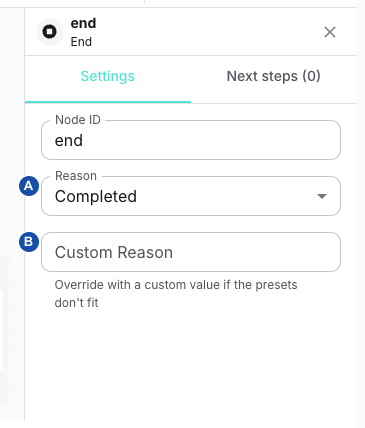
A — Reason selects a preset. B — Custom Reason replaces it with your own value. The following explanation applies to both controls.
Reason offers Completed, User hangup, Transferred, Error and Timeout. Custom reason is always visible. Both controls edit the same reason property; Custom reason is not an extra suffix. Choosing a preset replaces custom text, and typing custom text replaces the preset. An absent value displays Completed in the selector and empty text in the custom field; a new node explicitly stores completed.
The End runner records a flow_end action when its host supplies a conversation logger and returns complete. The main engine then finishes; a side-flow End finishes that branch. The surrounding runtime owns call/session teardown. A reason string describes the branch outcome; it does not make a transfer happen or simulate a remote user hangup. End exposes no Add exit action, even though the inspector retains its common Next steps tab.
Example: route the successful business branch to an End with completed, and a handled timeout branch to a separate End with timeout. Check conversation evidence and actual termination through the application test lifecycle; do not infer transport cause codes directly from these labels.
Related
- Build and edit a flow — to add nodes and edit the flow source
- Flow data and transitions — to write conditions, context updates and result mappings
- Choose a channel and AI provider configuration — to configure the providers that agent nodes use
- DTMF collection in SIP flows — to interpret keypad outcomes and retries