Deploy, verify and update Delphi
Use this journey to bring a deployment into service or change an existing one. Success means that the intended release and configuration are running, an authorized user can complete a test interaction, and you have a usable recovery point.
Availability: This procedure applies to deployment bundles using Linux service hosts, /opt/deployment/.env and /opt/services/<service>/. You need authorized host, registry, configuration-store and backup access. A Delphi application administrator role alone does not grant these infrastructure permissions. Use the service roles and optional modules listed in your deployment's release manifest.
For an existing installation, start at Prepare the change and recovery point. For a new installation, follow the steps in order.
1. Identify the environment and release
Record these before running an installation or update:
| Item | What you need to establish |
|---|---|
| Deployment and namespace | The intended customer/environment and its NAMESPACE; do not share configuration namespaces accidentally. |
| Release identity | The agreed container set and configuration bundle reference, including the previous set for an update. Image tags and CONFIG_REF are separate inputs. |
| Enabled services | The roles, modules and network paths actually used by this deployment, including its telephony or browser channel. |
| Access and connectivity | Registry/config-bucket access, SSM/Secrets Manager permissions, DNS/TLS, database/Redis connectivity and the configured provider path. |
| Acceptance interaction | A dedicated test app/channel, an authorized test user and the expected result. |
Use Release compatibility to select the container set and Prerequisites for a Delphi deployment to prepare hosts, network, cloud access and DNS. Compare their service lists with your selected deployment manifest.
This page covers deployment bundles on service hosts only. To prepare a new host, start with Provision instances and bootstrap a role.
2. Place configuration in the correct layer
In words: the deployment identity selects the bundle; its manifests select configuration; initialization applies it to the service; health and a real test interaction establish whether the result works.
| Layer | Purpose | What to preserve before changing it |
|---|---|---|
Bootstrap /opt/deployment/.env | Deployment identity and image/configuration references used by host scripts | The previous protected bootstrap file and exact references |
Service bundle and vars.yaml | Compose files, scripts and declared variables/defaults | The exact previous bundle, including object version or immutable release reference |
| SSM and Secrets Manager | Runtime settings and credentials resolved at initialization | Parameter/secret identities and versions; recoverable previous values in approved secure storage |
| Application database | Teams, flows, routing and other saved application configuration | A verified database recovery point; any relevant configuration export separately |
| External object storage | Recordings, media and backup objects | The retention and recovery arrangements for those objects |
For ordinary declared variables, the resolver collects local bootstrap values, then namespace-level SSM, service-level SSM, discovered Secrets Manager values and explicitly referenced external secrets. Later matching values override earlier ones. A manifest default fills an unresolved or empty value; composed variables are built afterwards. Only variables declared in the manifest enter the resolved output.
Avoid defining the same setting in several stores. If a change seems ignored, check its service, namespace and higher-priority source before repeating the restart. Find the variable and its consumers before deciding which hosts to touch.
On a provisioned host, inspect the expected API variables without requesting their resolved secret values:
/opt/services/common/show-env.sh --service api
A saved UI setting, a saved flow draft and a changed environment variable have different activation paths. Publish flow changes where required; use the setting's administration procedure for database-backed changes; initialize the affected service for environment changes. Saving one layer does not prove another has been activated.
3. Initialize dependencies, then application services
Provision the hosts and service bundles as described in Provision instances and bootstrap a role. Before application startup, establish the dependencies it needs: network/egress, database and Redis, required TLS material and any selected media/telephony services. Verify those dependencies before proceeding to their consumers.
Run each selected role's supplied init.sh from its service directory. For example, on the Ops host:
cd /opt/services/ops
./init.sh
Ops initialization runs the migration/baseline-seed container unless explicitly skipped. If it fails, the script refuses to start the Ops services. Investigate that failure before starting application versions that expect the migrated schema. Do not use skip options to make an incomplete first installation appear successful.
After successful initialization, perform the separate first-use registry setup on Ops:
cd /opt/services/ops
./delphi-setup.sh
The wrapper prepares the environment for the setup container. Follow Run first-use setup for the administrator and registry steps. For an upgrade, apply only the setup steps required by that release; first-use setup is not a replacement for migrations.
4. Prepare the change and recovery point
Before updating a running deployment:
- Record the current image/configuration references, affected services and intended observable change.
- Preserve bootstrap, bundle and parameter/secret versions. A TelWeb configuration export covers selected application configuration; it does not replace a full database backup or cloud secret recovery.
- Verify the latest required database backup completed successfully. A storage object existing is insufficient if the backup job failed. Rehearse restoration into an isolated database before treating the recovery path as tested.
- Preserve external recording/media objects required by your recovery scenario. A database dump does not contain them.
- Plan traffic handling and maintenance access. A direct host restart can interrupt calls or browser sessions; use the deployment's applicable drain/rolling-refresh procedure where available.
Use configuration recovery for the detailed recovery checklist and activation/restart guidance to identify affected services. Do not interpret drain as a guarantee that every interrupted operation can resume.
Choose the affected consumers
Start with the changed value and its owning configuration layer. A store update, a new bundle and a saved database setting have different activation paths. Use the selected release's service manifest to identify consumers; a similar variable name does not prove every service reads it.
| Change | Activation path | Verification boundary |
|---|---|---|
| Image tag | Apply update.sh --ecr-tag <image-tag> on each affected service host through the prepared deployment workflow. | Verify the actual running image identity. A reused tag or a skipped/failed pull does not prove new bytes are running. |
| Generated bundle | Apply update.sh --config-ref <bundle-ref> on affected hosts. | Verify the intended Compose, proxy/collector configuration and variable manifest were retrieved. Keep the image/bundle pair compatible. |
| Bootstrap values | Use supported update.sh options where available; operator-reviewed edits to other host bootstrap fields require that host's initialization workflow. | The script backs up bootstrap only when its supported variables change; a manual edit or plain restart does not establish a backup. |
| Startup SSM/Secrets Manager values or TLS material | Reread configuration through the affected service's initialization path; update.sh --restart-only keeps cached images. | Verify the new effective value or certificate/trust path at every consumer. This is not a general hot reload. |
| Database-backed settings | Follow the setting's own activation path. | Do not restart all hosts solely because a TelWeb form was saved. Some settings reload or invalidate caches; others need explicit synchronization. |
| TelAPI server rate-limit settings | The rate-limit loader refreshes on a Redis revision change or expiry of its 60-second cache. | No host restart is inherently required; a database/read failure can retain cached settings or defaults. Verify the effective limit rather than treating save success as propagation proof. |
| Database schema/setup | Follow the selected migration/setup release. | Normal Ops initialization can run migrations and seed before starting Ops; restart-only skips migration. An image restart cannot reverse committed schema changes. |
For database authentication, distinguish startup resolution from the separate authentication-triggered credential refresh. That optional runtime mechanism does not reload arbitrary environment variables or all database consumers.
| Service role | Identify the changed consumers | Plan and verify |
|---|---|---|
| Web | Public domains/proxy configuration, auth/session and password-policy environment, database/Redis connections and startup availability settings. | Verify sign-in and the affected UI path. Caddy's certificate renewal does not apply an arbitrary changed domain/Caddyfile. Coordinate password/reminder policy with Ops. |
| API | Public ingress, signing/authentication material, database/Redis connections and configured integration/media consumers. | Use the API group rollout path where configured; confirm healthy remaining capacity and affected sessions. A direct host restart can interrupt connections. |
| Voice | TelSys SIP and TelPhi runtime/provider configuration, database/Redis connections, recording/media and logging settings. | Arrange routing removal/drain and inspect active work before replacement. Verify SIP and media end to end; no general uninterrupted-call guarantee follows. |
| TelPro | SIP/TLS listener and advertised addresses, routing/Redis, proxy/media log settings and configured browser transport. | Use the applicable reconciler or planned host maintenance. Verify alternate ready edges before a rolling strategy; singleton edge maintenance can interrupt ingress. |
| Database | PostgreSQL, Redis and PgBouncer credentials, listener/TLS material and storage configuration. | Coordinate all consumers and their trust/credential sources. A bundled database restart affects them; managed databases use their own operator lifecycle. |
| Media | Server TLS, upload authentication, advertised names and storage path. | Coordinate presenting service and API/Voice trust consumers. Verify upload and retrieval through the application, not only server startup. |
| Ops | Scaler/Tasker environment, mail delivery, backup storage, reminder policy and migration connection. | Distinguish runtime environment from saved cron/job configuration. Verify the affected job and scaling behavior; do not rerun migrations merely to refresh a runtime value. |
| SigNoz | Backend, ClickHouse/ZooKeeper, retention and storage settings. | Plan the telemetry interruption and verify fresh logs/traces afterwards. Buffering does not promise no dropped telemetry. |
| Squid | Proxy ACLs, upstream route and listener. | Check dependencies on outbound registry, AWS and provider access before changing the proxy. Verify consumer connectivity afterwards. |
Choose order from the changed dependency graph and release requirements. Make required proxy/trust dependencies usable before their consumers; coordinate a database or credential change with all clients. Establish the selected schema before starting application images that require it. Change shared infrastructure only when it is affected, and verify each stage before proceeding. For scaled API/Voice groups, confirm working replacement capacity and healthy remaining instances; “one at a time” alone is not proof of availability. The Service Refresh procedure below explains its supported targets, cancellation and force limits.
For TelPro on this release, normal initialization installs native redis-tools if redis-cli is missing; the host therefore needs access to its package repositories. Copying only the reconciler script is insufficient. The idle reconciler reads the existing container's Redis settings; refresh work can fetch current configuration. Its timer runs every 30 seconds and health/heartbeat entries expire after 120 seconds. Verify continuing heartbeats, actual dialog/media counts and the intended multi-edge behavior. A failed count probe is unknown, not evidence of zero active calls.
5. Apply the intended change
On a selected, prepared API host, preview an image/configuration update with the actual release references:
cd /opt/services/api
./update.sh --ecr-tag <image-tag> --config-ref <bundle-ref> --dry-run
The angle-bracket values are placeholders. A dry run displays the plan; it does not prove that images, bundles or dependencies are available. After checking the plan and arranging traffic handling, run the same command without --dry-run to apply it.
For a configuration-store change that should retain cached images:
cd /opt/services/api
./update.sh --restart-only
Restart-only is not an image upgrade. API and Ops initialization skip image pulls in this mode, but can still fetch configuration bundles. Ops also skips migrations. Do not use it when the intended change requires new images or a database migration.
The update script backs up bootstrap configuration when it changes bootstrap values. A restart-only run does not guarantee a new bootstrap backup. Retain the recovery evidence from the preceding step yourself.
Refresh running services deliberately
Use Admin Settings → Service Refresh to queue a coordinated refresh of TelAPI, TelPhi or TelPro after a reviewed configuration change. The screen is not an image/configuration editor or a general restart button for Web, database, Media or Ops. Keep the intended release/configuration identity and recovery point from the preceding steps.
Availability: starting or stopping a refresh requires Super Admin. TelAPI requires an enabled, scaling-enabled API server group; TelPhi requires an enabled, scaling-enabled voice server group. TelPro uses its host reconciler instead. Enabled checkboxes do not prove that replacement capacity, a working reconciler or a healthy failover path exists.
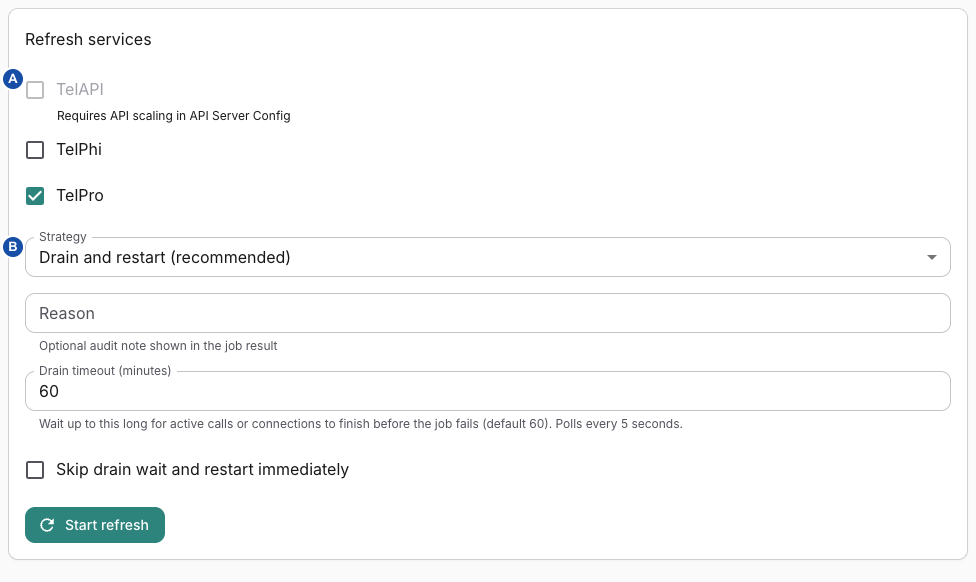
A — Target services identifies the instances to refresh; B — Strategy chooses the drain/restart or reload path. In this example, TelAPI is disabled because its scaling prerequisite is not configured; TelPhi is available and TelPro is selected. Which checkboxes are available depends on your deployment's server groups. The example shows the default strategy, a 60-minute timeout and force turned off. Select the image for full size.
Choose targets and a strategy
- Confirm which services consume the changed settings and which running instances will be affected. Verify remaining capacity, current calls/sessions and the maintenance/recovery plan before proceeding.
- Select the service checkboxes. The form initially selects TelPro only; this is not an automatic recommendation for every change. TelAPI/TelPhi can be disabled when their scaling prerequisites are absent.
- Choose the strategy and complete the applicable controls below. Do not combine unrelated service changes merely to make one job.
- Choose Start refresh once and record the returned job ID. The API queues
SERVICE_CONFIG_REFRESHwith one allowed attempt; queue acceptance is not refresh completion. If the response is uncertain, look for the existing job before submitting another.
| Control | Effect and important limit |
|---|---|
| Strategy → Drain and restart (recommended) | Attempts the service's drain/rolling path before replacement or restart. Form default. TelPro requires at least two registered ready edges for this strategy; it rejects a smaller set. This is a prerequisite check, not a tested failover guarantee. |
| Restart only (no drain) | Omits drain waiting. Active calls/connections can be interrupted. API/Voice still use their scaler refresh machinery; this is not a promise of an in-place process restart. |
| Reload only (TelPro trunk TLS) | Do not apply this to API or TelPhi: their handler records those targets as skipped. The label is narrower than the default command: without an explicit component, the handler selects TelPro server-tls. See the TLS caveat below before using it. |
| Reason | Optional trimmed note, up to 500 characters at the API. Use a change reference, never secrets. An omitted reason receives an actor-based manual reason. |
| Drain timeout (minutes) | Shown for drain-restart; form default 60, accepted form range 1–1440 minutes. It is sent as milliseconds. This is not a guaranteed total job duration: provisioning, verification and orchestration add separate waits. |
| Skip drain wait and restart immediately | Default off. Opts into bypassing the wait even with active work; do not use it to “fix” a stuck job without accepting interruption. It is a separate flag from the selected strategy. |
The form has no TelPro component selector. The API also supports an explicit component, but that does not make it a visible UI choice. For default reload-only, the edge attempts server-TLS rotation/verification and can fall back to restarting Kamailio if the reload fails. Therefore “Reload only” is not a reliable no-restart or no-call-impact promise. Use TLS activation to establish the exact material and consumer before choosing this path.
TelPro's host reconciler applies restart changes through update.sh --restart-only; it does not fetch a new image simply because a refresh was requested. API and TelPhi use scaler operations with replacement-instance behavior. Verify the resulting image and configuration identity separately rather than treating all three services as the same deployment mechanism.
Read the job and stop future work safely
The screen shows Latest refresh job, its ID/status, error, Refresh timeline and result details. Keep the job ID for job history. Inspect every selected service and instance: skipped, partial success, cancellation and a failed later target are different outcomes. An earlier target's applied change is not rolled back because another target failed.
Use Stop refresh only for a pending/running job when you want to prevent later work. This requests cancellation between targets: the currently refreshing host finishes; remaining hosts/services are skipped where their orchestration checks the cancellation flag. It is not immediate process termination, rollback or an “undrain everything now” action. A stop request can arrive during the final target, and the result can be marked canceled after that target finished. Recheck actual instance state and result before starting another job.
If a refresh is slow, distinguish waiting for active work, replacement readiness, edge acknowledgement and failure. Preserve the first error and per-target progress. Do not repeatedly force, stop and resubmit: those actions can overlap external work and make the applied configuration harder to establish.
Verify before restoring normal traffic
Confirm each intended target's result, effective configuration and image, healthy routing and actual service behavior. For voice/edge work, use an approved synthetic call through the changed path; for API work, verify an authorized request and the affected session path. A healthy process or completed job alone does not establish audio, external-provider access, secret adoption or uninterrupted existing calls.
If a target is skipped or fails, keep the already-applied target list with the recovery record and resolve the failed layer using the following recovery procedure. For services outside this screen, follow the appropriate host deployment procedure; do not select a superficially similar target as a substitute.
6. Verify each layer before admitting normal traffic
| Check | Expected evidence | If it fails |
|---|---|---|
| Initialization | Successful script exit; migration result where applicable; intended running image/configuration identity | Stop the rollout and inspect the failed stage. Do not assume an old running container is the new release. |
| Service and routing health | Required containers/dependencies healthy and the intended upstream reachable through its normal ingress | Check dependency connectivity, TLS, registry/config access and drain state. |
| User access | Authorized user can sign in and reach the intended team/app | Check identity, roles and feature availability rather than restarting unrelated services. |
| Test interaction | The dedicated phone/browser interaction reaches the intended published flow and produces its expected result | Follow call diagnostics for SIP, or the applicable integration/channel procedure. |
| Operational evidence | A fresh conversation and the expected logs, traces or selected artifacts for that test | Use the logging evidence map; an intentionally disabled recording is not a failed call. |
| Recovery readiness | Identified usable recovery point and an owner for rollback | Keep the change incomplete until the missing recovery prerequisite is addressed. |
TelAPI exposes /health: its handler returns an error when Redis is unavailable, database state is degraded or the instance is draining. A successful response is useful routing evidence, but it does not prove that provider calls, SIP/media, authentication or every database operation work. Test through the normal ingress as well as checking service initialization.
Record the release, configuration references, test time and correlation identifiers with the outcome. Do not include credentials, real call content or full environment dumps in the change record.
7. Recover at the failed layer
- Wrong runtime setting: restore the intended parameter/secret version, activate its consumers and repeat the affected checks.
- Wrong image or bundle: select the known compatible previous references and use the applicable redeployment procedure. Check schema compatibility before downgrading application images.
- Schema/data failure: use the verified database recovery procedure and coordinate application/configuration versions. Replacing an image does not reverse a migration.
- Missing external artifacts: recover them from the storage recovery path; restoring Postgres alone cannot recreate their contents.
After recovery, repeat the same health and test-interaction checks. Keep normal traffic restricted until the relevant acceptance checks pass. Restore deployment configuration and restore Postgres provide the detailed recovery procedures.
Use Service topology to locate dependencies, Service health for role-specific verification, and Release compatibility to record the exact component set before and after an update.
Verify the legal-document catalogue
When deploying or investigating a wrong/missing legal document, check the catalogue metadata and served files together. Team administrators review and accept documents; operators verify the deployed catalogue. Delphi has no legal-document publication dashboard or routine publication command.
- Record the intended document type/name, version, effective date, file path and active state from the approved deployment data. Preserve the existing version/consent records and the corresponding file assets through your established backup and recovery process.
- Compare the entries returned by
legalConsent.currentDocumentswith that intended catalogue. This is a public read used during registration. It selects active versions by descending effective date, then creation date, retaining one per document type; it does not compare version labels numerically. - Open each returned file path in the deployed environment and verify that the file is reachable and matches the reviewed document/version. A valid database row or successful HTTP response does not establish that the correct text was deployed. Keep independently recorded file identities in your release evidence; the product consent schema does not store a content hash.
- Ask an authorized team administrator to inspect the team's current/accepted version comparison without submitting acceptance for a deployment check. Verify the registration document list separately when self-service registration is enabled.
An active future-dated version can appear immediately. Selection does not filter effective dates against today's date, so setting a future date is not a scheduling mechanism. Coordinate activation and file delivery through the deployment's reviewed change procedure; stop if the intended procedure or rollback is not defined.
Do not rerun baseline.legal-documents as a generic publish or repair command. That setup step first deactivates every active version and then upserts/reactivates its two repository baseline documents. It preserves historical rows/consents but can replace the active catalogue and update a baseline version's metadata. A database or application-configuration restore alone is not proof that the matching legal files were restored. Preserve and verify both boundaries; do not overwrite a previously accepted file and describe the old consent record as proof of acceptance of new bytes.
Verify platform TLS
Use this procedure when installing or rotating certificate material, or when the stored configuration says TLS is enabled but the expected listener or verified connection is unavailable. First identify the connection: public edge TLS, carrier-facing SIP trust/client authentication, and internal database/Redis encryption are separate configurations. A renewed public certificate does not rotate every internal trust bundle.
| Material or connection | Owner and activation boundary |
|---|---|
| Public API/TelPro server certificate and private key | Edge settings select domain, management mode and platform secret keys. Renewal writes secret values and service environment material; a separate refresh activates it on hosts. Load-balancer TLS termination can make API backend TLS deliberately unnecessary. |
| Inbound SIP client trust | Assigned CA material is exported to Redis and aggregated by the TelPro watcher. Per-trunk SIP checks enforce the configured client-certificate/name requirements; do not assume isolated trust stores per trunk. |
| Outbound SIP client identity | CA, client certificate and client key references feed exported egress TLS material. The watcher requires client cert/key and a target before producing a client profile; references alone do not establish loaded authentication. |
| PostgreSQL/PgBouncer and Redis | Database-host server material plus application-host trust bundles and each consumer's TLS settings. A shared namespace or certificate label is not evidence that both connection legs use verified TLS. |
Establish the expected configuration
- Record the environment, exact consuming service, endpoint hostname/port, TLS termination point and intended certificate identity/expiry. Read service topology before assuming this installation uses the bundled database host rather than managed infrastructure.
- Review the relevant platform configuration references and credential-storage scope. Inspect identifiers/status rather than copying PEM private keys or secret JSON into logs or tickets.
- Check the effective deployment variables below, including the actual container configuration after recreation. Updating a secret or parameter is not proof an existing process received it. Use the established deployment/refresh procedure, with the background-job and service-health evidence for that target.
- Compare successful materialization/activation with the listener or connection actually used. Check certificate identity, expiry, chain/name verification and application connectivity separately. These source paths do not certify a deployed endpoint or uninterrupted calls during rotation.
Public edge certificate lifecycle
EDGE_TLS_RENEW handles api and telpro. Its effective domain comes from the respective edge setting, otherwise Tasker's DOMAIN_API / DOMAIN_TELPRO. Automated issuance uses Certbot DNS-01 with the dns-hetzner-cloud plugin and requires HETZNER_API_TOKEN, DNS permissions and outbound connectivity. It is not a generic certificate issuer for every DNS provider.
| Setting or result | Operational meaning |
|---|---|
EDGE_TLS_RENEWAL_THRESHOLD_DAYS | Tasker default 30. A parseable certificate with more remaining whole days is skipped unless forced. |
EDGE_TLS_CERTBOT_STAGING | Default false; true asks Certbot for its staging issuer. A staging-issued result is not a production trust result. |
CERTBOT_EMAIL | Issuance contact; configure the intended operator contact for this deployment rather than relying on the repository default. |
managementMode=manual | Ordinary renewal skips this target. A forced job bypasses manual mode and the age threshold; it can replace manually managed material. Force does not bypass the API backend-TLS-disabled check. |
API_TLS_ENABLED in Tasker | Explicit override for whether API backend TLS is enabled; otherwise the handler reads that service's TLS_ENABLED parameter from SSM. Missing/read-failed SSM state is treated as disabled and API renewal/refresh is skipped. This does not inspect the load balancer's live certificate. |
EDGE_TLS_FULLCHAIN_B64, EDGE_TLS_PRIVKEY_B64 | Base64 certificate chain/private key provided to the service environment; base64 is transport encoding, not encryption. EDGE_TLS_CA_BUNDLE_B64 is optional additional CA material. |
EDGE_TLS_VERSION | SSM signal bumped after secret synchronization. A bump failure is logged but does not roll back already written certificate material. |
Renewal writes platform certificate/key values and merges the two edge values into the service's consolidated Secrets Manager object, then updates recorded timestamps and enqueues EDGE_TLS_REFRESH only when at least one target renewed. Refresh invokes the existing drain-restart service refresh path with force:false; it is a separate job, not an in-process certificate reload. Check its target outcomes. A completed renewal job may have skipped all targets, and partial external writes are not rolled back atomically. A stored expiresAt derived from whole remaining days is not a substitute for examining the certificate's actual expiry.
Startup can differ from intent. The deployment startup resolver accepts existing base64 material or tries valid matching host PEM files. If TLS_ENABLED is true but no material is found, it can set TLS false for that boot. Do not report TLS active from the requested SSM flag alone. At container preparation, the shared decoder validates certificate/private-key parsing and matching public keys, then writes the pair; it does not validate expiry, hostname coverage or the trust chain. Required TLS with invalid/missing material fails preparation. A base64 decoding failure aborts; it is not repaired by the local-file fallback.
Local development may use make certs material mounted at /tls-in, instead of AWS-delivered edge values. The decoder's local fallback is not a production issuance or automatic renewal mechanism. TelPro writes the pair under /etc/kamailio/tls; other service callers select their own paths. Tmpfs use is a deployment mount decision, not a claim that every secret in the system is memory-only: host preparation scripts and credential-fetch workflows also use files.
Activate SIP trust and client material
Saving platform-secret metadata or a value is not equivalent to exporting every consumer. Inbound SIP configuration uses the platform-wide Redis sync; egress trunk updates have granular synchronization. Follow SIP configuration activation and the egress save boundary. The resolver can turn an inaccessible/missing TLS secret into empty material, so successful export alone is not proof usable PEM reached the edge.
The exporter writes voiceai:tls:materials:sip:* and voiceai:tls:materials:egress:*, then updates voiceai:tls:materials:version. With TelPro TLS_ENABLED=true, its watcher polls that version every WATCH_INTERVAL_SECONDS (default 5), regenerates tls.cfg, and attempts kamcmd tls.reload.
- Inbound CA entries are combined into one bundle; client-certificate inspection is configured globally and the SIP route applies the trunk's requirements.
- Outbound profile generation skips a trunk without resolved client cert/key or target address. The generated default client profile disables certificate verification; do not assume setting a per-trunk verification switch proves a suitable verified client profile was generated and selected. Confirm the effective profile and connection.
- If
tls.reloadfails orkamcmdis absent, the script logs the failure but still records the observed material version. An unchanged version does not automatically trigger a subsequent retry. Check the watcher and runtime state; a successful file replacement is not a successful reload. - Removing material from the exported set rewrites configuration, but the script does not establish secure erasure of old per-trunk files or rollback of in-flight TLS sessions.
Never paste exported TLS-material payloads into diagnostics: outbound exports can contain private-key PEM. Record object IDs, version signal, timestamps and sanitized activation errors. When recovery is needed, use the reviewed deployment path and configuration recovery; a metadata restore alone cannot recover the external secret value or prove the previously loaded TLS state returned.
Establish and rotate Media HTTPS trust
The internal Media host has its own certificate lifecycle. Its initialization selects material in this order:
- When both
MEDIA_TLS_FULLCHAIN_B64andMEDIA_TLS_PRIVKEY_B64are present, it decodes them intofullchain.pemandprivkey.pemunderMEDIA_TLS_CERT_HOST_PATH(default/opt/services/media/tls). - Otherwise, it reuses those files when both are nonempty.
- Otherwise, it generates a self-signed certificate for
PRIVATE_IP, withMEDIA_TLS_SAN_DNSas an optional DNS name. It copies that certificate toca-for-clients.pemfor consumers to trust.
A supplied certificate must cover the hostname or IP in the actual Media URL. Keep its private key in secret storage; distribute only the certificate authority or self-signed public certificate to consumers. Do not assume a previously generated ca-for-clients.pem has been updated after switching to supplied material.
Store the trust bundle in TTS_MEDIA_CACHE_CA_BUNDLE for each service using the endpoint. A single-line base64 encoding of the PEM avoids multiline configuration transport problems; API and Voice also accept PEM and normalize literal escaped newlines. Apply the new server material and consumer configuration in a coordinated maintenance window, then verify the restarted services. An existing trust bundle does not automatically learn a newly generated self-signed certificate.
On an API or Voice host, the shipped /opt/services/common/check-tts-media-cache-tls.sh --docker <container-name> helper can read the running container's cache URL and bundle, compare certificate fingerprints, and display OpenSSL/curl verification results. Inspect the output: the helper's exit status alone is not proof that every TLS check succeeded. Verify the chain and hostname for the actual URL, then make a permitted synthetic cache request or system-audio preview through each affected application path. A TLS handshake does not prove upload authorization or storage readiness.
If verification fails, check the selected material, URL/SAN, validity period and effective consumer bundle before changing anything else. Restore a still-valid coordinated server/trust pair or correct the intended pair; do not disable certificate verification. Use Deploy and verify system audio for the separate library-token, cleanup and storage checks.
Verify internal database and Redis encryption
For a bundled database host, prepare-tls-server.sh materializes INTERNAL_CA_CRT_B64, INTERNAL_TLS_CERT_B64 and INTERNAL_TLS_KEY_B64 under its tls/ directory; key mode is 0600 and ownership is prepared for the database image. Empty inputs produce placeholders, not certificates. The script does not provide issuance or cryptographic validation of the trio.
Application-host prepare-tls.sh writes DATABASE_SSL_CA_BUNDLE_B64 and REDIS_TLS_CA_BUNDLE_B64 into separate CA files; deprecated INTERNAL_CA_CRT_B64 is a fallback for either missing bundle. Without either input it writes an empty placeholder. Match the CA to the actual peer: PgBouncer, direct PostgreSQL/managed database, or Redis. Do not assume the public edge chain is the correct trust bundle.
| Control | Behavior |
|---|---|
POSTGRES_TLS_ENABLED=on | Bundled server enables SSL; default off. Certificate/key must be nonempty. POSTGRES_FORCE_SSL=on requires TLS on and switches nonlocal authentication rules to TLS-only. |
PGBOUNCER_CLIENT_TLS_SSLMODE, PGBOUNCER_SERVER_TLS_SSLMODE | Separate client→PgBouncer and PgBouncer→PostgreSQL policies; bundle defaults are empty. Verify both legs instead of inferring backend encryption from a client's connection. |
DATABASE_SSL_MODE | Shared Node helper: unset preserves URL behavior; disable explicitly disables TLS; require encrypts without certificate verification; verify-ca verifies chain but suppresses hostname checking; verify-full retains hostname checking. Explicit mode strips competing ssl* URL parameters. |
DATABASE_SSL_CA_FILE | Shared helper default /etc/ssl/database/ca.crt; verify modes require the file to be readable. Readability alone does not establish a useful valid bundle. DATABASE_SSL_REJECT_UNAUTHORIZED=false or PG_SSL_INSECURE=true weakens verification and must not be described as verified TLS. |
Database-host REDIS_TLS_ENABLED, REDIS_TLS_PORT, REDIS_FORCE_TLS | Defaults false, 6380, false. TLS-enabled bundled Redis can keep its plaintext listener until FORCE is true; FORCE requires TLS enabled. Server TLS uses --tls-auth-clients no, not required mutual client authentication. |
| Shared Node Redis helper | REDIS_TLS_ENABLED defaults false; REDIS_TLS_REJECT_UNAUTHORIZED defaults true. Optional REDIS_TLS_SERVERNAME supplies SNI; absent/unreadable/empty custom CA can fall back to system trust. REDIS_PORT still selects the destination port (default 6379); enabling TLS does not automatically switch this helper to 6380. |
| TelPro Redis tools | Entrypoint/watcher use REDIS_TLS_PORT (default 6380) when TLS is enabled, and invoke redis-cli with --insecure, with an explicit CA only when available. Do not extend the Node helper's verification guarantees to these tools or to every SIP-engine connection. |
Prepare valid server material and client trust before tightening listener policy. Verify each consumer on the intended TLS port and each PgBouncer leg before removing plaintext access. This is a sequencing requirement, not a zero-downtime guarantee or a universal command. Managed AWS database/cache deployments have their own server and certificate lifecycle; the local database Compose switches do not configure those managed endpoints. Runtime database credentials and migration credentials also have separate ownership; a migration connection succeeding does not establish that normal service connections use the intended identity or TLS policy.
After rotation, verify the affected services' effective settings, successful connection, certificate chain/name and expected expiry. If a consumer fails, preserve the exact error and old/new certificate identities without secret contents; stop before disabling verification or globally forcing refresh as a workaround. A rollback needs still-valid old credentials/material and compatible trust/listener policy. Revoked or expired credentials cannot be made valid by restoring a database snapshot.
For database identities, secret formats, startup resolution and runtime refresh, use Configure and rotate database credentials. A successful migration, application query and backup each exercise a different consumer.
For fleet growth or replacement, use Capacity and maintenance to check server-group controls, API limits and the different drain-timeout outcomes before changing infrastructure.
Related
- Provision instances and bootstrap a role: to prepare a new host before the first deployment.
- Environment variable reference: to find the role and default of a variable you change.
- Release compatibility: to select a matching set of images and configuration.
- Choose and verify a configuration recovery: to roll back a change that failed verification.