Configure platform defaults and secrets
Use Admin Settings → Platform Settings to register shared platform credentials and change platform defaults. Team-specific values belong in Team variables and secrets; application providers remain in Provider and channel configuration.
Availability: Platform administrators can change settings and secrets. Platform Superviewers can inspect settings and secret metadata but cannot write; being a Team Admin does not grant platform access. Some cards depend on deployment feature flags, as described in Save boundaries. If the tab or actions are unavailable, check Access and teams.
Start with your task:
- To set up or relocate secret storage, follow Establish platform secret storage.
- To add a credential or certificate, follow Register a platform secret.
- To rotate, delete or recover a value, follow Rotate, remove and recover a secret.
- To manage interface languages and translations, follow Manage available UI languages.
- To change AI or other shared defaults, follow Configure AI defaults or Other Platform Settings controls.
Each step establishes a different result; none implies that every existing consumer has refreshed.
Feature-dependent cards and save boundaries
AI Builder Defaults appears when aiFlowBuilder is enabled; QA Scoring Defaults appears when qaScoring is enabled. The browser maps these to FEATURE_AI_FLOW_BUILDER and FEATURE_QA_SCORING; QA visibility additionally requires the development environment check. The development check accepts runtime version labels edge, local, latest and dev (case-insensitive). These visibility flags do not themselves provision credentials or grant a team the feature. The platform settings API independently requires platform-administrator authority for updates and storage tests.
Each section has its own Save action. Editing fields is local to the form until that action succeeds; there is no single “save everything” operation. Successful storage or metadata saving does not verify a downstream provider, activate all flows, or migrate external secrets.
Establish platform secret storage
Before writing values, have the deployment operator confirm the intended AWS account and namespace. Different deployments sharing an AWS account must not unintentionally share a collection path.
| Control | Meaning and default |
|---|---|
| AWS Region | Region of the platform Secrets Manager collection; the settings default is eu-central-1. This is separate from a team's own AWS region and assumed role. |
| Namespace | Read-only in this form. Resolution prefers PLATFORM_SECRETS_NAMESPACE, then NAMESPACE in the service environment. Without either, an existing persisted namespace can be used; a new unset configuration defaults to voiceai/local. Ask the deployment operator to correct an unintended namespace. |
| General secrets collection | Collection suffix for generic and API-key values; default platform/secrets. |
| TLS materials collection | Collection suffix for TLS certificate/private-key values; default platform/trunk-tls. |
Full AWS names combine namespace and collection suffix, for example example/staging/platform/secrets. These are locations, not secret values. Namespace and collection fields accept letters, numbers, /, _ and - with a maximum of 256 characters.
- Check the displayed namespace and the intended region/collection paths.
- Use Test Connection for the proposed form values. It attempts a general-collection read; a missing collection or missing test entry can still return success. It does not test writes, deletion, the TLS collection or provider authentication.
- Choose Save Storage Settings only when the locations are correct. Changing paths or region does not copy existing payloads. Coordinate any migration and recovery point before switching a populated deployment.
- Verify a known, non-destructive consumer through its owning workflow. Do not create or overwrite a production credential merely to prove the connection test.
Team paths follow a separate rule: newly provisioned defaults prefer ENVIRONMENT, then OTEL_DEPLOYMENT_ENVIRONMENT, then the platform namespace as their prefix. Existing team storage pointers are preserved. Correcting a platform namespace therefore neither proves existing team isolation nor migrates team values; inspect team storage assignments.
Register a platform secret
The image shows the empty metadata form. The letters identify controls, not a sequence of changes. Select the image to enlarge it.
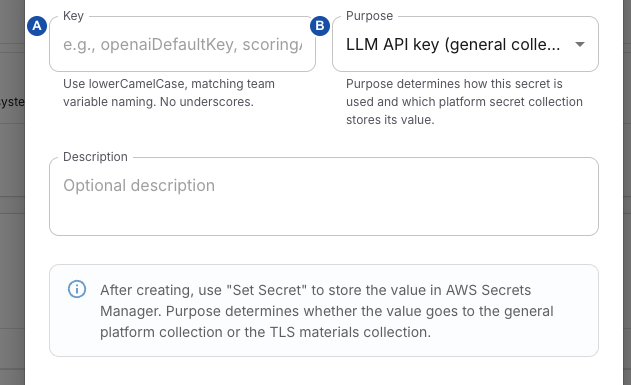
- A — Key: the stable identifier a consumer references; this is not the secret value.
- B — Purpose: the material type and destination collection. Choose it before creating the record.
In Platform Secrets, create a metadata row first, then set its value. The list shows Key, Purpose, Description and Updated; it does not display the stored value or a value-presence indicator. A row alone is not proof that a credential exists.
| Field | What to enter |
|---|---|
| Key | Unique platform identifier used by consumers, for example serviceApiKey. Use lowerCamelCase starting with a lowercase letter, then letters/numbers only; maximum 100 characters. No spaces, hyphens or underscores. |
| Purpose | Select the kind of value below. The new-form selection is LLM API key; change it deliberately when registering another type. |
| Description | Optional purpose, owner and rotation context, maximum 500 characters. Do not paste credentials here; metadata is visible to platform readers and included in audit details. |
| Purpose | Stored collection and intended material |
|---|---|
Generic platform secret (GENERIC) | General; a secret used by an explicitly configured consumer. |
LLM API key (LLM_API_KEY) | General; an LLM credential. |
Azure API key (AZURE_API_KEY) | General; an Azure credential. |
SigNoz API key (SIGNOZ_API_KEY) | General; the credential referenced by SigNoz settings. |
TLS CA certificate (TLS_CA_CERT) | TLS; CA certificate material referenced by trunk verification settings. |
TLS client certificate (TLS_CLIENT_CERT) | TLS; outbound client certificate material. |
TLS client private key (TLS_CLIENT_KEY) | TLS; the corresponding private key. |
TLS server fullchain certificate (TLS_SERVER_CERT) | TLS; edge server certificate chain. |
TLS server private key (TLS_SERVER_KEY) | TLS; the corresponding edge server key. |
Choosing a purpose selects storage; it does not attach the secret to a consumer or establish that its format is valid. The value endpoint accepts a non-empty string and does not itself parse certificates or test API keys.
- Choose Create, enter Key, Purpose and Description, then Create.
- On the saved row, choose Set Secret Value. Enter Secret Value (or Secret Value (PEM) for TLS) and Confirm Secret Value identically, then choose Set Secret. The UI rejects an empty/whitespace-only value and trims the value before sending it.
- Enter secrets privately: these multiline entry boxes are not masked password fields. Do not capture screenshots while values are present. The value cannot be retrieved through this interface after saving.
- Configure the consumer's key/reference, then verify that specific consumer. For trunk references and activation, use SIP routing; use platform TLS verification for edge activation.
Edit lets you change the description. Key and purpose are disabled in the edit form, but they are not immutable API fields: the update API accepts changes. Treat any API rename or purpose change as a migration, not a harmless label edit. Key-based consumers can break; changing between general and TLS purposes does not move the value between AWS collections.
Rotate, remove and recover a secret
Set Secret overwrites the value associated with the registry row's internal ID in its collection. Keep the old credential valid until a controlled consumer check confirms the rotation, where the provider permits overlap. Ordinary value updates do not automatically copy values into existing teams or synchronize all applications.
Secret reads are cached per process (default one hour, configurable by the operator). A write updates the writing process's cache; it is not a broadcast invalidation across services. Ask the operator to check effective consumer state before revoking an old credential. No immediate adoption by an ongoing conversation is guaranteed.
Avoid concurrent edits to values in the same collection: writes read and replace its shared payload without a conditional version check.
Edge server certificate/key updates are a special case: if they match the configured edge keys and both values are present, the backend copies the pair to the service collection, marks its management mode manual and queues an edge refresh. A later step can fail after the original value was already stored. Saving a certificate is not proof that the live endpoint serves it; use the operator's TLS verification workflow.
Before Delete, locate consumers by both key and trunk reference. The API blocks deletion while a SIP/egress trunk references the registry row, but this is not a complete dependency check for SigNoz, LLM defaults, edge settings or existing team copies.
Deletion removes the external value before deleting metadata. Removing the last entry force-deletes the entire AWS collection without a recovery window. A missing/unavailable collection can prevent deletion; a later database failure can leave metadata after value removal. Refresh and have the operator check both stores instead of assuming an error means nothing changed. Deleting the platform source does not revoke copies already provisioned into team storage.
Platform-secret create/edit/delete and value replacement emit metadata-only PLATFORM_SECRET audit events; a replacement records valueUpdated, not the value. The list's Updated field belongs to the metadata row and is not a reliable rotation timestamp. Use security and audit investigation for the evidence trail.
The configuration bundle includes platform settings, but not the platform-secret registry or its AWS values. Do not treat a settings snapshot as a credential backup. The Platform Settings form has no per-card Save snapshot or history control. Use Configuration recovery for supported recovery assets and their activation limits; cloud-secret recovery must be planned separately.
Configure AI defaults and check their consumers
AI Builder Defaults has Briefing chat and Builder / generator rows, each with Provider, Model and Team secret key. Providers are openai, anthropic or azure; model is a non-empty identifier, not a provider-availability check. The initial role defaults are Anthropic / claude-sonnet-4-6, using briefingAiKey and builderAiKey respectively. A deployed saved value takes precedence over these defaults.
Team secret key is a configured identifier, not the credential itself. The supported role-key choices are openaiDefaultKey, azureDefaultKey, briefingAi, briefingAiKey, builderAi, builderAiKey, scoringAi and scoringAiKey. Resolution tries the team value only when custom LLM keys are allowed (or subscription enforcement is disabled), then the registered platform value, then the provider's environment fallback. Missing storage or a missing key can still prevent use; selecting a name does not provision it.
Azure OpenAI base URL must use HTTPS, an approved Azure hostname, and the /openai/v1 path. It is required when the resolved role uses Azure; the resolver can otherwise use AZURE_OPENAI_BASE_URL. Realtime resource name, Realtime domain suffix and Realtime deployment set the platform Azure defaults used when applying supported built-in template defaults. They are not a bulk rewrite of existing explicit application provider settings. Use the actual deployment's values; an example or prefilled name is not evidence that an Azure resource exists.
QA Scoring Defaults exposes Provider, Model, Team secret key and Default scoring prompt. Initial defaults are openai, gpt-4o-mini, scoringAiKey and a generic goal-completion/helpfulness/compliance prompt. Saving does not enable QA for an otherwise ineligible app/team/plan; team QA configuration explains those conditions and overrides.
Important save boundary: Save QA Scoring Defaults writes the qaScoring setting. The current scoring worker uses that setting's prompt, but obtains its credential and default provider/model from llmDefaults.scoring. Save AI Builder Defaults writes llmDefaults, including a scoring block built from the QA fields currently held in the form. Do not assume QA Save alone changes the effective scoring key/model, or use AI Builder Save without checking those QA values. If the builder section is unavailable, ask the platform operator to inspect the effective settings through the supported configuration interface; do not toggle a feature merely to expose a Save button.
For shared openaiDefaultKey and azureDefaultKey, both managed team rows are provisioned for every plan in these versions. They acquire values only when the platform source has a value; rerunning provisioning can overwrite existing team values. Follow Platform-managed defaults rather than treating rotation as a fleet-wide copy operation.
Other Platform Settings controls
| Section/control | Meaning, save boundary and next check |
|---|---|
| Send test email: Recipient, Subject, Body | Recipient is required. Blank subject defaults to Delphi test email; blank body adds diagnostic sender/time text. Send test email queues one EMAIL_SEND job; it is a real send, not a dry run. Verify the job and intended mailbox using Background jobs; queued/completed alone does not certify inbox delivery. |
| SigNoz Observability → Signoz URL / API key secret | URL plus registry key name (default signozApiKey), not a pasted credential. The platform resolver uses saved settings only with both a URL and a retrievable value; otherwise it falls back to environment configuration as a whole. A successful Save does not validate SigNoz connectivity. |
| Retention days | Default 7, allowed 1–3650. Used for the source-log availability window; it is not a command to change the external SigNoz server's retention or delete all persisted conversation artefacts. |
| Span persist delay seconds / SIP ladder persist delay seconds | Each defaults to 90, allowed 0–3600. Delay for persistence work after a conversation; choose according to log arrival. Save Signoz Settings saves this card, not the API-key value. |
| Default global egress route ID | Empty disables this fallback. A non-empty ID must resolve to an enabled global route; saving first attempts to synchronize that route. See outbound selection for precedence and verification. |
| Transfer restrictions | Platform destination-policy defaults, with a separate Save transfer restrictions action and team overrides. Use the field definitions and consequences in team transfer restrictions, applying them at platform scope here. |
| Resilience defaults | Platform provider-role and call-level defaults, with Save resilience defaults. Team and flow overrides remain separate. See team resilience and provider resilience; do not assume every individual field merges across scopes. |
Availability: the Resilience defaults card appears only when resilience controls are enabled for the deployment; resilience controls explains the flag and the plan condition for team and flow editors.
Configure loss-of-audio warnings
Availability: Platform readers can inspect Admin Settings → Platform Settings → Audio connection; a Super Admin is required to save it. This controls the gateway's caller-leg RTP monitor, not recognition of speech or the bot's response deadline. An application can customize the warning message, but cannot override the platform timing.
- Open Audio connection and review the current values before editing.
- Set Warn after (seconds) and Disconnect after (seconds). The disconnect value is the total interval without incoming audio, including the warning period; it is not an additional wait after the warning.
- Set Media connection warning and Message language together. The language describes the text you wrote; the runtime prepares audio for the call language.
- Choose Save audio connection settings, reload and confirm the saved values. Save is unavailable while the query fails, a save is pending, the form is invalid or no draft edit has been made. Do not interpret an unavailable control as a successful update.
| Setting | Default and validation |
|---|---|
| Warn after | 10 seconds; integer milliseconds in the API, from 1,000 through 300,000 |
| Disconnect after | 30 seconds total; same range, and at least 5 seconds later than Warn after |
| Media connection warning | Nonempty trimmed text, at most 500 characters. Default: “There seems to be a problem with the audio connection. Please stay on the line while we wait for it to recover.” |
| Message language | en-US; a valid language tag such as de-DE, normalized to canonical form, at most 100 characters |
Zero does not disable the monitor. Each SIP leg snapshots the saved platform settings and the application's warning override when monitoring starts; changing this card does not rewrite the snapshot of an ongoing call. Validate a new controlled call after saving. For an application-specific message or restoring inheritance, follow the flow Settings inspector. For missing media, warning failures or unexpected disconnection, use caller media diagnosis.
A warning is not guaranteed to be audible over a broken media path. Prompt preparation or RTP-observation failure needs its own operator investigation; extending the timeout does not repair the network.
Manage available UI languages
Open Admin Settings → Languages. This is a separate tab from Platform Settings. Platform administrators manage language metadata and translation overrides; platform-wide readers can inspect the catalogue and effective bundles, while Superviewers remain read-only. A Team Admin role alone cannot publish platform translations.
The list shows Code, Native name, Name, Active, Users and Override. Users counts account language assignments, not current online sessions. DB override means an override value is stored; Disk only means none is stored, not proof that a shipped translation bundle exists or is complete.
Add or edit a language
- Choose Add language, or Edit metadata for an existing entry.
- Complete the fields below and choose Save. Metadata changes and translation changes have separate save operations.
- For a new language, inspect its translations before enabling it for general use. Copying another language is a starting point, not a translation.
- Verify the intended language appears in a user's picker and that representative screens and placeholders render correctly. A saved catalogue row alone does not establish complete localization.
| Field | Meaning and validation |
|---|---|
| Code | Lowercase two-letter code, optionally followed by a hyphen and uppercase two-letter region, such as de or en-US. The editor locks the code for an existing entry. It does not support arbitrary long language tags. |
| Name (English) | Administrator-facing name, 1–64 characters. |
| Native name | Name shown in the user picker, 1–64 characters. |
| Sort order | Integer 0–10000; lower values appear earlier. New-form default is 0. |
| Active | Makes the locale available through the language catalogue and message endpoint. New-form default is enabled; disable while preparing incomplete work. English cannot be deactivated. |
| Copy translations from | Creation-only seed from another registered language's effective disk-plus-override bundle. The form initially prefers English when available; None (start empty) creates no seed. Editing metadata does not replace existing translations. |
The API rejects ordinary activation when no effective translations exist and no copy source was supplied, but this is not a completeness check. An inactive locale can still have assigned users; disabling it does not reassign those accounts. Coordinate changes with affected users and preserve English as the supported fallback.
Edit and verify translation overrides
Choose Edit translations for the target locale. Reference language selects a read-only reference pane; Override (editable) contains the target's effective disk-plus-database content. Changing the reference does not copy it into the target.
- Keep a protected copy of the existing intended override before replacing it.
- Edit the JSON object, preserving namespace/key structure and message placeholders. Parse errors block saving; root arrays, null and primitive values are rejected.
- Choose Save, then verify the actual affected screens in the target language. The backend validates a JSON object, not every translation key, placeholder or message expression.
Saving replaces the stored override object. Because the editor initially displays the effective bundle, saving that full content can store shipped strings as explicit overrides too; later shipped wording may then remain shadowed. Prefer a deliberate, approved override scope rather than treating this as a line-by-line patch API.
The runtime combines shipped English fallback, the target's shipped bundle and the target database override, with the target override winning. English database overrides are not automatically copied into every other locale's fallback. Keep secrets, private customer text and internal-only information out of translation bundles: the language/message routes serve interface content without an account-specific authorization boundary.
Reset to file immediately removes the database override; it is not canceled by closing the editor afterward. A file-backed language returns to shipped text. A database-only language can lose its only bundle and return “Bundle not found,” even if the catalogue entry remains active. Preserve the needed translation content first; do not use Reset as a generic refresh button.
Translation Save/Reset clears the target's server cache and invalidates the editing browser's target message query. Other browsers are not pushed a new bundle instantly. The server message cache has a one-hour TTL; failed server invalidation is swallowed. The browser message query uses a one-hour freshness policy, not periodic polling: visible text can stay stale until a refetch is triggered, so there is no guaranteed one-hour update deadline. The language picker has its own cached list. If labels remain stale, confirm the saved target and check cache/refetch behavior with the operator rather than repeatedly overwriting translations.
Retire a language safely
English cannot be deleted. Deletion is also refused while users are assigned to that code; arrange deliberate reassignment first. Delete removes the catalogue row and its database override after confirmation, not shipped translation files. Disabled, deleted and untranslated are different states; verify both account preferences and usable message content before considering the retirement complete.
Verify the effective change
Reload the saved section and confirm the intended non-secret values, then check one known consumer at the appropriate scope. For a rejected save, distinguish permission/validation from external AWS errors. For a saved but ineffective value, check the reference key, collection/namespace, team copies or overrides, process cache and the consumer's separate activation procedure. Share only redacted errors and identifiers. Retrying a save can repeat an external write; establish partial state first.
Database runtime credentials use a separate operator configuration and rotation path. Registering a platform-secret row does not configure the database client’s refresh source.
Related
- Manage shared team variables and secrets — to store team-scoped credentials and understand managed team copies.
- Configure and maintain a team — to check each team's secret storage after changing platform storage.
- SIP routing — to attach TLS materials to a trunk and activate the change.
- Configuration recovery — to plan recovery for settings that the bundle does and does not contain.