Diagnose background jobs and recurring schedules
Use this procedure when a backup, message, recording, score or maintenance operation is delayed or failed. Identify the specific job and expected external result before restarting workers or creating another job.
Availability: In /admin-settings, Job History and Cron Schedules are platform-wide views. Super Admin and Super Viewer accounts can read both views; schedule creation, editing, deletion and Run Now require Super Admin. Team membership alone does not grant this access. Deployment credentials, feature flags and target-system permissions remain separate prerequisites. See Access and teams.
1. Find the responsible job
Tasker keeps its job queue and its recurring schedules in the product database. Redis holds only runtime state such as scheduler leadership, so there is no Redis replay procedure for jobs. Use Job History and the Tasker logs as your evidence, and do not recover jobs by editing database rows.
Open /admin-settings/job-history (Job History) and narrow by type, status and time. Rows default to newest Created first. Read these columns together:
| Column | Interpretation |
|---|---|
| Type | Handler family, not proof that its dependencies or feature are enabled. |
| Status | Worker bookkeeping state; interpret using the table below. |
| Created | When this job record was enqueued. |
| Started | First pickup time; retries retain that timestamp. |
| Duration | Based on stored start/completion values; can include retry waiting and is not necessarily one handler attempt's duration. |
| Attempts | Pickup count against Max attempts, not a delivery-success count. |
| Result | Handler-returned data; inspect skipped/disabled outcomes and target identifiers. |
| Last Error | Most recently stored failure. Completion does not automatically clear an earlier error. |
The list truncates result/error content. Use bounded logs with job ID, type, attempt and time to investigate; avoid copying whole payloads that can contain recipient details or credentials. The list and by-ID queries do not return the job payload, lock ownership or next-attempt time. An authorized operator may need additional read-only database evidence for those fields.
Read the actual status transition
| State | Meaning in the worker |
|---|---|
PENDING | Waiting for scheduled time/next attempt and an available worker. This includes failed attempts scheduled for retry. |
RUNNING | Picked up and assigned a lock; it does not prove active progress or an external effect. |
COMPLETED | Handler returned and completion was recorded. Its result can still say skipped, disabled or success:false. |
DEAD | Attempts were exhausted, or password-reminder delivery became uncertain and automatic resend was blocked. Inspect the error before recovery. |
FAILED | A value displayed by the history UI and used in cron last-result summaries; the normal retry branch sets the job itself back to PENDING, not FAILED. Investigate provenance if a job record has this state. |
On narrow screens, scroll the diagram horizontally to see each outcome.
The retry edge records FAILED in the associated cron's last-result summary while the job returns to PENDING. The reclaim edge can repeat uncertain work; this diagram does not promise exactly-once effects.
A COMPLETED SMS job can report that SMS is disabled; scoring can complete after marking the conversation skipped. Mail transport acceptance is not proof the recipient received the message. Verify the requested business/storage result as well as the worker state.
2. Locate the dependency and execution path
| Work family | Typical registered types and result to verify |
|---|---|
| Recordings and conversation evidence | AUDIO_RECORDING_PROCESS, its internal source-cleanup follow-up, PERSIST_CONVERSATION_SPAN_TREE, PERSIST_CONVERSATION_SIP_LADDER: inspect expected object/evidence and separate cleanup outcome. |
| Communication | EMAIL_SEND, NOTIFICATION_SEND, SMS_SEND, internal role-change-code mail: verify the permitted destination and transport outcome. |
| Backup and maintenance | BACKUP_DATABASE, job/audit/cache cleanup, consistency checks, stale-server cleanup: confirm retained objects or intended bounded changes. |
| Subscription and account lifecycle | Rollover, overage calculation/payment, expiry/cancellation/customer cleanup and abandoned-registration cleanup: inspect actual account/payment state before repetition. |
| Scoring and authoring | SCORING_CONVERSATIONS, FLOW_ASSISTANT_RUN: verify feature/configuration and resulting conversation/run state. |
| Infrastructure | Number reconciliation, password-expiry checks, edge TLS renewal/refresh, SERVICE_CONFIG_REFRESH: inspect the target service/resource outcome. |
This is a responsibility map, not a promise every job type is safe to schedule manually. Some registered work is internal-only or requires a producer-created payload. The Cron Job Type list and the executor registry are not identical catalogues. An unknown type fails in the executor; a syntactically valid JSON object does not satisfy a handler's contract.
Check effective configuration on Tasker, not only Web UI settings. For example FEATURE_SMS and FEATURE_QA_SCORING can cause handler-specific skip outcomes. Other producers/handlers have their own restrictions. Use feature availability, service health and logs for the relevant layer.
For rollover, payment-failure, grace-expiry or canceled-team cleanup jobs, inspect the subscription and usage state before deciding that execution should be repeated. Payment recovery, released numbers and decommissioned accounts have different boundaries; a new job is not an account-restoration procedure. Use access and teams to distinguish a role/team-selection problem from billing cleanup.
3. Distinguish scheduler failure from worker delay
Use the Tasker log investigation fields to distinguish schedule enqueueing from worker attempts and to choose the correct schedule/job identifiers before applying this recovery guidance.
Only the Tasker leader runs the scheduler. Workers run on every Tasker instance. Tasker defaults are a 10-second scheduler poll, 5-second worker poll and five concurrent worker jobs; deployments can override them. These values are not processing-time guarantees.
The scheduler initializes enabled schedules with no Next Run. It then enqueues due schedules and advances their Last Run and Next Run. Last Run records enqueueing, not successful completion. Schedule advancement and job creation are separate writes. Scheduling is not exactly-once, and missed intervals are not replayed automatically. The next occurrence is computed from the scheduler's current time and the schedule timezone.
Workers select due PENDING jobs by descending priority then scheduled time, using row locking and skip-locked selection. A future scheduled/next-attempt time, saturated concurrency, database failure or missing worker can explain waiting. Confirm these before adding duplicate work.
Retries normally use the configured/default 30-second base delay with exponential growth, capped before jitter at 15 minutes and roughly ±20% jitter. Persistence jobs for span trees/SIP ladders use their explicit delay directly when supplied. Attempt count rises on pickup. Do not treat a pending retry as abandoned simply because it did not restart immediately.
An active execution renews its lease every 30 seconds, including while saving its outcome. Renewal and outcome writes match the job ID, RUNNING state, worker and attempt number. Recovery inspects leases older than five minutes: eligible work returns to PENDING, but exhausted attempts and password reminders whose send-start marker is present move to DEAD. A failed heartbeat or lost worker still needs investigation; a lease is not an exactly-once guarantee for external effects.
When a handler succeeds but saving completion fails, the worker retries the completion write without rerunning the handler. If those writes remain unsuccessful, ordinary jobs remain RUNNING for recovery. Password reminders take the uncertain-delivery path below. Inspect both the external outcome and the persisted job before restarting or replaying work.
4. Change a recurring schedule deliberately
Open /admin-settings/cron-schedules (Cron Schedules). The list shows Name, Job Type, Schedule, enabled state, Next Run, Last Run and Last Result. Use Edit to change a schedule; History opens its configuration history. The edit dialog offers Save snapshot for an existing schedule. See configuration recovery before restoring a historical schedule as live configuration.
| Field | Constraint and consequence |
|---|---|
| Enabled | New schedules default enabled. Disable to prevent future scheduler selection; it does not cancel jobs already enqueued or running. |
| Name | Required, 1–100 characters. Choose an identifiable operation/target rather than a generic retry label. |
| Job Type | Selects the registered operation expected to interpret Payload; new form defaults to database backup. Selecting a type does not supply its credentials or a valid payload. |
| Cron Expression | Required nonempty text; parsing occurs in the scheduler. Save acceptance alone does not prove expression validity. |
| Max Attempts | 1–10, default 3. Copied into new jobs; changing it does not retroactively rewrite existing jobs. |
| Timezone | Default UTC. Verify the named timezone and the resulting Next Run, including local clock changes. |
| Description | Optional explanation of purpose and ownership. |
| Payload | JSON object, default {}. Syntax/object validation does not check the type-specific handler inputs. |
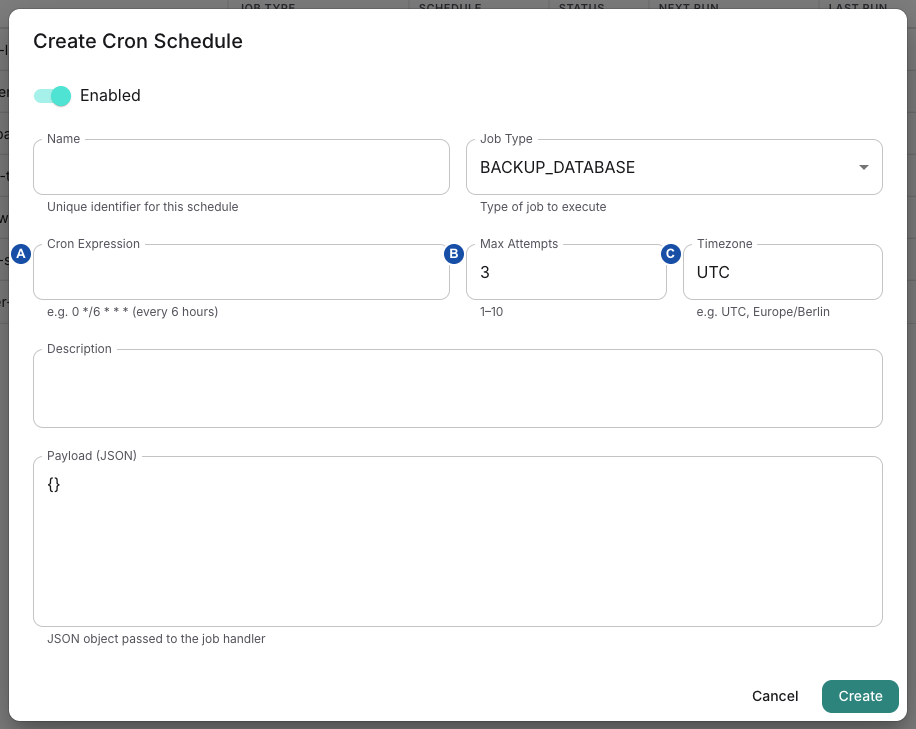
A — Cron Expression: define the schedule and verify its next run. B — Max Attempts: set the retry limit for newly created jobs. C — Timezone: check the schedule’s clock context. This example shows an empty new schedule; opening the dialog does not create or run a job. Select the image for full size.
After Create/Update, inspect the saved fields and scheduler evidence. Editing expression/timezone or re-enabling an existing schedule does not automatically clear/recompute a previously stored Next Run. The existing due time can remain until evaluation advances it. Do not promise the new expression controls the very next enqueue without checking it. Invalid expressions produce scheduler errors; correct them and verify Next Run before relying on the schedule.
Run Now creates a new job from the schedule's current type, payload and attempt limit. It does not restart a failed row, wait for completion, or change the schedule's next occurrence. It can be invoked even when the schedule is disabled. Repeated clicks can create repeated effects. Use it only after identifying why a fresh execution is appropriate, then follow that new job through its actual outcome.
Deleting a schedule clears its association from existing jobs and deletes the schedule row. It does not delete/cancel those jobs or reverse their effects. Historical job rows may consequently no longer identify that schedule. Preserve investigation references before deletion.
5. Recover without inventing a replay mechanism
- Record the job ID, type, attempts, timestamps, error and expected target effect. Distinguish no job created from a pending, running or dead job.
- Check downstream state first. A timeout or lost completion write can follow a successful external action; repetition may resend, charge, delete or modify again.
- Resolve the concrete cause: credentials, target availability, feature policy, payload contract, storage or service health. Preserve failed evidence.
- If a retry remains scheduled, observe that job rather than creating a new one. For DEAD or uncertain RUNNING work, use the handler-specific supported recovery path after checking idempotency/target state.
- Verify both new worker evidence and the external result. Stop repeating the action if outcome is uncertain or errors recur; escalate with bounded job and trace evidence.
The Job History UI is read-only. The Tasker API has no general job retry, cancellation or deletion operation. Do not manufacture one by changing database status or replaying Redis records. Run Now is a new schedule execution, not a general recovery button.
Exception: service configuration refresh has a specific cancellation request for pending/running refresh jobs. The currently refreshing host finishes and remaining targets are skipped; it is not immediate process termination or rollback, and it is not a drain-without-restart operation. Use the service refresh procedure, and verify cancellation progress before making another change.
Job cleanup can remove COMPLETED and DEAD rows older than its retention cutoff; missing old history is not proof that work never happened. Recording processing can transactionally enqueue a separate source-cleanup job after completion: verify that follow-up separately before claiming source objects were deleted. Follow recording diagnostics for the recording-specific lifecycle.
For upgrades/restarts, retain the job and target-state evidence and follow deployment and service health. Restarting Tasker does not reconstruct missing work, reverse an external effect or make an invalid payload valid.
For EDGE_TLS_RENEW and SERVICE_CONFIG_REFRESH, verify the certificate and service activation result as well as the job status. A completed job can have taken a no-change path.
For BACKUP_DATABASE, verify the dump, upload and retention outcome as well as the job status. Application database credential refresh does not prove that the backup process uses the new password.
Password reminders: distinguish queued, sent and uncertain
The password-expiry check claims the account's current password cycle and queues its USER / PASSWORD_EXPIRY_EMAIL notification in one database transaction. The account's passwordExpiryNotifiedAt marker means durably queued, not delivered. A later check does not create a second reminder for that same password cycle merely because the first mail is delayed.
Availability: from 0.9.18. Password-expiry reminders are fenced so that a worker restart, lease expiry or retry does not send the same reminder twice.
Before this reminder reaches the transport, Tasker persists PASSWORD_REMINDER_SEND_STARTED on the owned job. A definite non-delivery can clear that guard and use the normal retry path. An ambiguous transport result, a lost worker lease after sending started, or an unsaved completion after handler success blocks automatic resend and moves the job to DEAD with a DELIVERY_UNKNOWN explanation. This protection is specific to password-expiry reminders; it is not a general guarantee for all email or notification jobs.
For an uncertain reminder, retain the original job ID, timing and bounded error. Ask the mail operator to check relay/provider evidence and, where appropriate, recipient receipt before deciding on a supported recovery action. Do not clear a delivery marker or enqueue replacement mail merely to make the job history green. SMTP acceptance and recipient delivery remain separate results.
QA scoring failures
Availability: from 0.9.18. A SCORING_CONVERSATIONS job classifies a failed scoring request, retries only transient failures and stores the reason with the conversation.
| Failure kind | Cause | Retry behavior |
|---|---|---|
rate_limited | HTTP 429 without a quota code | Retried inside the job |
provider_unavailable | HTTP 5xx or 408 | Retried inside the job |
network | No HTTP response, for example DNS, TLS, proxy or timeout | Retried inside the job |
insufficient_quota | The provider account has no remaining credit | Not retried; the job moves to DEAD at once |
auth | HTTP 401 or 403, for example a wrong or revoked key | Not retried; the job moves to DEAD at once |
invalid_response | A successful response that is not a usable score | Not retried; the job moves to DEAD at once |
request_rejected | Any other HTTP 4xx, for example an unknown model name | Not retried; the job moves to DEAD at once |
A transient failure is retried up to three attempts in total inside the job, with a 1-second and then 2-second delay. A longer Retry-After value from the provider extends the delay; no delay exceeds 20 seconds. If all attempts fail, the job follows its normal queue retries. A failure without one of these kinds also keeps the normal queue retries.
The conversation stores the failure kind, HTTP status code, number of attempts and whether the failure was retryable. In the conversation's QA tab, a failed score shows "QA scoring failed for this conversation." followed by the reason, for example "Reason: the scoring provider rejected the request because the account has no remaining credit."
To recover, fix the cause first: add credit or switch the key for insufficient_quota, replace the credential for auth, and correct the model or scoring configuration for request_rejected or invalid_response. Starting another scoring run before you fix a non-retryable cause produces the same failure.

A selects the conversation’s QA tab. B gives the failure reason; this example requires restoring credit with the scoring provider before another scoring attempt.
Canceled-team cleanup
The cleanup-cancelled-teams schedule runs the BILLING_CLEANUP_CANCELLED_TEAMS job daily at 04:00 UTC (0 4 * * *) with up to three attempts. Its payload sets the retention period: { "retentionDays": 30 } by default.
The job selects teams whose subscription is canceled and whose cancellation date is at least the retention period in the past. For each such team it:
- marks the team as deleted and deactivates its users; applications, agents, scenarios and flows are kept;
- releases its auto-provisioned phone numbers, revokes its API keys and invalidates its sessions;
- queues deletion of the payment-provider customer record where one exists;
- writes a team deletion audit record with the deletion mode
CANCELED_SUBSCRIPTION_RETENTION.
retentionDays must be an integer from 1 to 3650; any other value makes the job fail. Lowering it affects every canceled team at the next run, so confirm the affected teams in subscription and usage before you change the payload or use Run Now. A team removed by this job is not restored by disabling the schedule afterwards.
Configure and verify email delivery
Use this procedure when account invitations, password messages or operational email alerts are missing. The team notification inbox does not configure mail transport. A queued job, a successful transport call and arrival in a recipient's mailbox are separate outcomes. Central documentation identity-service onboarding has its own SMTP configuration; these settings govern product email, not that separate account setup.
Availability: Changing deployment environment variables or secrets requires deployment operator access. Platform Settings → Send test email requires Super Admin; Super Viewer cannot send it. Use a designated recipient who has agreed to the test; this action sends a real message. An editor visible to a broader role does not grant send permission.
1. Identify the actual sender
EMAIL_SEND and NOTIFICATION_SEND jobs execute in Tasker. The reference Ops manifest forwards the shared mail settings to Tasker. Direct sendEmail/notification callers in another process need their own effective transport configuration; changing Tasker's environment is not evidence that every sending process has changed. Follow the deployment's configuration and activation procedure rather than editing a secret without updating its consumer.
| Setting | Effective behavior |
|---|---|
EMAIL_TRANSPORT | smtp by default; ses selects AWS SES. Compared after lowercasing, without trimming. Unknown values warn and fall back to SMTP; there is no automatic SMTP failover after an SES send fails. |
SMTP_HOST, SMTP_PORT | SMTP destination; port defaults to 587. Port 465 selects Nodemailer's secure connection mode. Other ports do not imply a verified TLS policy; confirm the relay's requirements. Missing host warns but does not prevent constructing the adapter. |
SMTP_USER, SMTP_PASS | SMTP authentication is supplied only when both values are nonempty. A half-configured pair does not produce a configured authenticated transport. Keep these in the deployment's secret source. |
SMTP_PROXY | An explicitly forwarded, trimmed value overrides generic proxy selection for SMTP. Otherwise the helper resolves a proxy for http://<smtp-host>:<port> using the shared proxy environment. The reference Ops manifest does not forward SMTP_PROXY; setting it only in a source file does not make it a container variable. |
AWS_REGION | SES region; default eu-central-1. The selected region, sending identity and account permissions must match the deployment. |
AWS_USE_INSTANCE_PROFILE | Exact true or 1 selects the shared AWS SDK default credential chain rather than the helper's explicit file/static-key branches. This does not prove that the resolved identity came from EC2 IMDS. Verify the actual identity and permissions without exposing credentials. |
EMAIL_SENDER_NAME, EMAIL_SENDER_ADDRESS | Direct-email defaults: Delphi VoiceAI and noreply@localhost. A message's explicit from overrides them. Configure a usable sender; the fallback address is not proof of a deliverable identity. |
NOTIFICATION_SENDER_NAME, NOTIFICATION_SENDER_ADDRESS | Database-driven notifications prefer these, then the corresponding EMAIL_* value, then Delphi Notification / noreply@localhost. A notification type's own sender overrides those defaults. These extra variables also require explicit forwarding; they are not listed in the reference Tasker mail environment. |
SES uses the shared AWS credential helper: without instance-profile mode, paired Docker secret files take precedence over paired environment access keys, followed by the SDK default chain. Temporary environment keys require a session token; the file branch does not load one. SES requests use the shared proxy resolution for the regional SES endpoint. Neither SMTP nor SES is universally required to traverse Squid: verify the effective proxy/bypass rules and network path.
Verify SES prerequisites
Availability: use this procedure when the deployment selects SES for mail. It requires an operator who can configure the Tasker identity and the SES account; a team administrator cannot grant AWS permissions.
- Confirm the configured SES region and sender identity. Verify that identity in the same region. While the SES account is in the sandbox, verify the intended test recipient too.
- Grant the Tasker identity the sending action required by the transport, scoped to the permitted sender identity. SES policies use
ses:SendEmailandses:SendRawEmailfor sending; follow AWS SES access control for the selected sending operation. Do not grant account administration merely to send mail. - Check the credential and proxy selection described above from the Tasker container, then recreate the affected consumer after a configuration change.
- Send a controlled notification to a test mailbox you own. Confirm the transport result and actual mailbox receipt. If delivery fails, distinguish AWS authorization, unverified identity or sandbox restrictions, connection failure and downstream mailbox rejection before retrying.
Transport adapters are cached by the direct sender and notification-service instance. Update and recreate/reinitialize the applicable consumer through the deployment procedure after changing transport credentials or provider configuration; there is no general hot-reload promise. Preserve the previous configuration reference, but do not assume restoring a revoked credential can restore delivery.
2. Separate a notification-rule problem from transport
In Admin Settings → Notification Types, Super Admin and Super Viewer can inspect types and only Super Admin can change them. For the event's category/code, check enabled state, sender, recipient definitions, templates and minimum interval. This is platform configuration, not a user's inbox preference.
A type must exist and be enabled. Recipients may be literal addresses or PARAMETERS:<name> references to event variables; invalid or missing addresses are discarded and duplicates removed. A parameter list in the editor is not evidence that every caller supplies those values. Unresolved {{name}} placeholders remain in the rendered template; verify the event supplies required data before treating a successful send as correct content.
The notification minimum interval is held in a process-local map keyed by category/code and updated after a successful send. It is not a durable, per-recipient or fleet-wide deduplication guarantee. Direct EMAIL_SEND jobs bypass notification-type lookup and this notification-service limiter.
A disabled type makes the dedicated NOTIFICATION_SEND handler complete with a skipped result. Other unsuccessful results—including no valid recipients, rate limiting and transport failure—throw into the job retry/dead-letter path. Thus COMPLETED may mean deliberately skipped; inspect the result. Retries after ambiguous transport failures can repeat a message, so inspect evidence before resubmitting.
3. Verify one permitted message
- Confirm the intended consumer has the selected transport, sender and required network/credential configuration. Initialization logs such as SES: Initialized or SMTP: Initializing establish construction, not successful delivery.
- In Platform Settings, use Send test email with the designated recipient and a recognizable non-sensitive subject/body. Save the returned job ID. This queues an
EMAIL_SENDjob with one allowed attempt; the queued confirmation is not a receipt. - Inspect that job in job history. Check its status and last error. Email sent successfully means the transport call returned successfully; confirm recipient receipt separately, including delivery delay/filtering.
- If plain email works but a notification does not, check its type, recipient variables, sender override, minimum interval and result. A direct test bypasses those rules and cannot validate them.
For SMTP failure, distinguish missing/partial configuration, relay authentication, destination reachability and TLS policy. For SES failure, distinguish credential-chain errors, permissions, region/sender rejection and network/proxy failure. Preserve a bounded error summary and job identity; do not copy message bodies, reset links or credentials into a general ticket.
If sending may already have reached the transport, avoid repeatedly pressing Send or replaying jobs. Verify the outcome with the recipient/provider evidence first. The task is complete when the intended path has a verified result and any remaining sender/template or recipient issue has its own owner—not when a job is merely queued.
Configure and diagnose SMS delivery
An SMS_SEND job queues work; it does not prove that a handset received a message. The Tasker SMS transport uses seven.io. Keep recipient numbers, message text and API credentials out of shared diagnostic evidence; use an approved existing job and bounded identifiers first.
Check the effective configuration
FEATURE_SMS
Product feature enablement; Tasker rechecks it before a new provider dispatch. A valid saved acceptance checkpoint takes the accounting-resume path first.
SMS_API_KEY
Sensitive Ops configuration forwarded to Tasker. It can be absent during bootstrap, but the send path requires it. Do not expose its value while checking presence or rotation.
Outbound network
Tasker calls https://gateway.seven.io/api/sms over HTTPS, using the configured proxy when applicable. The request timeout is 10 seconds; it is not an end-to-end handset-delivery deadline.
Team and subscription
With subscription management enabled, the worker checks team SMS enablement, subscription existence/state, SMS parts and overage limits before dispatch. See subscription and usage.
Apply changed configuration through the reviewed deployment activation procedure; editing a secret/configuration source alone does not establish which value the running Tasker uses. There is no setting that selects a different SMS provider.
When subscription management is disabled, the quota helper allows sending after the SMS feature check without its team/subscription checks. Accounting still updates a subscription record after provider acceptance. Do not interpret the flag as removing every accounting prerequisite: a missing subscription can leave accepted delivery awaiting accounting recovery.
Understand message validation and charges
The transport validates the normalized recipient as E.164 and rejects empty text. The default sender is DelphiAI; explicit sender IDs allow at most 11 alphanumeric characters or 16 numeric characters. Local validation does not establish carrier acceptance of a sender ID.
Quota estimation counts parts, not queued jobs. GSM-7 uses 160 septets for one part or 153 per concatenated part; extension characters consume two septets. Other characters use the implementation's UTF-16-unit estimate: 70 units for one part or 67 per concatenated part. Provider-reported positive parts are used for accepted-message accounting, with a fallback of one when absent/invalid. Compare the recorded parts, not the number of Send clicks, with usage.
Interpret the job before retrying
- Find the original job in Job History. Record its ID, team, state, attempts, reason/provider code and timing using the job procedure above. Do not create another SMS action to investigate the first one.
- Inspect the result as well as the job state. A feature-disabled skip, quota block or terminal provider rejection returns
success: falseand can still produce a COMPLETED Tasker job.blockedandrejecteddistinguish those outcomes. A transport exception follows the job's retry/dead-letter policy. - A successful transport response requires HTTP 2xx, provider success code
100, an accepted message result and a message ID. The job result includesmessageId,providerCode,recipient,sender,parts,priceandtotalPrice. This is provider acceptance, not a handset delivery receipt. - If provider acceptance was saved as an
SMS_DELIVERY_V1checkpoint, a retry of that same job resumes missing usage accounting instead of sending again. Accounting and the checkpoint'susageTrackedupdate share a database transaction. The accepted-message checkpoint is saved before accounting, but after the provider call: a lost response, process failure or failed checkpoint write can leave an uncertain outcome. This is not an exactly-once delivery guarantee. - Reconcile uncertainty with the provider owner before a manual retry or a new job. Tasker supplies the job ID as
foreign_id, but no provider idempotency guarantee is established here. The adapter sendsno_reload=1, disabling the provider's content-based reload lock; two separately queued messages with identical content are not automatically deduplicated.
An accepted job with failed accounting needs the original job/checkpoint and subscription state investigated. Usage-notification failure is separate from the accounting transaction. A rejected message needs its validation/provider reason resolved; repeatedly replaying it is not a fix. Check logs and service health for worker/network failures without copying message bodies or secrets into tickets.
If a live acceptance test is necessary, agree on a recipient, test content and potential charge first, then verify provider acceptance, recipient receipt and usage separately.
Related
- Logs: to find the Tasker log lines for a job ID before you retry it.
- Service health: to check whether the Tasker worker and its dependencies are running.
- Deploy, verify and update Delphi: to apply changed mail or SMS configuration to the running Tasker.
- Subscription and usage: to confirm SMS limits and canceled teams before you change a schedule.