Configure SIP header rules
Use a header configuration to describe reusable changes to SIP headers at the proxy. This guide owns rule authoring and verification. SIP routing owns trunks, routes and base-number assignments; SIP termination owns application HangUp/Transfer headers and their separate budgets. Reading a SIP header into flow context is a different operation from changing the forwarded message.
Availability: platform Header Manipulation lists default and team configurations; Settings → Header Manipulation lists configurations owned by the selected team. Super Admin manages defaults; ordinary creation/deletion of a team configuration requires that team's Admin authority and the selected/default team context. Super Viewer remains read-only for these resource mutations. Visible edit controls are not proof a request will succeed: see the team-editor limitation below.
Before activating a rule: synchronization gathers rules from base-number assignments but writes global incoming and outgoing rule lists. The runtime does not automatically check the owning team or assigned base number for each rule. An assignment alone is therefore not a runtime isolation guarantee. Ask the operator to verify the deployed rule scope and conditions before enabling a change. A blank-condition default must not be treated as safe for only one customer or number.
1. Create or open the correct configuration
- Select the intended scope. For a team configuration, select the team and use its Header Manipulation tab. For a default, use the platform administration surface. There is no team/type picker in this shared form: its caller supplies that context.
- Choose Create, or open the edit control for the intended row. Compare Configuration Name, Type, Team, Rules Count, Base Numbers Count and Enabled in the platform list; the team list omits Type/Team because it filters to its owner.
- Enter Configuration Name (1–100 characters), optional Description (up to 500) and the configuration's Enabled state. New forms default to enabled. Keep unverified configurations disabled until their scope and activation plan are reviewed.
- Choose Add Rule. The form opens a new rule in the right panel; select a left-panel row to edit another rule. Rule Enabled and the trash icon change the local form. They do not independently save a rule. The form permits an empty rule list, up to 50 rules; its split hint begins at 20, not a measured performance guarantee.
- Complete the fields and conditions below, then choose Save Configuration. Cancel closes the form without submitting its unsaved edits. After success, reopen and compare what persisted before assigning or activating it.
Team-editor limitation: the shared update form submits its team/default context, while the update API rejects those fields from non-Super-Admin callers even if unchanged. A Team Admin can therefore encounter Only Super Admins can change the default flag or team assignment when editing an existing configuration. Ask the platform administrator to review the change; do not use another team's context or lower-level rule endpoints to bypass the rejection. The platform form forces default scope on submission, so an administrator must also check scope before editing a team-owned row there.
2. Set the rule fields
The screenshot shows one unsaved rule in the editor; each letter marks a control described below. Select the image to enlarge it.
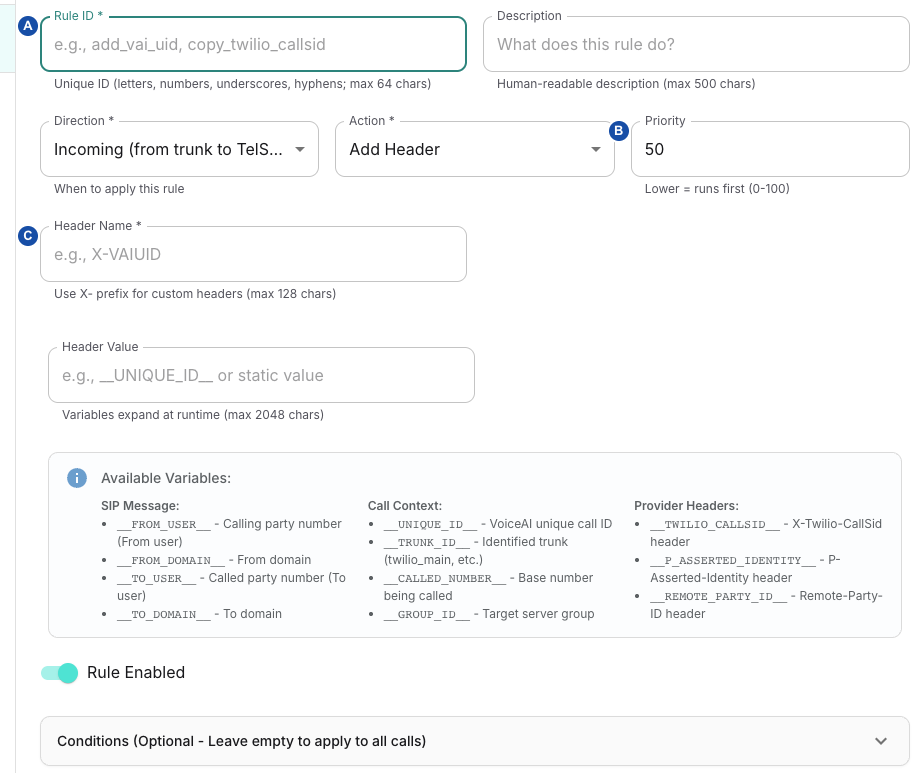
- A — Rule ID: choose an identifier that does not collide with another configuration in the same direction.
- B — Priority: lower values run first; this controls execution order, not the rule’s position in the sidebar.
- C — Header Name: name the header to add, remove or replace. Check the action-specific limitations below.
| Control | Meaning, value and limit |
|---|---|
| Rule ID | Required identifier, 1–64 characters, starts with a letter; letters, digits, _ and - thereafter. Use a distinct ID across configurations in the same direction: synchronized rules collide by direction + Rule ID, not by configuration. |
| Description | Optional explanation, up to 500 characters. Describe the purpose without putting credentials in it. |
| Direction | Incoming (from trunk to TelSys) / Outgoing (from TelSys to trunk); new rule defaults to Incoming. These are UI direction labels, not a guarantee that every SIP method traverses that rule route. |
| Action | Add Header, Remove Header, Modify Header, Copy Header; new rule defaults to Add. See the actual effects and Copy limitation below. |
| Priority | Lower runs first; default 50, range 0–100. Use whole numbers. Do not rely on visual row order or assume defaults execute before team rules. Avoid equal priorities when order matters. |
| Header Name / Target Header | Required, 1–128 characters; starts with a letter and contains only letters, digits and -. The UI suggests X- for custom names. This editor's grammar differs from callback-header normalization. It does not support dynamic name templates. |
| Header Value | Shown for Add/Modify; up to 2048 characters before substitution. Static text and supported __VARIABLE__ tokens compose the replacement value. This is not a regex search/replacement field. |
| Source Header / Value Template (optional) | Shown for Copy; the template offers __SOURCE_VALUE__. The source-header field is not persisted by these versions' model/CRUD path, so do not rely on Copy authored through this UI. |
| Rule Enabled | New rule defaults to true. Both configuration and rule must be enabled for synchronization to export the rule; changing either in the form still requires Save. |
Add appends a header; it does not replace an existing occurrence. Remove removes matching header-name occurrences when present; it has no value-pattern field. Modify removes existing occurrences and appends the newly composed value, including when no previous occurrence exists. It is whole-value replacement, not a regex rewrite or automatic URI escaping. Copy, when supplied a runtime source header by another verified configuration path, skips missing/empty source values and appends its result; the UI persistence limitation above prevents promising that path here.
There is no separate prefix/suffix action. For a safe generic illustration of value composition, an Add/Modify value trace-__UNIQUE_ID__-end combines literal text with the available call identifier. This changes the value, not arbitrary header names. It neither edits a bot's output keys nor configures STT/TTS outputKeyPrefix. Do not transfer those unrelated flow controls into this editor.
Value substitutions
| Token group | Runtime source and limitation |
|---|---|
__FROM_USER__, __FROM_DOMAIN__ | Current SIP From username/domain. |
__TO_USER__, __TO_DOMAIN__ | Current Request-URI username/domain at the edge; the UI's To wording does not mean the values come from the To header. |
__UNIQUE_ID__, __TRUNK_ID__, __CALLED_NUMBER__, __GROUP_ID__ | Proxy routing/call context, when available at this point. |
__P_ASSERTED_IDENTITY__, __REMOTE_PARTY_ID__ | Actual corresponding message-header value, if present. Provider-specific helper tokens similarly depend on the source header being present. |
__CALL_ID__, __SOURCE_IP__, __SOURCE_PORT__, __METHOD__, __TIMESTAMP__ | Additional consumer-supported message/time values; timestamp is seconds. These are not all listed in the form's short helper list. |
__ORIGINAL_FROM__, __ORIGINAL_TO__, __ORIGINAL_CONTACT__, __ORIGINAL_USER_AGENT__ | Full header values read at processing time. The names are not evidence of an immutable original-message snapshot. |
Substitution is conditional on the source value being available; an unavailable token can remain literal. Do not assume it becomes empty, is URI-escaped, is truncated to the editor limit, or can be recursively evaluated. __TIMESTAMP_MS__ is not replaced; use __TIMESTAMP__ (seconds).
3. Restrict matching and understand order
Expand Conditions (Optional - Leave empty to apply to all calls). The UI helper says rules are bound to a base number, but the exported runtime rule has no automatic base-number condition.
| Condition | Match |
|---|---|
| Trunk ID | Exact identified trunk ID, up to 64 characters. This is a condition on a rule, not an editor attached to the trunk row. |
| Source IP Pattern (Regex) | Proxy's observed source IP, pattern up to 256 characters. A proxy/NAT peer can differ from the caller's address. |
| Calling Number Pattern (Regex) | Current From user, pattern up to 256 characters. |
| Called Number Pattern (Regex) | Current Request-URI user, pattern up to 256 characters; routing may already have rewritten it. |
All supplied conditions must match; blank values impose no restriction. Pattern syntax is checked with JavaScript's regex constructor on save, while matching occurs in the proxy's regex engine. Successful save is not proof of identical pattern behavior: test both a matching and a non-matching call on the deployed path. Use anchored simple patterns where appropriate; do not treat a substring match as exact-number equality.
The exporter sorts by ascending Priority, combines default/team rules, and keeps only the first encountered rule for each direction/Rule ID. It does not define a default-before-team precedence or a reliable winner for duplicate IDs. Incoming rules run at the incoming INVITE point. Outgoing rules run where the proxy invokes its outgoing rule route; the normal relay then applies separate action-specific egress headers. This form has no SIP-method selector, so you cannot limit a rule to BYE or REFER here.
4. Verify persistence, assignment and activation
Saving this form updates database configuration. Saving does not publish the rule to the runtime configuration store or test a SIP message. There is no per-rule Test or Apply button, and the edge is not updated automatically.
- Reopen after Save and check scope, enabled states, IDs, priorities, values and conditions. An update replaces the entire rules list through several writes, not one transaction. If it fails, refresh and compare persisted rules before retrying; do not assume all previous rules remained intact.
- Use the base-number assignment workflow for the intended configuration relation. Assignment is separate from rule editing. Record every affected number and the operator's intended runtime conditions.
- Ask the operator to verify the actual deployed synchronization mechanism and exported scope. The platform-wide sync rebuilds several routing namespaces, not only one header rule; do not trigger it as a casual per-rule Test action. A saved, assigned or enabled row alone does not prove activation. Ask the operator for the time the synchronization completed.
- With an approved test call, ask the operator for the signaling capture of the test call and compare the actual forwarded SIP message for matching and non-matching cases. Record deployment revision, rule/configuration identity, call ID, method and expected before/after header behavior. An “Applied header rule” log alone is insufficient: the generic log can appear even when Copy skipped internally.
- Verify application termination headers separately when they coexist with proxy rules. Use SIP termination for protected names, optional BYE/Transfer budgets and peer-outcome evidence; its limits are not universal limits for this header-rule engine.
Do not use these rules as an assumed authentication/privacy filter. This editor has no protected-header denylist equivalent to the termination subsystem, and proxy debug paths log processed header values. Avoid copying authorization tokens or secrets into custom headers, descriptions or logs. Removing identity/routing headers can change signaling behavior; verify the intended protocol outcome rather than interpreting Save as approval.
For rollback, preserve the previous configuration and assignment beforehand, restore the intended values, and have the operator verify the resulting runtime state. Cancelling the form does not reverse a completed save; restoring a database record alone does not establish Redis state. See configuration recovery.
Delete an unused configuration
The list's Delete action is separate from deleting a local rule row in the edit form. Configuration deletion is rejected while any base-number association uses it. Review and remove the intended associations through their owner first, then delete only the verified unused configuration. Removing an assignment or database configuration is not proof that a previously exported runtime rule has disappeared; verify activation/cleanup with the operator.
Related
- Base numbers: to assign a header configuration to the numbers it serves.
- SIP termination reference: to check the separate limits for HangUp and Transfer headers.
- SIP log reference: to find the signaling capture that shows the forwarded message.
- Configuration recovery: to activate or roll back a configuration change.